
It’s fairly common to first release the better equipped device, as a sort of power display, so the Zyxel WBE660S that you see here is the most powerful WiFi 7 access point from Zyxel (at the moment of the writing) and yes, it has been released a few months before the NWA130BE and it also came with MLO from the beginning.
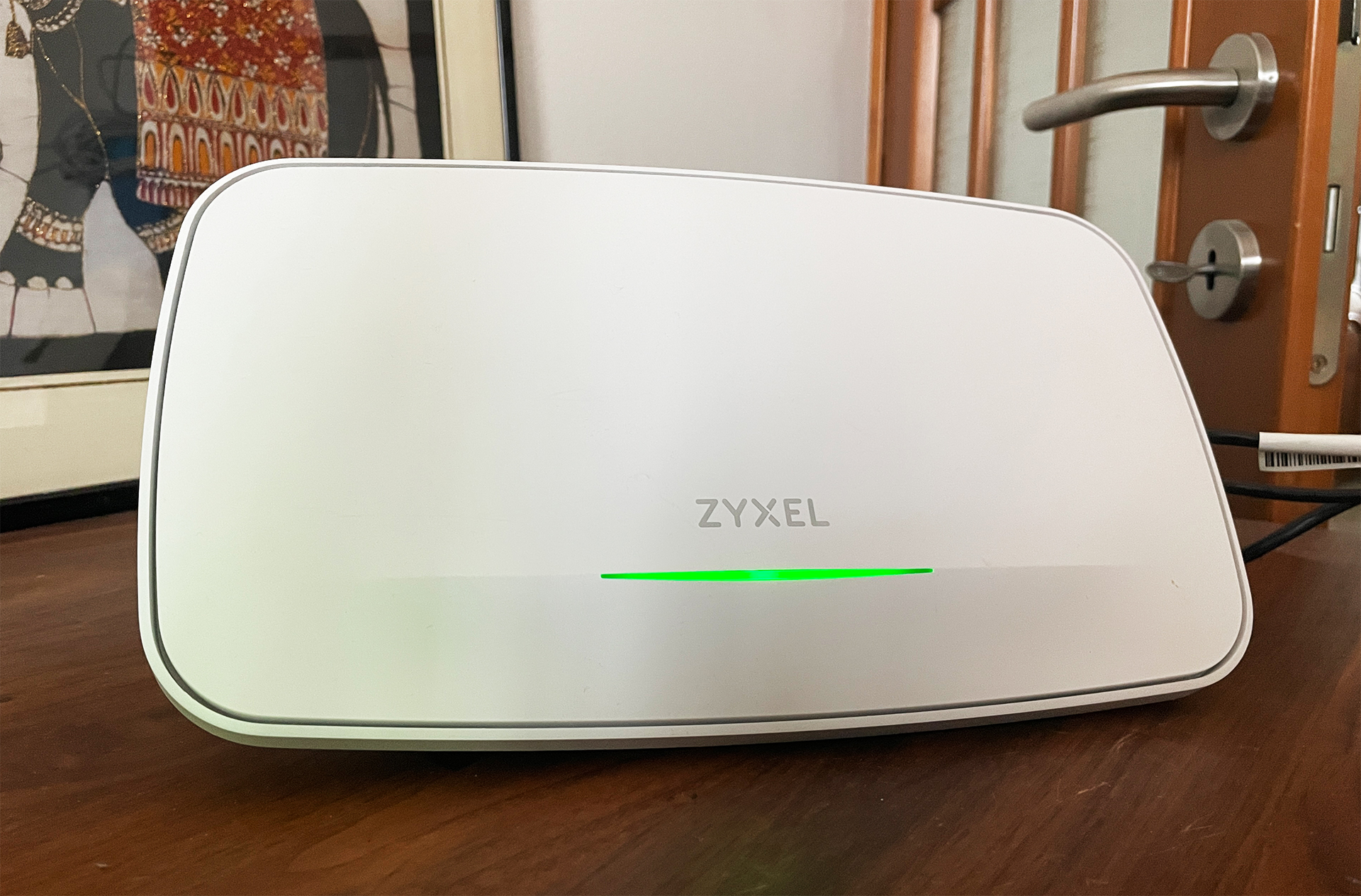
The Zyxel WBE660S is a best of a device and not necessarily in terms of size, but weight and robustness. I was sure that it could be mounted outdoors, but there is no IP rating, so mount it out on your own risk. The access point comes with two ports, one Gigabit, the other 10GbE which is a huge step up from the 2.5GbE port for the NWA130BE.
The antenna gain is also better on the WBE660S and the spatial streams are 4×4 on all three radio bands. Other than that, we do get a smart antennas once again, and, in terms of software management, there is not only the option to use the Nebula Cloud, but a controller and the option to use the access point in standalone mode as well. That being said, let’s see the WBE660S in action.
The Design and Build Quality
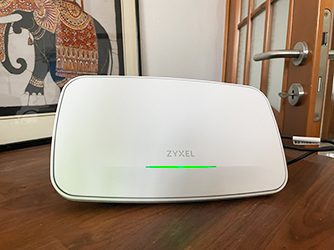
The Zyxel WBE660S is definitely larger than the WBE660S, but not by that much, and this new design definitely helps differentiating the access points from the rest. The upper side is made of plastic, while the rear is metallic for a better heat management.
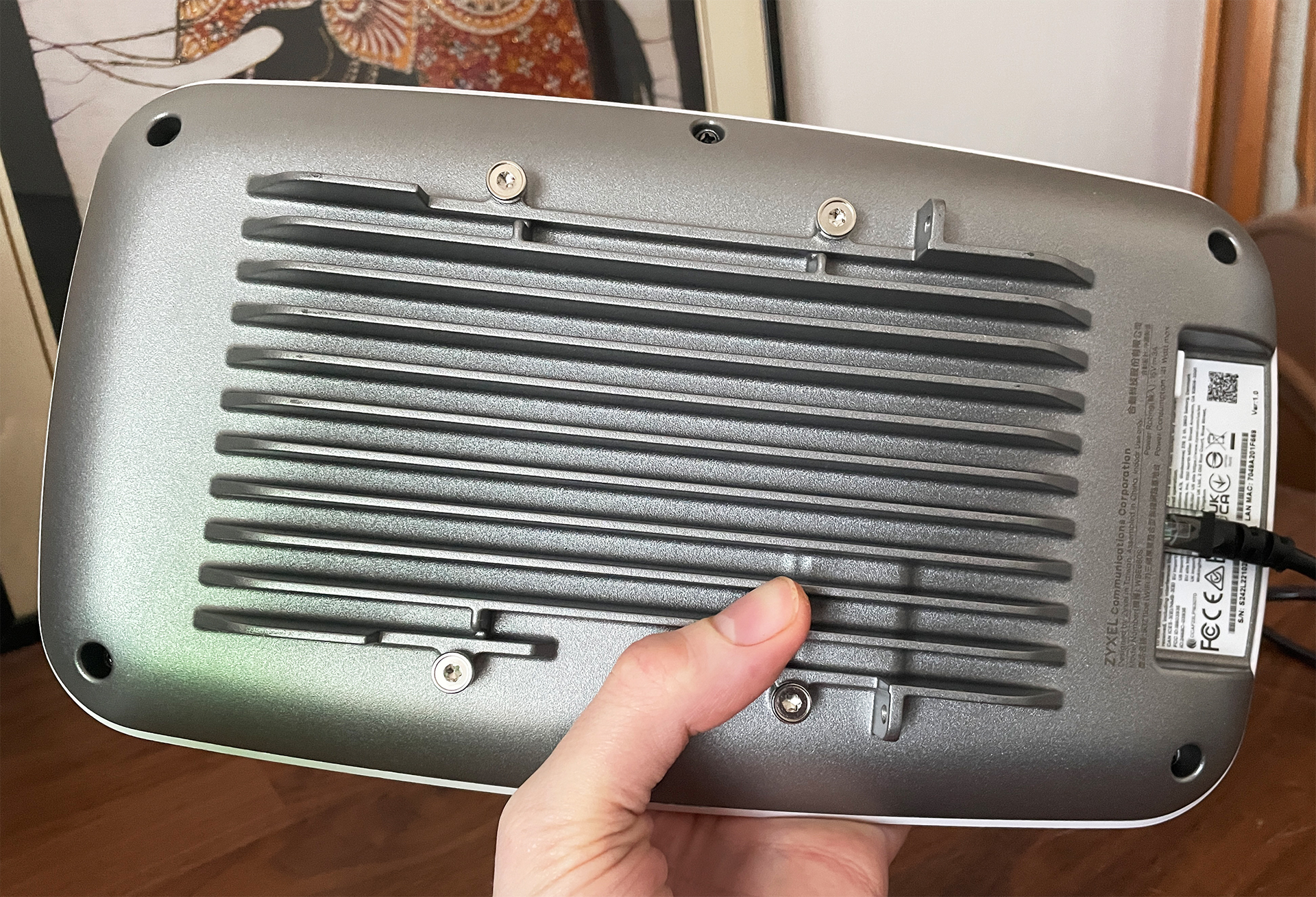
The NWA130BE went with an all-plastic case, but it was specially designed to help dissipate the heat as well, so it’s not ordinary plastic. The single LED sits at the top in a similar fashion to the NWA130BE which at this point, can be considered a miniature WBE660S. Flip it upside down and we get to see the intricately-designed metallic bottom and, since we’re dealing with a ceiling-mount access point, it does come with a bracket. As for the ports, we do get quite a few surprises here.
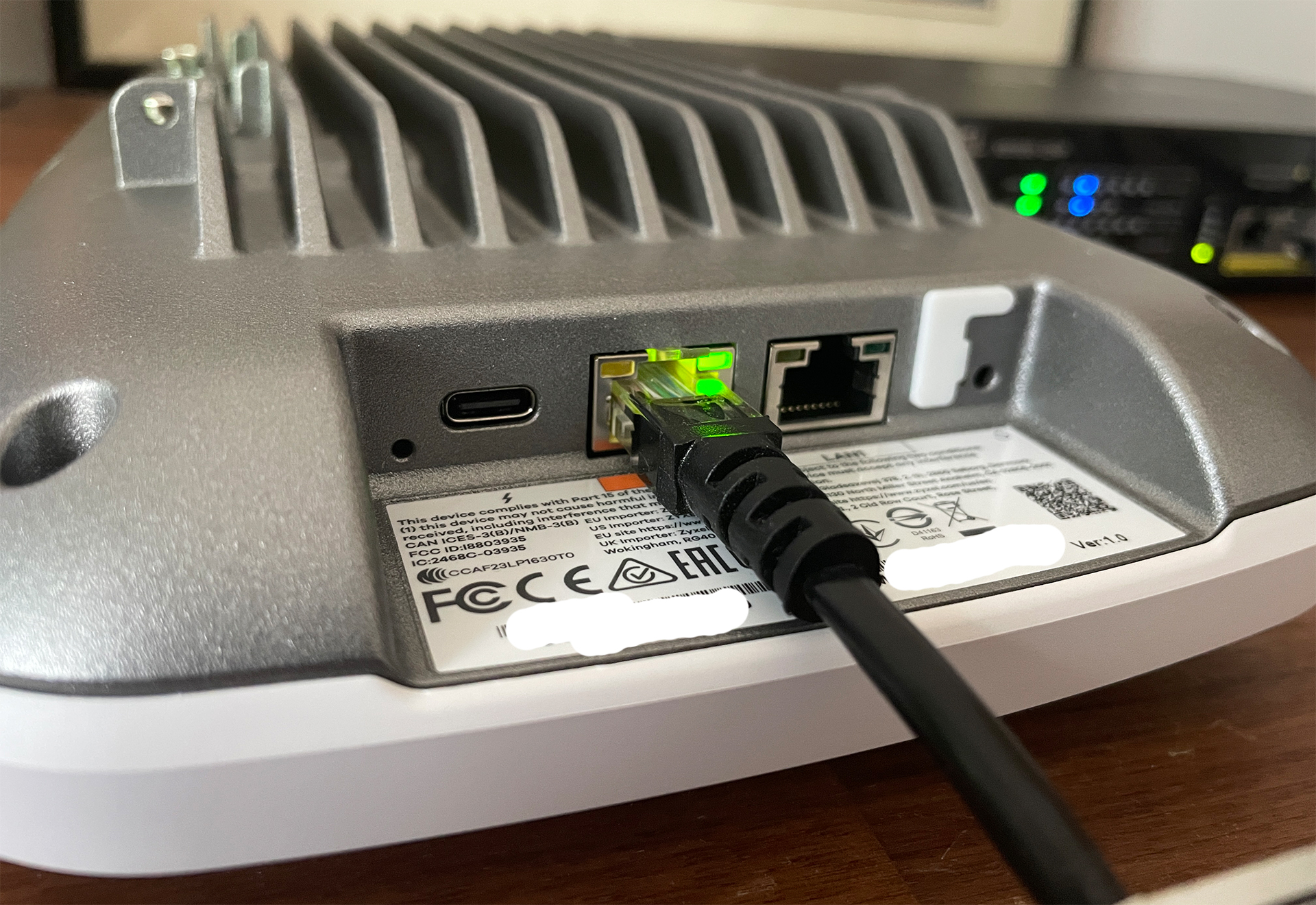
On one hand, there are two Ethernet ports, one is Gigabit, the other can go up to 10GbE which is excellent news considering that this is a WiFi 7 access point. On the other hand, we get a USB-C port for charging if PoE(++) is not available which is a novel feature on networking hardware. There is also a Console port and a Reset button. Now let’s see how well it performs in the Test Lab!
Wireless Performance and Test Lab
Zyxel WBE660S
Test details
Test year: 2025. Firmware: v7.10.
Charts use measurements stored in the MBReviews benchmark database. Stability charts are downsampled for display; the full one-second series remains in the database.
Read the full MBReviews Wi-Fi testing methodology.
Explorer version: 0.10.0.
Before getting into the more complicated tests, I first took a look at the more basic single-client tests. And, as I did with the U7 Pro, the Zyxel NWE130BE and many more other WiFi 7 access points, I relied on multiple types of client devices ranging from the higher-end WiFi 7 to the still common WiFi 5 devices. And the results are impressive, the WBE660S managing to outclass all the other WiFi 7 access points that I tested, going above 2.5Gbps when near the client and still maintaining above 1.3Gbps rates at 30 feet. At 70 feet, we see that it drops below 100Mbps, and, after checking the signal attenuation graphic, we understand why the WiFi 6 client did much better in terms of range.
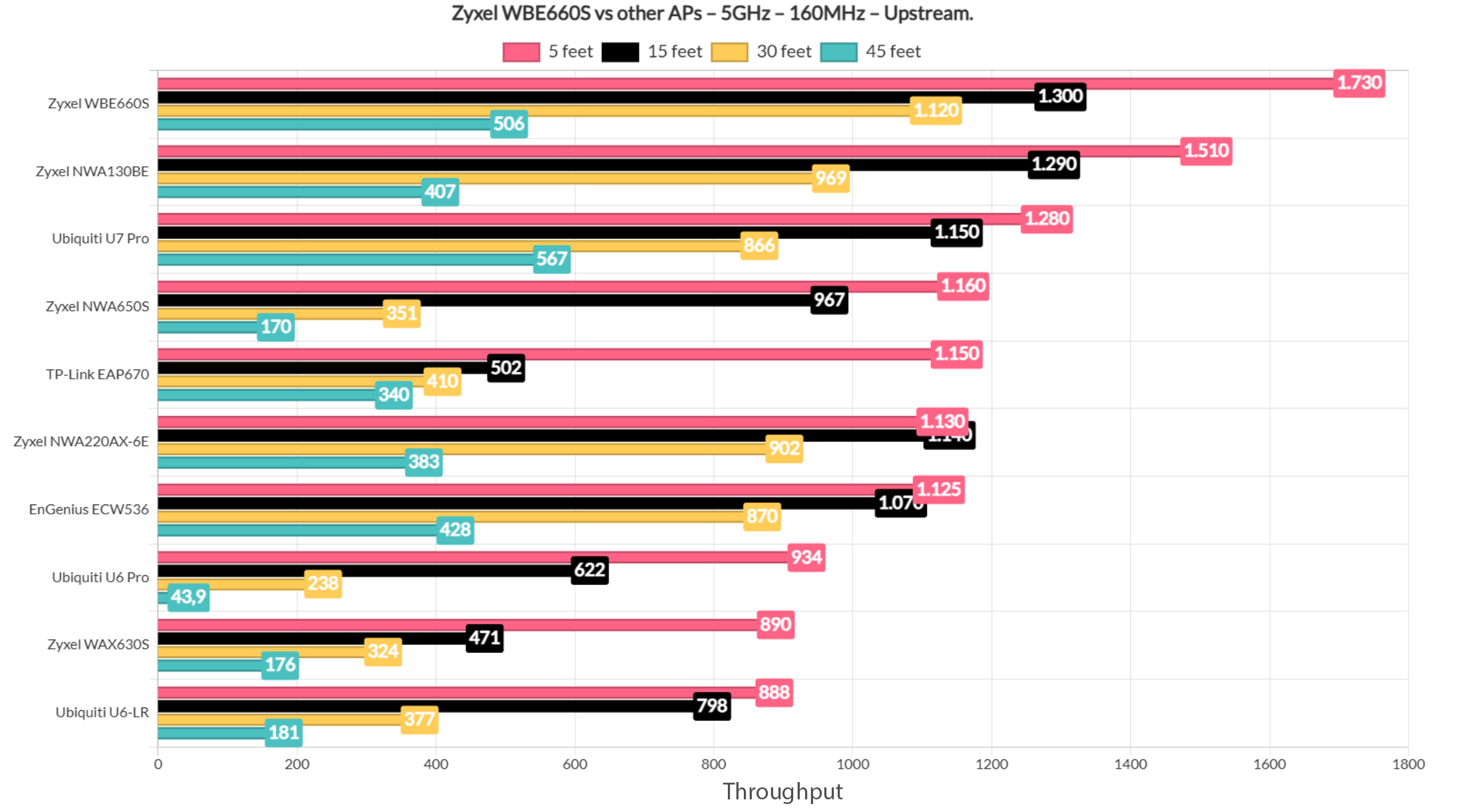
Let’s also have a look at how the WBE660S fares against other access points when using the 80MHz channel and 5GHz.
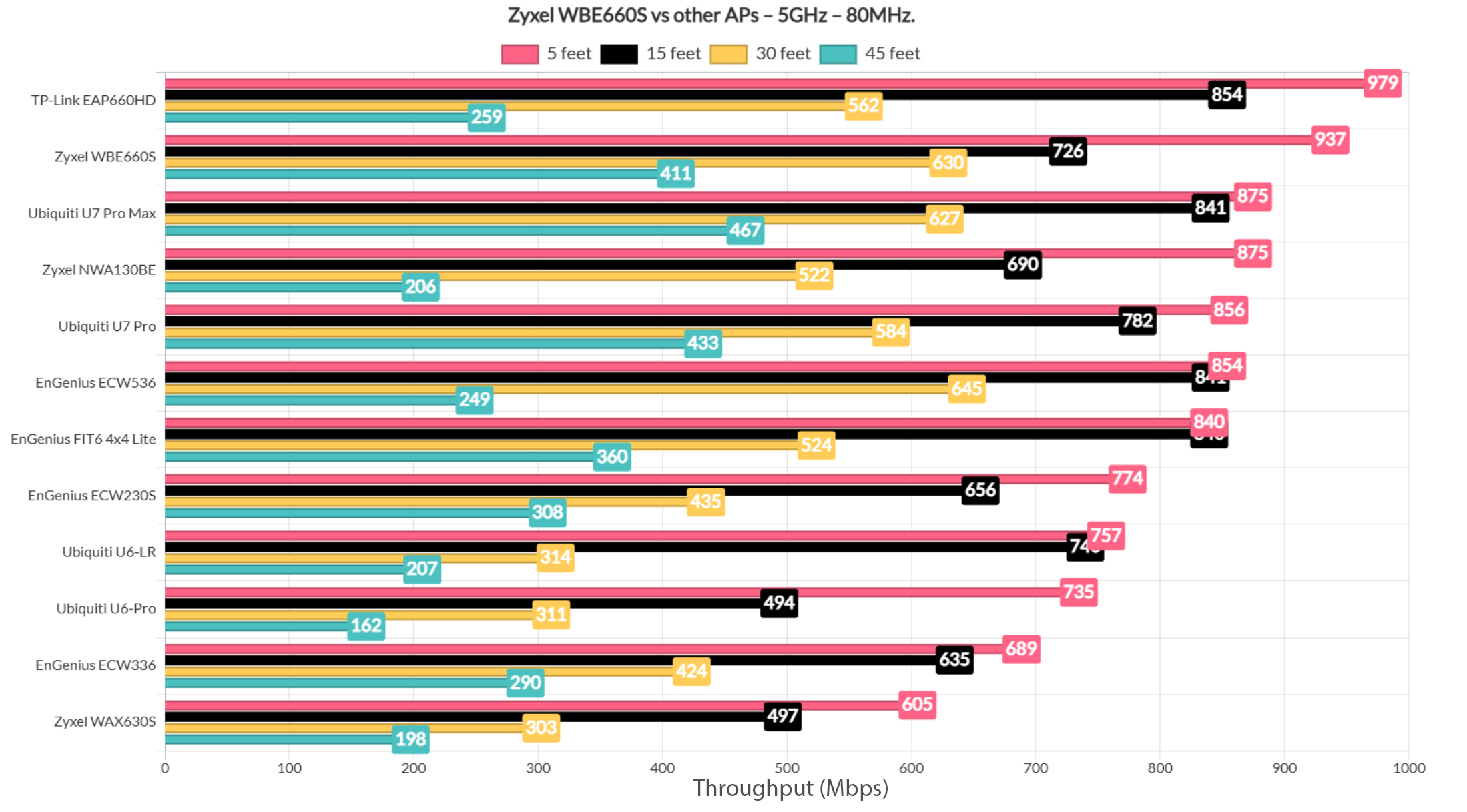
Still not as good as the TP-Link EAP660HD, but still second. And it did take first spot when using the 160MHz channel bandwidth.
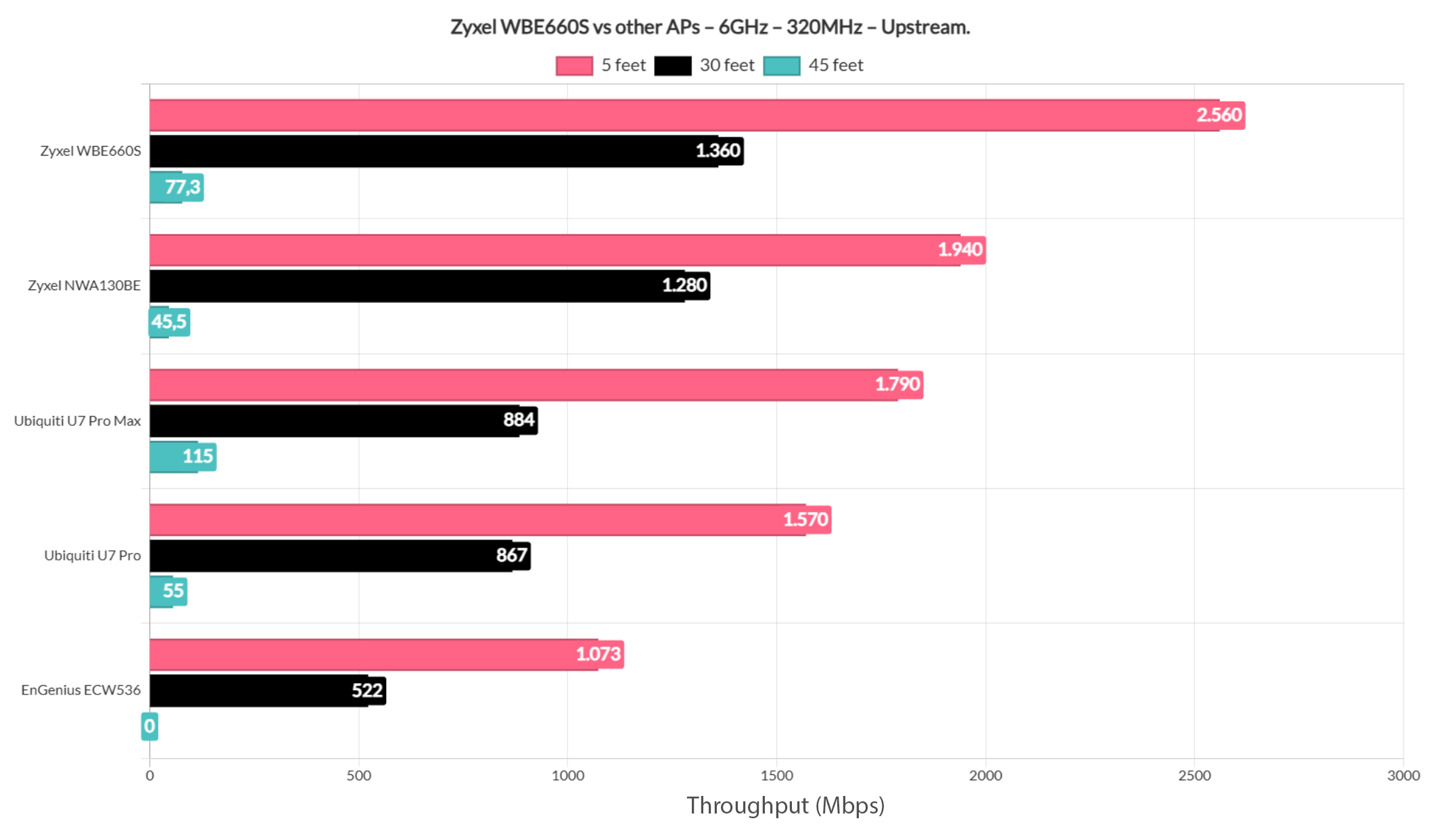
Switching to 6GHz and 320MHz, the Zyxel WBE660S once again takes first spot.
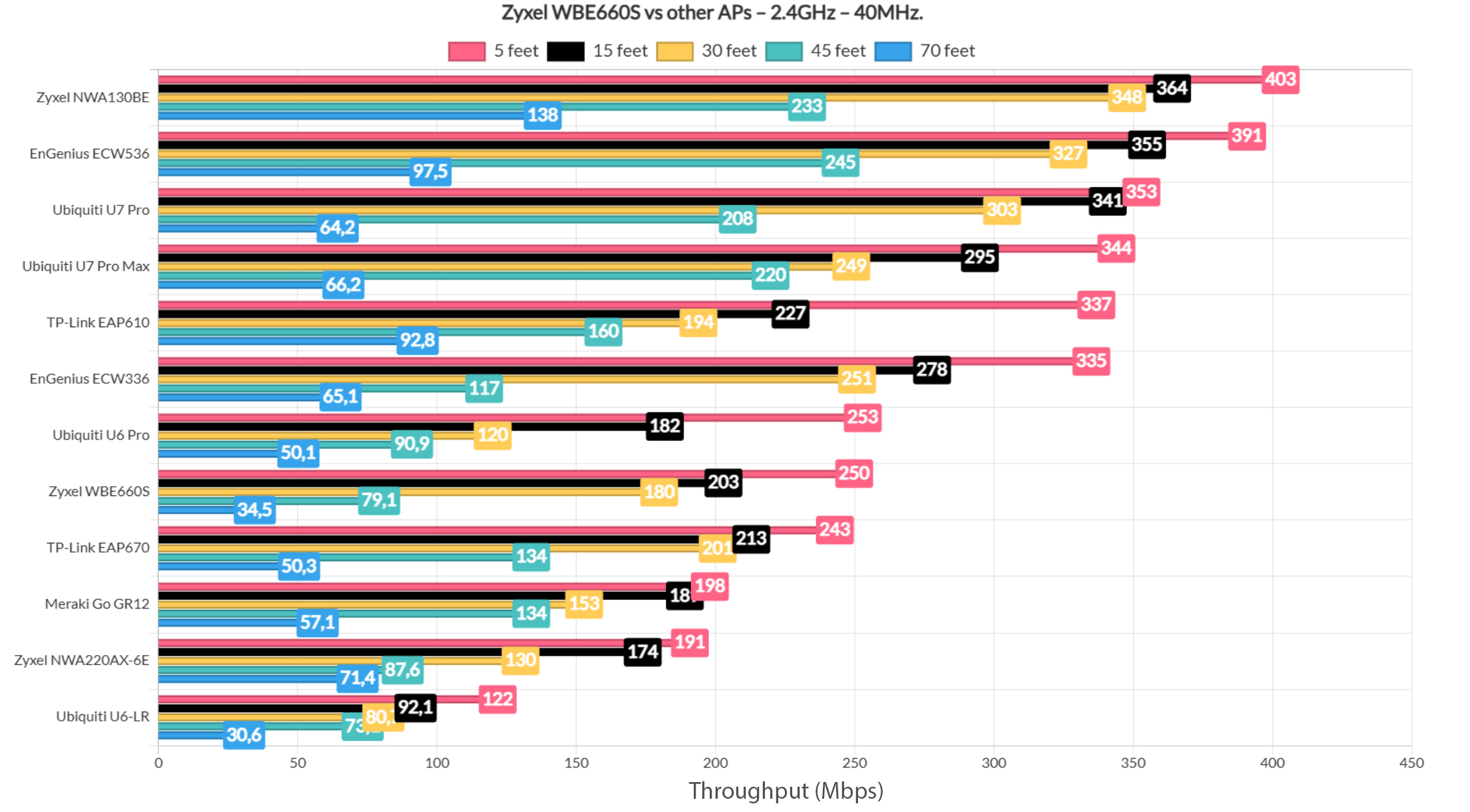
Moving on to the 2.4GHz radio, we can see that it offers a fair performance, clearly adjusted to be suitable mostly for IoT devices and some old tablet.
For the multi-client tests, I used the same five wireless clients and a 10GbE wired server, together with net-hydra developed by Mr Jim Salter to simulate different types of traffic, such as streaming, browsing, download and VoIP. With five simultaneous 1080p streams, the WiFi 7 and WiFi 6 clients performed decently well,while The WiFi 5 clients immediately crossed 100ms which is not good. Moving to 4K streaming (35Mbps) increased the latency across the board.
Adding intense browsing alongside the streaming traffic produced the more interesting results. Browsing remained responsive even under heavier loads, and the WBE660S generally performed better than some of the other WiFi 7 APs I had tested. Switching from 1080p to 4K streaming increased the streaming latency considerably (water is wet).
Testing the WBE660S with two (uncapped) clients downloading continuously alongside streaming and browsing produced about 787Mbps on the 5GHz radio using the 80MHz, but the latency is still very high. Reducing the test to a single downloading client did improve things and the lighter combo of repeated 1MB downloads, browsing and VoIP was handled well. Overall, the WBE660S produced some of the better multi-client results I have seen from a WiFi 7 AP, particularly under heavy download traffic. The full client-to-client latency distribution and throughput results are available in the Test Lab.
The MLO Performance
If you care for the throughput graphs, check the Test Lab because here I added the latency values that I got using FLENT:
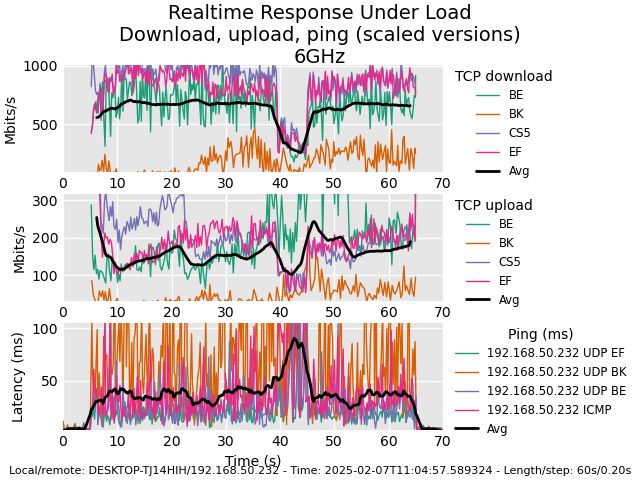
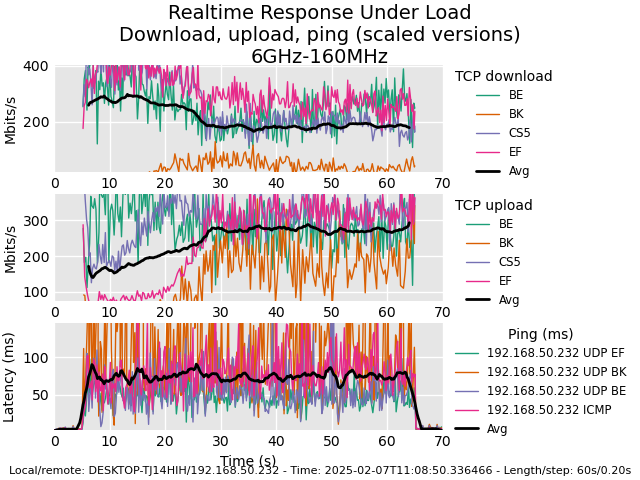
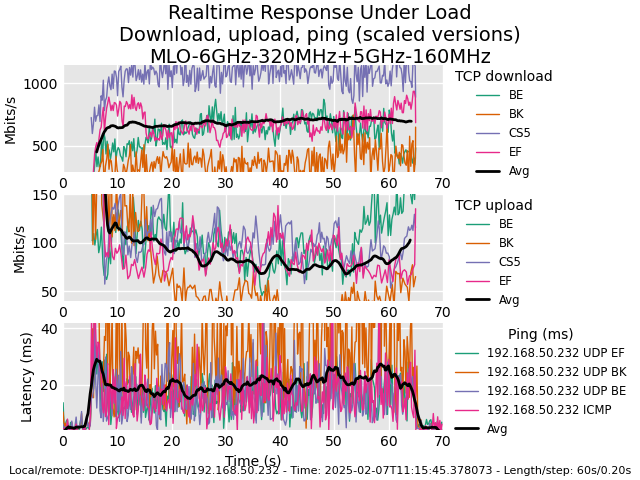
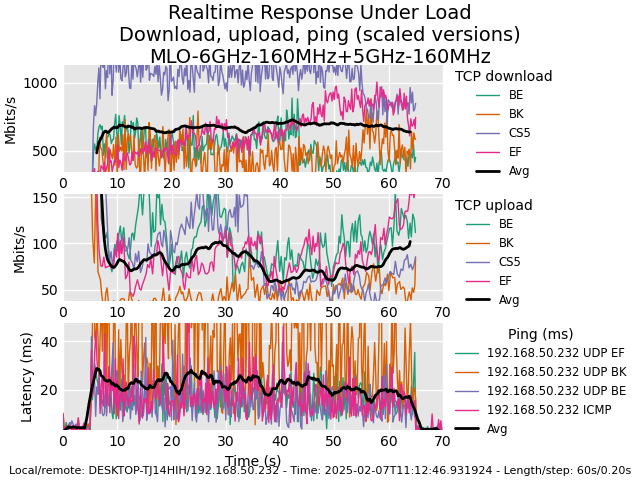
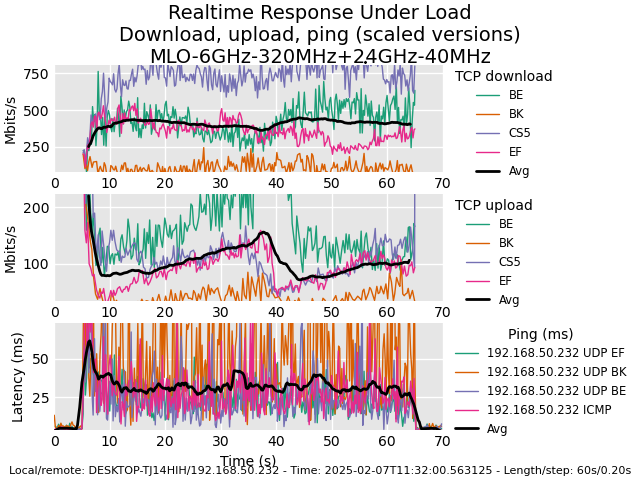
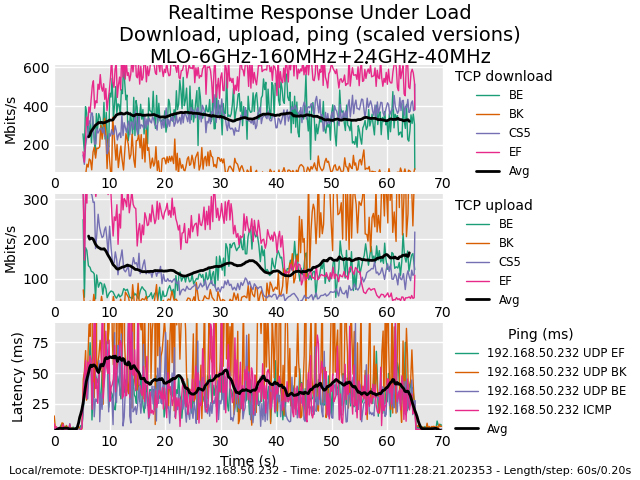
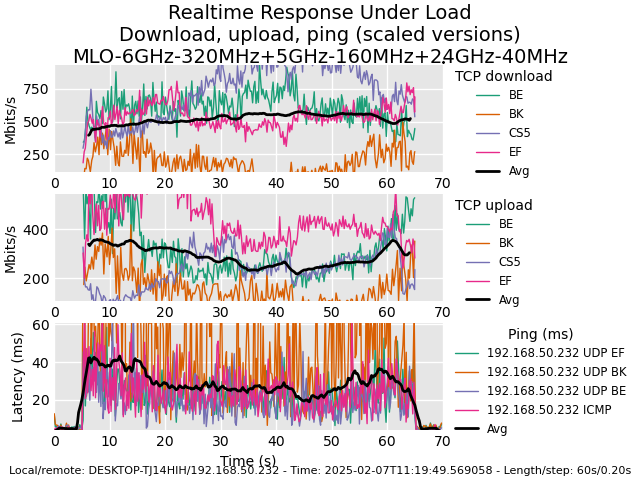
5GHz(160MHz) & 2.4GHz(40MHz).
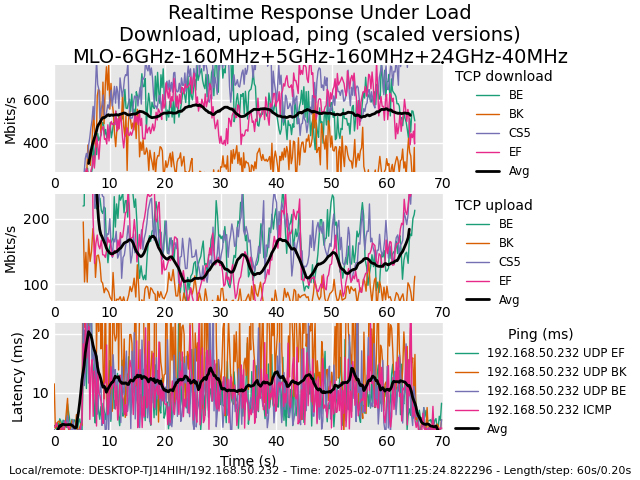
5GHz(160MHz) & 2.4GHz(40MHz).
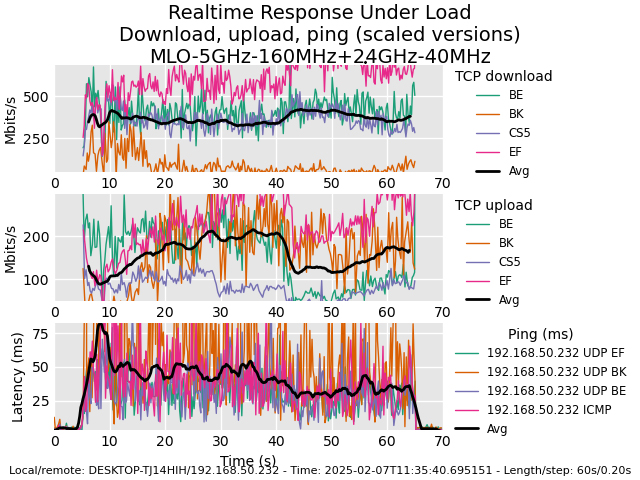
The Thermal Management
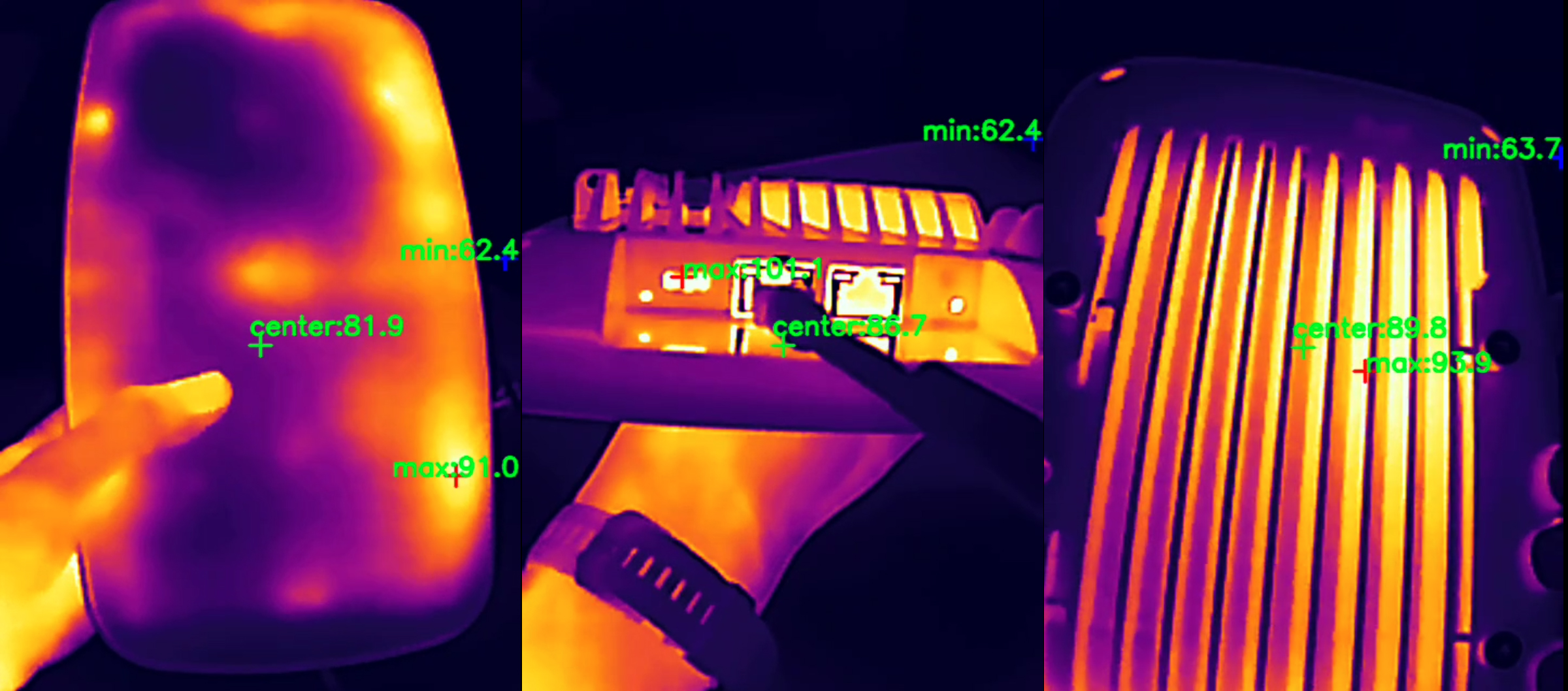
While Ubiquiti went the weird route of adding a fan to cool down the case of their WiFi 7 access points, Zyxel kept the tried method of moving the heat away from the components using heat spreaders and a half of the metallic case. Did it work? It did and, as you can see, it worked better than expected.
Zyxel WBE660S Teardown
Now that we’ve reached the teardown section, know that I did open the access point a couple of months back and I did a dedicated video where I go far more in-depth on the process of opening the device. Then again, Zyxel makes things simple as always, requiring the removal of four screws and yes, there is no warranty seal. Why would there be one? And we quickly get a good view of the PCB.
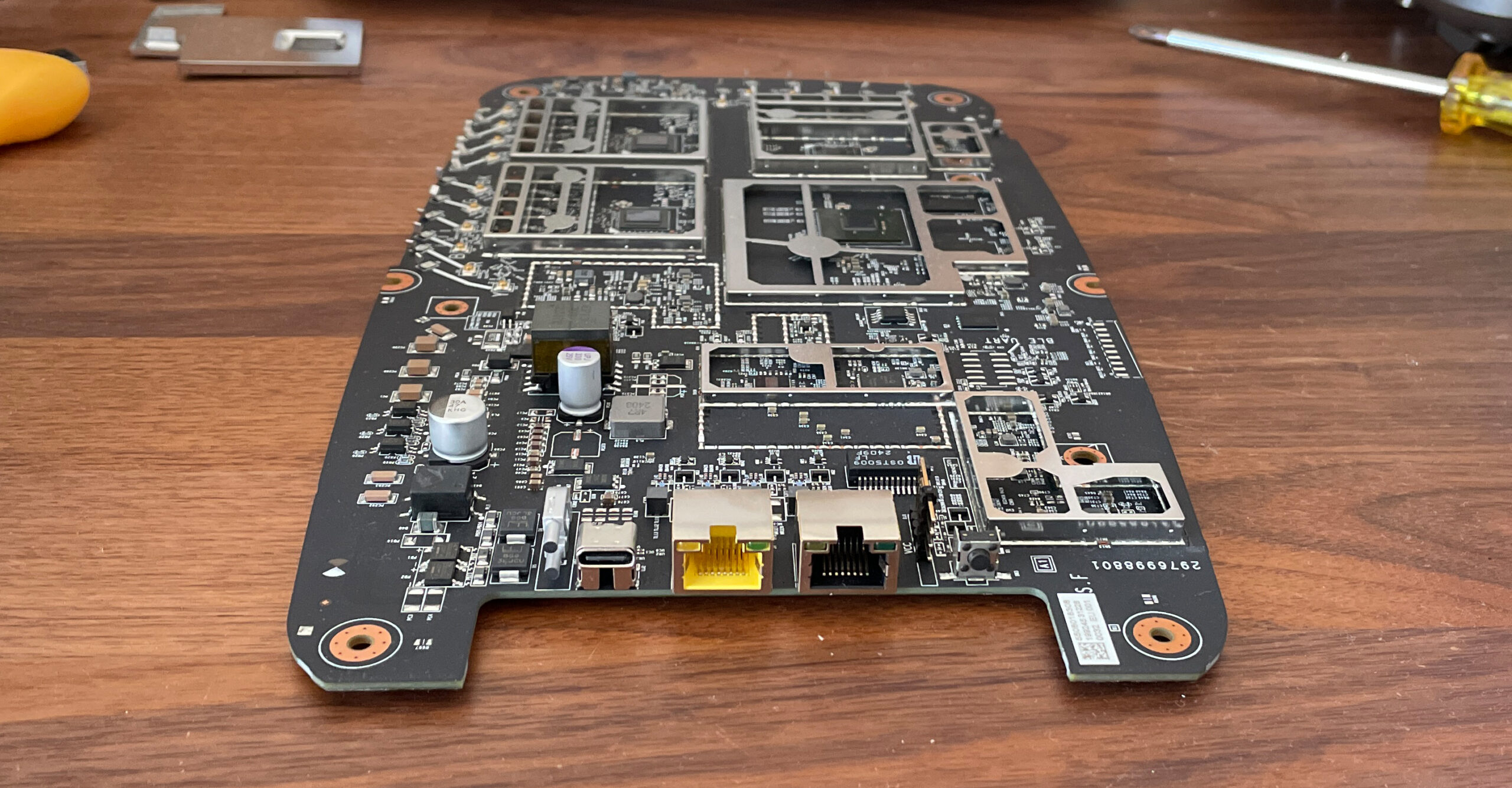
The main components are beneath the aluminum covers, but before that we need to see this smart antenna that Zyxel has proudly announced it has used with the WBE660S, which, just like on the NWA130BE, it does include an RF filter. To reach the two antenna plates, you will have to first detach a metallic heat spreader and, before that, to carefully disconnect all the antennas from the board. They are no soldered, so it’s easy to do so. I have also included a comparison table with other WiFi 7 access points that I have tested so far.
Hardware Comparison
| Zyxel WBE660S | Ubiquiti U7 Pro Max | Zyxel NWA130BE | EnGenius ECW536 | |
| CPU | quad-core 2.2GHz Qualcomm IPQ9579 (A73) | quad-core 1.5GHz Qualcomm IPQ5322 | quad-core 1.5GHz Qualcomm IPQ5322 (Cortex-A53) | quad-core 2.2GHz Qualcomm IPQ9570 (A73) |
| RAM | 2GB Nanya NT5AD512M16C4 | 1GB Samsung (SEC K4A8G16 SYC 8CTD) | 1GB Micron 3UR77 D8BPK (DDR4) | 2GB (2x Nanya NT5AD512M16C4-HRI) |
| Storage | 256MB MXIC MX35UF20E4AD | 4GB Kingston EMMC04G-MT32 | 512MB (MXIC X233662 MX35UF46E4AD-241)/ 16MB NOR flash (MXIC MX25U12832F) | 512MB NAND (MXIC MX35UF4GE4AD) |
| Switch | Marvell AQrate GEN4 Ethernet PHY | Qualcomm QCA8081 Ethernet PHY | Qualcomm QCA8385 Ethernet PHY | 2x RealTek RTL8261N N2068H3 |
| 6GHz Radio | Qualcomm QCN6274 802.11a/n/ac/ax/be 4×4:4 | Qualcomm QCN6274 802.11be 2×2:2 | Qualcomm QCN6274 802.11be 2×2:2 | Qualcomm QCN6274 802.11be 4×4:4/td> |
| 5GHz Radio | Qualcomm QCN6274 802.11a/n/ac/ax/be 4×4:4 | Qualcomm QCN6274 802.11be 4×4:4 | Qualcomm QCN6274 802.11be 2×2:2 | Qualcomm QCN6224 802.11a/n/ac/ax 4×4 4×4:4 |
| 2.4GHz Radio | Qualcomm QCN6214 802.11b/g/n/ax 4×4:4 | Qualcomm QCN6274 802.11b/g/n/ax 2×2:2 | Qualcomm IPQ5322 802.11b/g/n/ax 2×2:2 | Qualcomm QCN6214 802.11b/g/n/ax 4×4:4 |
The Standalone Platform
Just like the NWA130BE, there is a very comprehensive standalone platform as well. And it’s also pretty much identical as we can see the four main sections on the left side. The Dashboard shows detailed status info consisting of various widgets and yes, you can choose which will stay and which will go. Then, there’s the Monitor where, we get more in-depth with the status info.
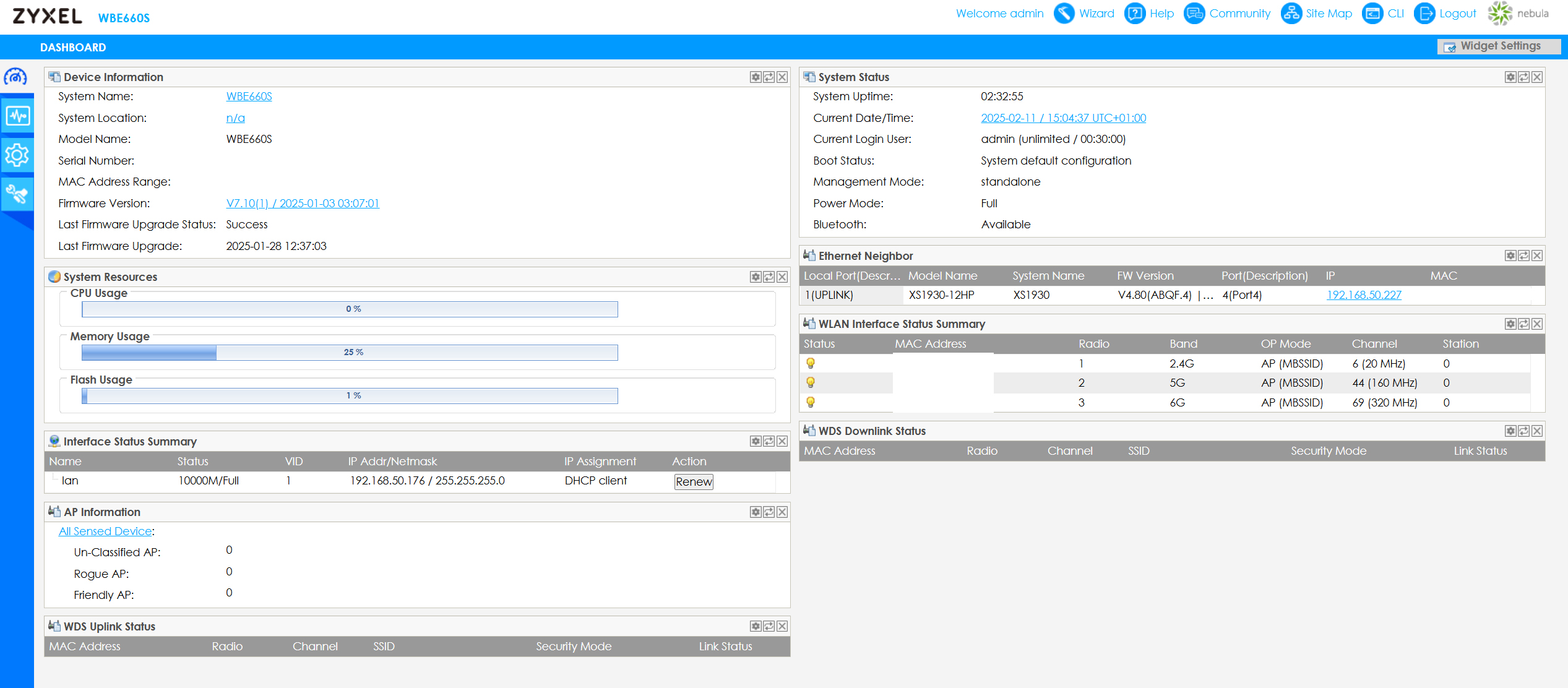
We can see some Radio info, if there is any Station or WDS Uplink and Downlink info available, check whether the Rogue AP detection found something and just have a good look at the Log info. Then, there’s the Configuration section which goes deep into Network adjustments including VLAN and Storm Control. While under Wireless, there’s the AP Management where we can change how each Radio behaves and it does include setting up SSIDs as well.
We also get Load Balancing and DCS, and a more old-school approach of Object configuration. Under Maintenance, we can change the system configuration files, update the firmware, use the Diagnostic Info Collector and the Remote Capture. Sure, there is more to it, but let’s also have a look at the Nebula Controller.
The Nebula Controller
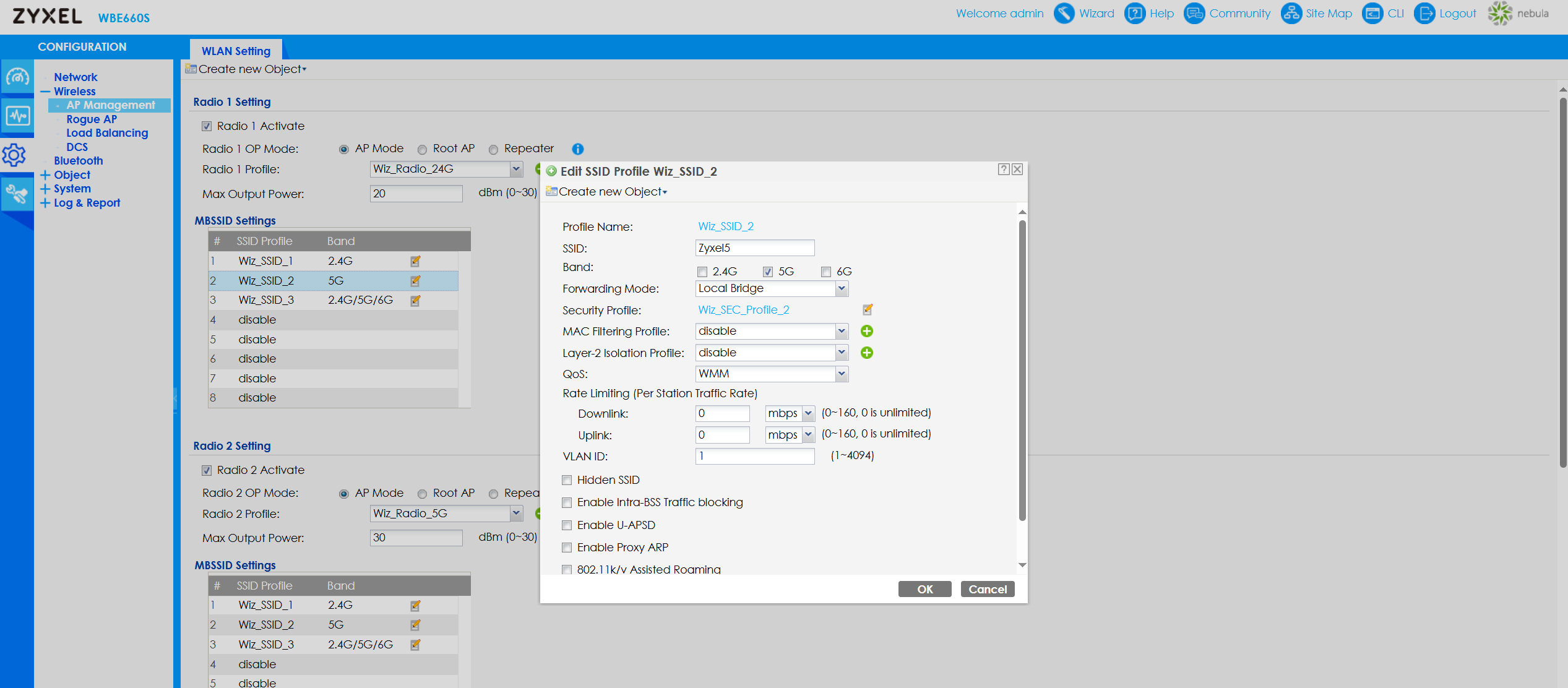
Just like with the NWA130BE, I am going to use the Basic License and, the experience is pretty much the same with the Zyxel WBE660S. There’s the Dashboard where you get to see various status info about the AP and other devices on the same site. Then, we get to see the access point under Devices which includes some other personalized info, such as the Map, as well as some Live Tools. But the most important are what we find under Configure because we get to set up the SSID and the Radios.
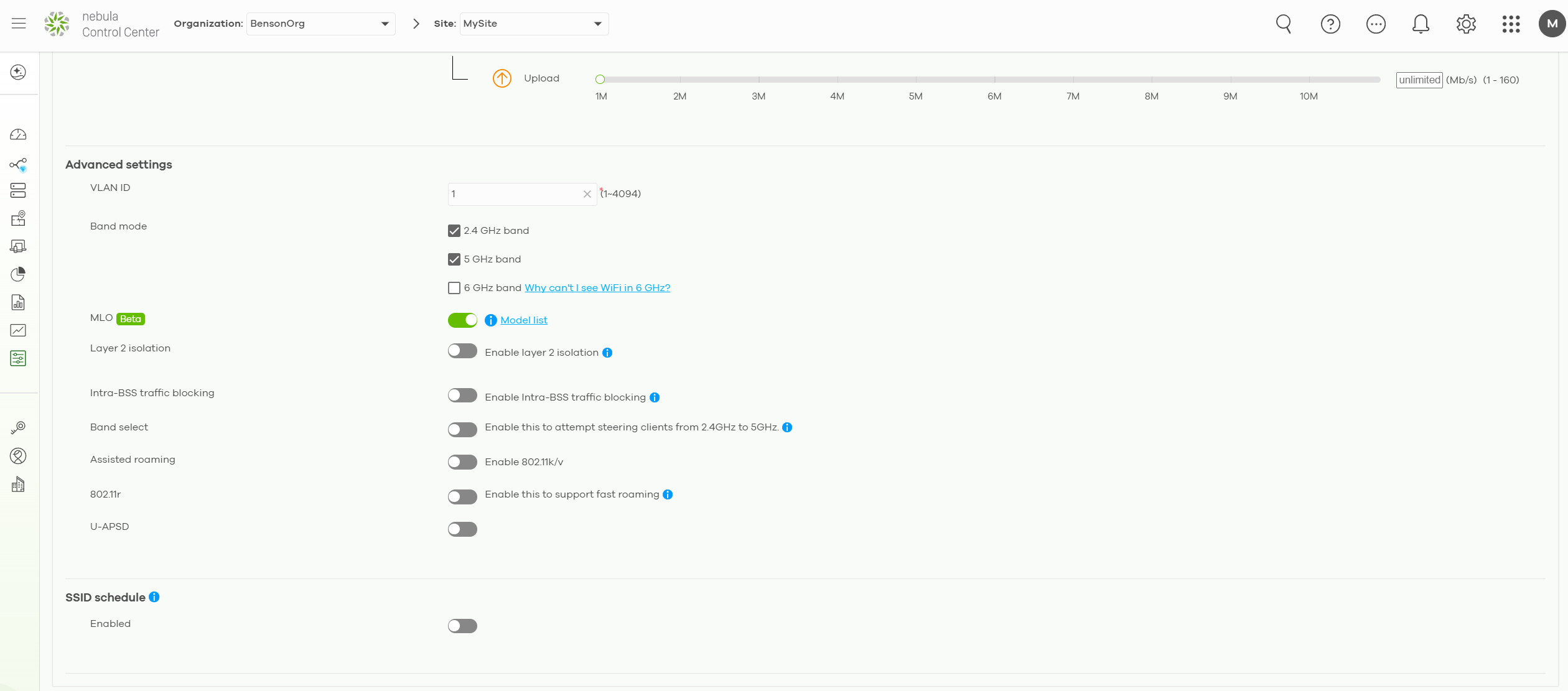
The SSID settings are differentiated in normal settings and some advanced ones. These include the option to add and set up SSIDs and, yes, here is where you get to enable MLO as well. It’s interesting to see that under the Radio Settings, you can choose the channel and channel bandwidth, but the 5GHz radio is limited to 80MHz. To go to 160MHz, it is required that you scroll to the bottom of the page, identify the access point, choose the radio and then, you get to change the radio settings for it individually, overwriting the global ones.
Then again, before anything else, you do need to visit the License and inventory section where you can add new devices, set the Site where they will operate and assign a license.
The Conclusion
The Zyxel WBE660S costs quite a bit more than the NWA130BE, but, considering the similarities in terms of features and used technologies, is it actually worth the extra cost? The WBE660S is definitely a better-performing device and it’s the best WiFi 7 access point that I tested so far, so it’s worth paying extra. Is it worth double or more the price of the NWA130BE, that, I am not so sure about. You definitely don’t get double the throughput or that much less latency.
Zyxel WBE660S
Pros
- Supports MLO
- 6GHz radio (320MHz)
- Performs well under heavier workloads
- Comprehensive Cloud and local platform
Cons
- A bit large
- A bit expensive