
What do we have here today? It’s the ASUS TUF Gaming BE3600, a gaming-focused WiFi 7 router and I paid close to 300 dollars for it, so is it worth the money? Well, let’s first address the mammoth in the room. ASUS does call the BE3600 a WiFi 7 router, but there is no support for the 6GHz radio and, just like some Xiaomi routers, such as the BE7000, they did implement MLO.
Technically, it’s enough to be able to call the TUF Gaming BE3600 a WiFi 7 device, but I am fairly sure that it will confuse a lot of people which will get the router expecting the 6GHz radio. Remember that the BE88U costs a whole lot more, well above what myself and most other people are willing to pay. I would just keep the existing router and get something like the U7 Pro which the 6GHz is that important.
Anyway, the MLO is an important feature that can help improve the bandwidth and the throughput, but it does require compatible client devices. If you have been following my journey towards getting a stable performance from the existing PCIe WiFi 7 adapters, then you know we’re still not there yet. Hopefully, the issues will be addressed in the next couple of months, that’s the promise we get anyway.
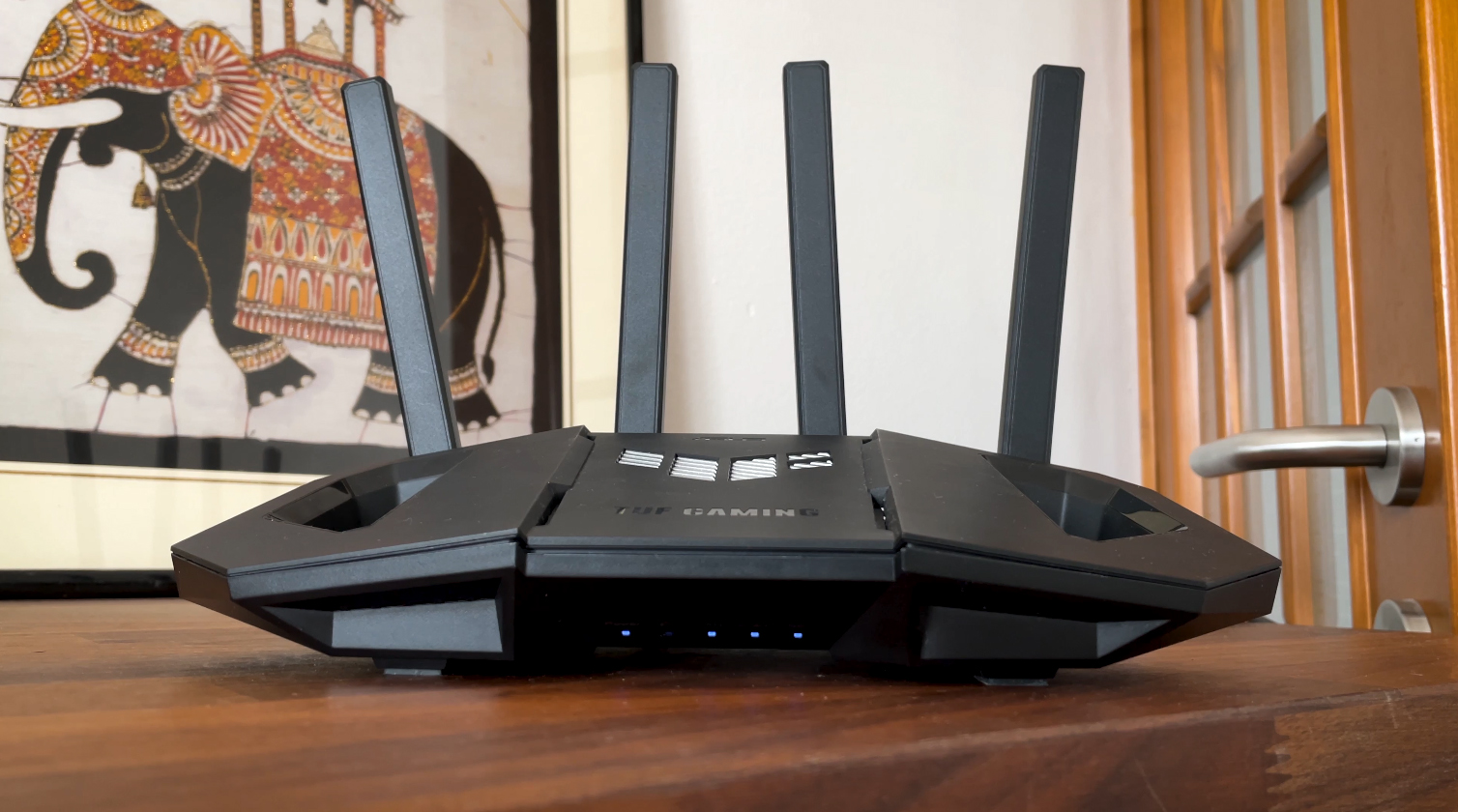
The TUF Gaming BE3600 also supports 4K-QAM modulation, AiMesh and a single 2.5GbE port for whatever reason. There are also the usual gaming features and the Smart Home Master which I haven’t tested before, so it would be interesting to see what it can do. Let’s not forget it’s Wings-like agility, that’s also important.
Design and Build Quality
In terms of design, the ASUS TUF Gaming BE3600 apparently took inspiration from drones which is a bit odd from my point of view, but at least explains the two ears or wings which don’t really serve any purpose outside the pure aesthetic value. The device is fairly compact and it has four non-removable antennas. It is still possible to replace them since the joints seem to be identical to other routers.
What I found a bit curious was the decision to almost completely hide the LED lights, so if you want to check the status of the router and that of the network, you do need to raise the router a bit. I don’t find the LED array ugly, but the designers seem to not be fond of them. Don’t you dare change them for a single LED light!
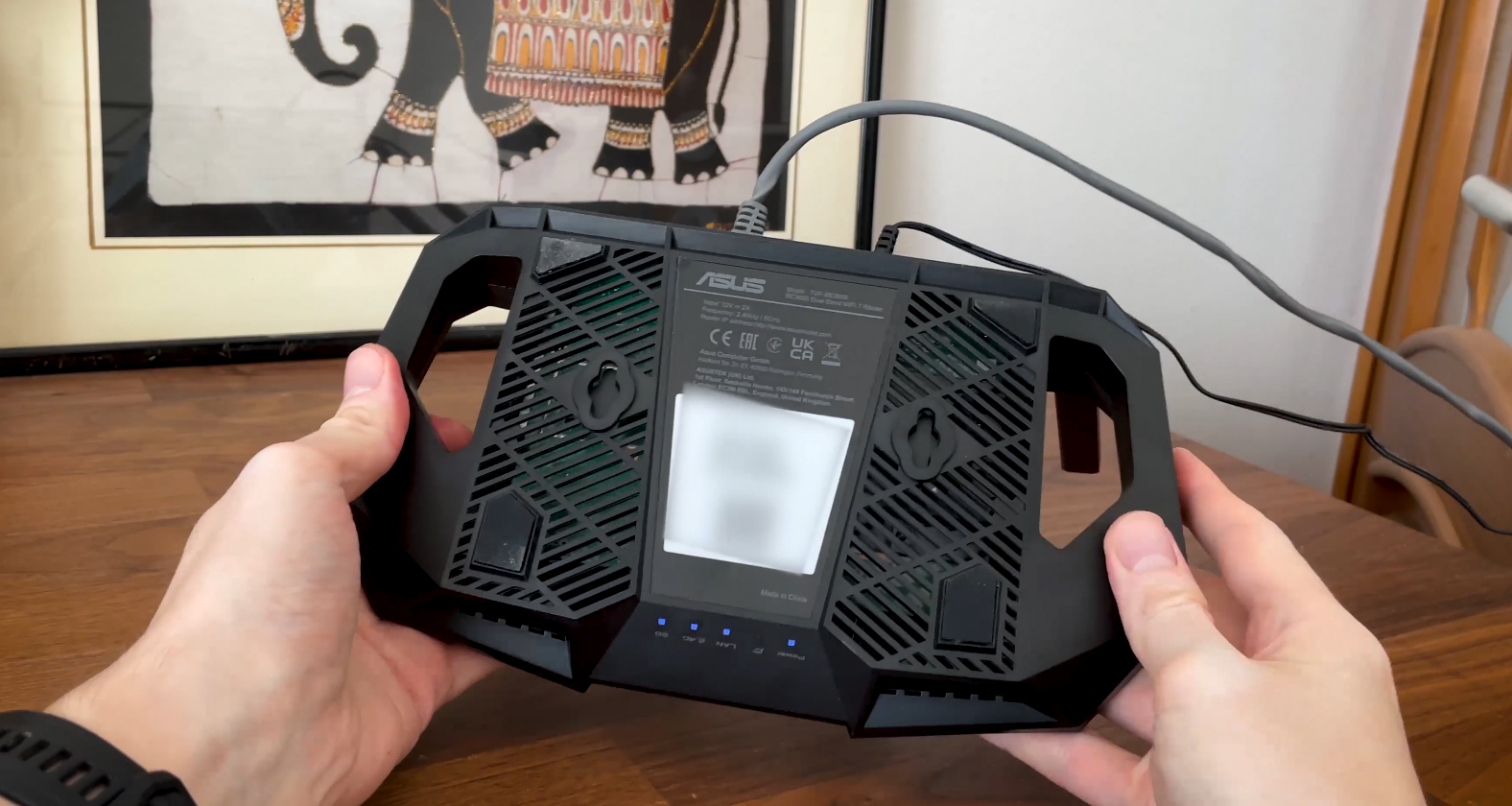
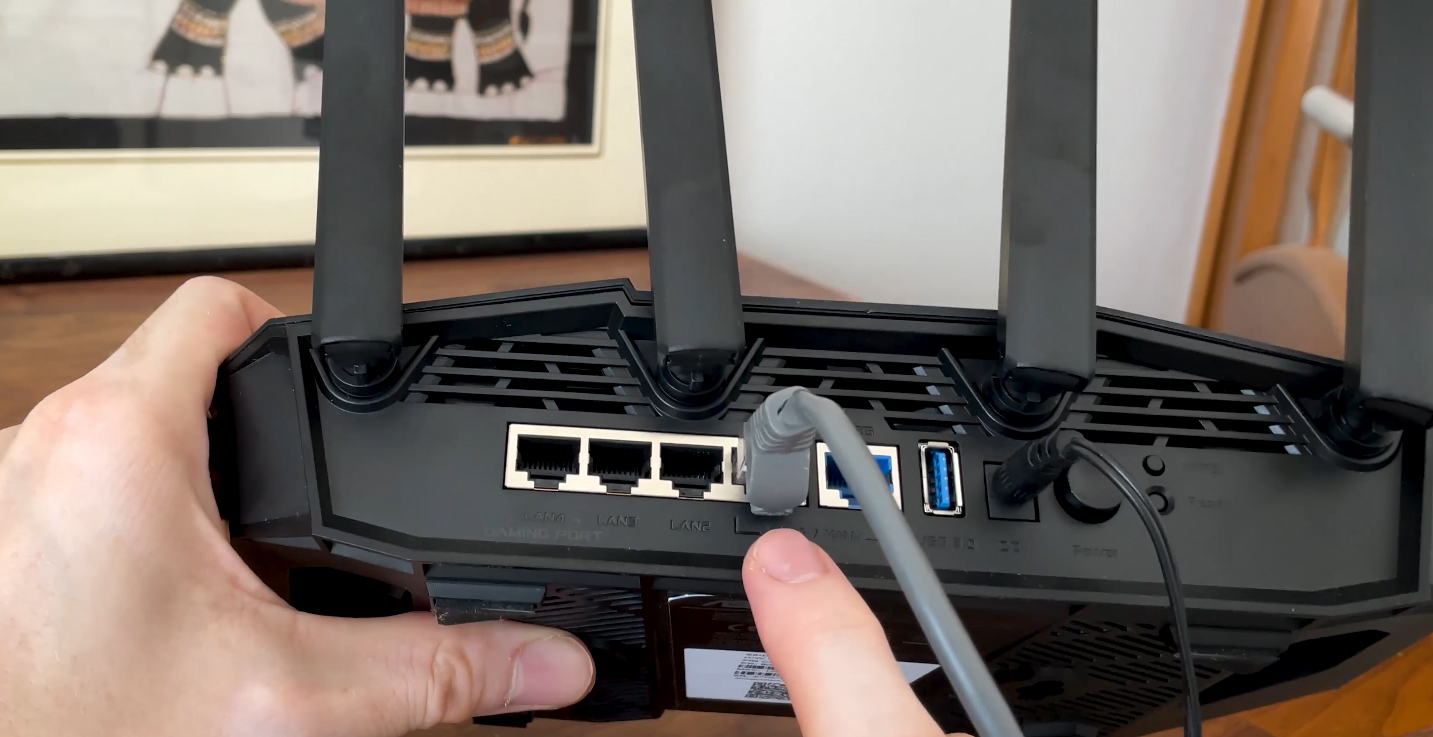
On the bottom of the TUF BE3600, we can see the four silicone feet and two holes that allow the option to wall-mount the router. Now let’s talk about the ports. We get four LAN ports from which the first can function as a Gaming port, while the fourth can be used for a secondary WAN connection. All four are Gigabit only.
The WAN port is 2.5GbE and for the price tag, there should have been at least one other 2.5GbE port. Anyway, farther to the right, there’s a USB 3.0 port, a DC-In port followed by a Power button, the WPS button and the recessed Reset button.
The Heat Management
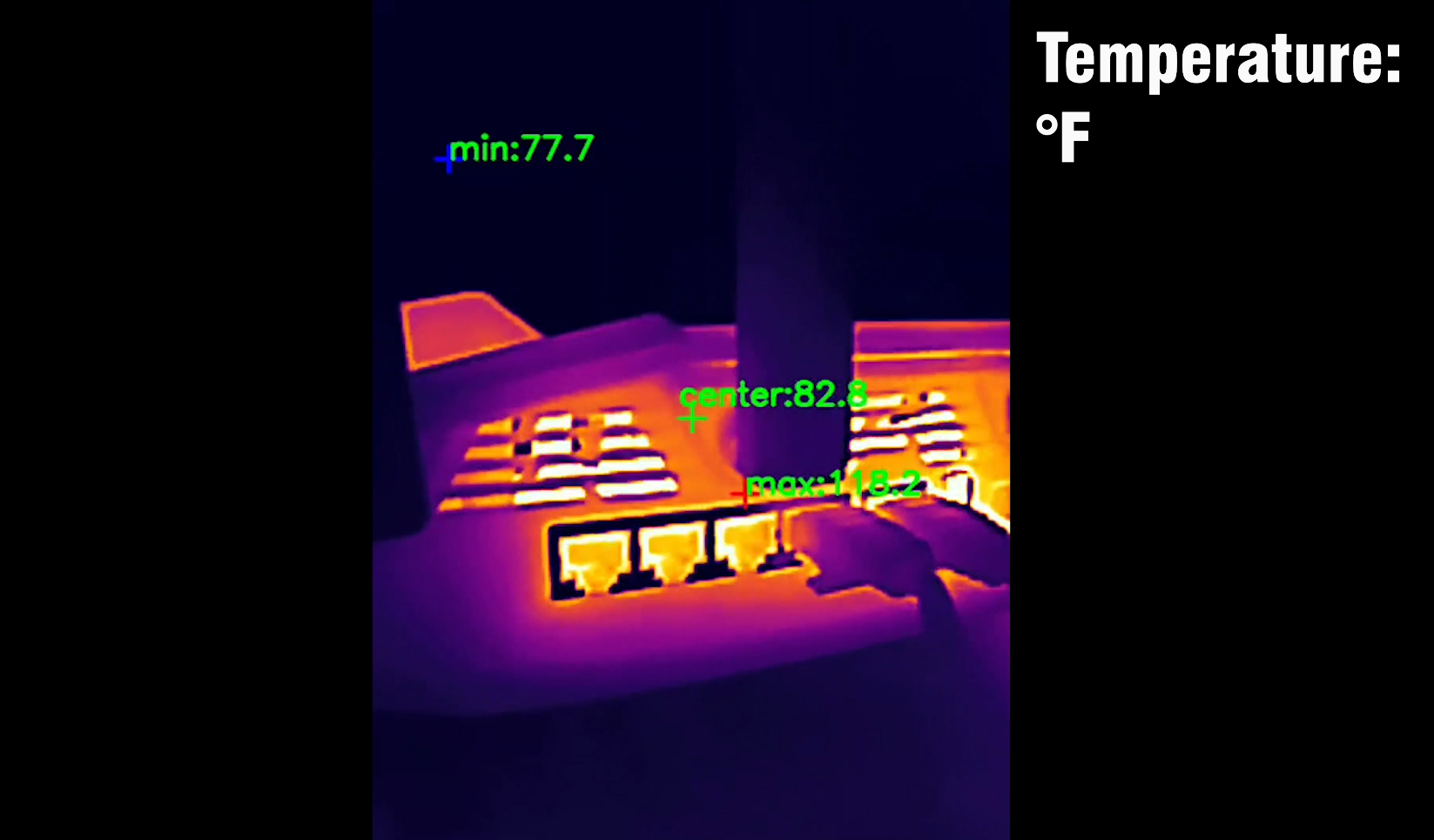
In terms of heat management, ASUS rarely misses, so it made sure that the passive cooling is well done. There are opening all around the case including at the top, rear and bottom sides. And, as you can see from the photos I took using a thermal camera, there are some warm spots which is normal considering the heat transfer away from the chipsets, but there doesn’t seem any risk of any future thermal throttling.
ASUS TUF Gaming BE3600 Quick Teardown
I already opened the TUF Gaming BE3600 router in a dedicated video, so know that it’s fairly easy to do so, but there are a couple of aspects that you need to keep in mind. First, there is a warranty seal which can void the warranty outside the US, so be careful with that.
Then, know that the plastic latches can break when detaching the top part, so be as gentle as possible, especially not to leave any marks because again, you’re most likely going to void the warranty. Anyway, the PCB is fairly small, those two ears don’t really have a purpose as I mentioned before and there is a single chipset for both the 2.4 and the 5GHz radios.
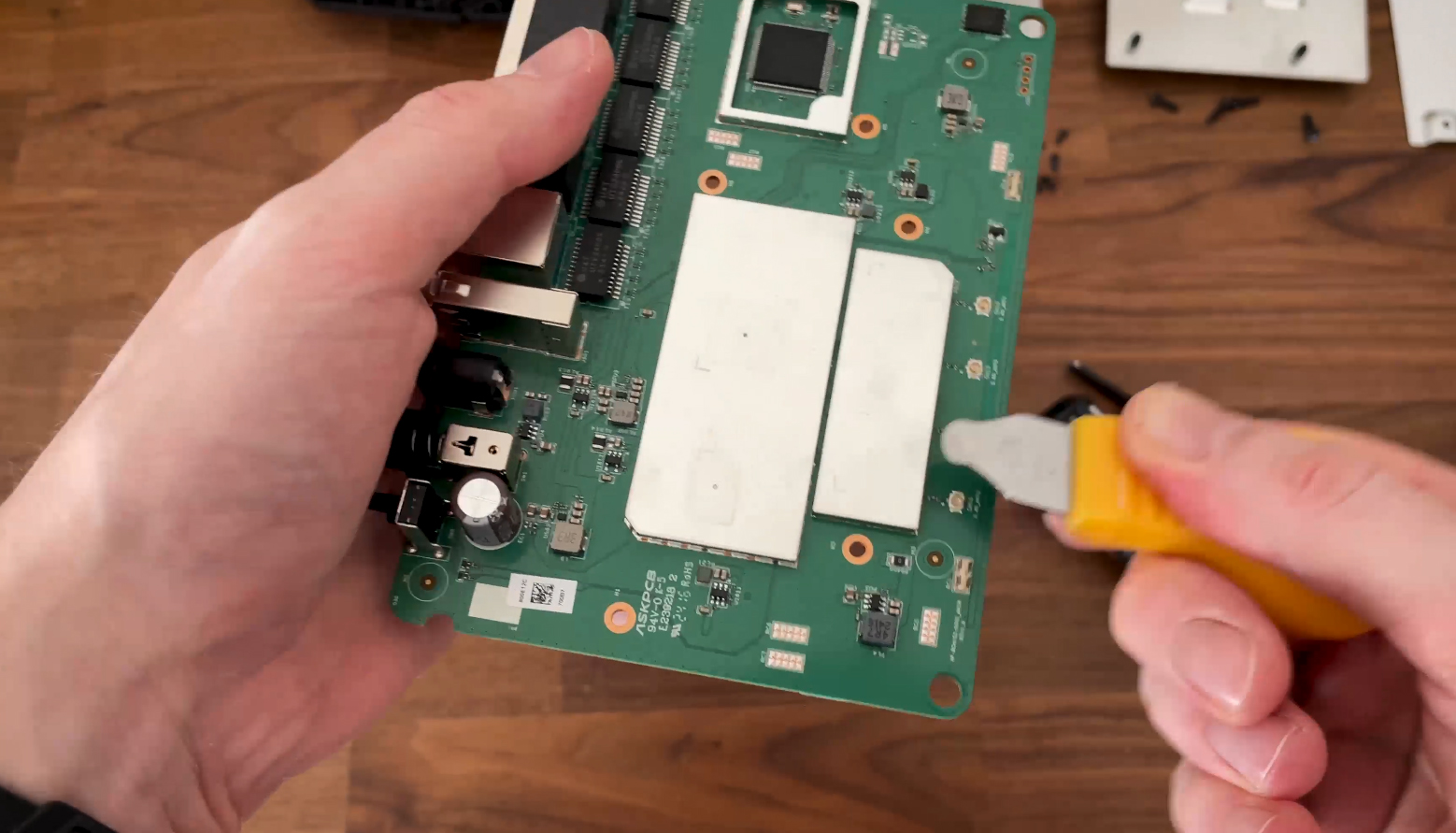
You can see all the components here, but I will go a bit faster through them, so pause at any time to get a better look. I also have included a comparison table at the end with other similar devices.
| ASUS TUF Gaming BE3600 | Xiaomi BE7000 | Asus TUF-AX4200 | Asus RT-AX86U Pro | |
| CPU | quad-core 2.0GHz Broadcom BCM6764LFKFEBG | quad-core 1.5GHz Qualcomm IPQ9554 | quad-core 2.0GHz Mediatek MT7986AV | quad-core 2.0GHz Broadcom BCM4912 |
| RAM | 1GB Nanya NT5AD512M16C4-HR | 1GB Nanya (2x NT5CC256M16ER-EK) | 512MB Nanya NT5CB256M16ER-FL | 1GB (2X Samsung SEC 234 K4A4G165WF) |
| Storage | 256MB NAND Winbond 25N02KVZEIR | 128MB GigaDevice 5F1GQ5REY1G | 256MB Winbond 25N02KVZEIR | 256MB MXIC (MX30LF2G28AD-TI) |
| Switch | Realtek RTL83675 PHY | Qualcomm QCA8084 | MXL TC1PZ4122 | Broadcom B50212EB1KMLG PHY |
| 5GHz Radio – 1 | Broadcom BCM6764LFKFEBG a/n/ac/ax/be 2×2:2 | Qualcomm QCN6224 a/n/ac/ax/be 4×4:4 | Mediatek MT7976DAN an/ac/ax 3×3:3 | Broadcom BCM6715KFBG a/n/ac/ax 4×4:4 | 5GHz Radio – 2 | – | Qualcomm QCN6224 a/n/ac/ax/be 4×4:4 | – | – |
| 2.4GHz Radio | Broadcom BCM6764LFKFEBG a/n/ac/ax/be 2×2:2 | Qualcomm QCN5024 b/g/n/ax 4×4:4 | Mediatek MT7986AV b/g/n/ax 2×2:2 | Broadcom BCM6710KFFBG a/b/g/n/ax 3×3:3 |
The Wireless Test (5GHz)
Now that we’ve reached the single-client wireless testing section, let’s talk about the devices that will be used here. First of all, there is a single 2.5GbE port which I will be using for the connection to the server PC and the LAN port 1 for the WAN connection. Then, I relied on the same laptop equipped with an Intel AX200 adapter, as well as the one that used the Intel 8265 WiFi 5 card.
What I did change was that I did not use the Pixel 2 XL this time, but instead I included a PC that relies on a WiFi 7 adapter. If you do want me to return and continue to use the Pixel 2 XL as well, do let me know in the comments.
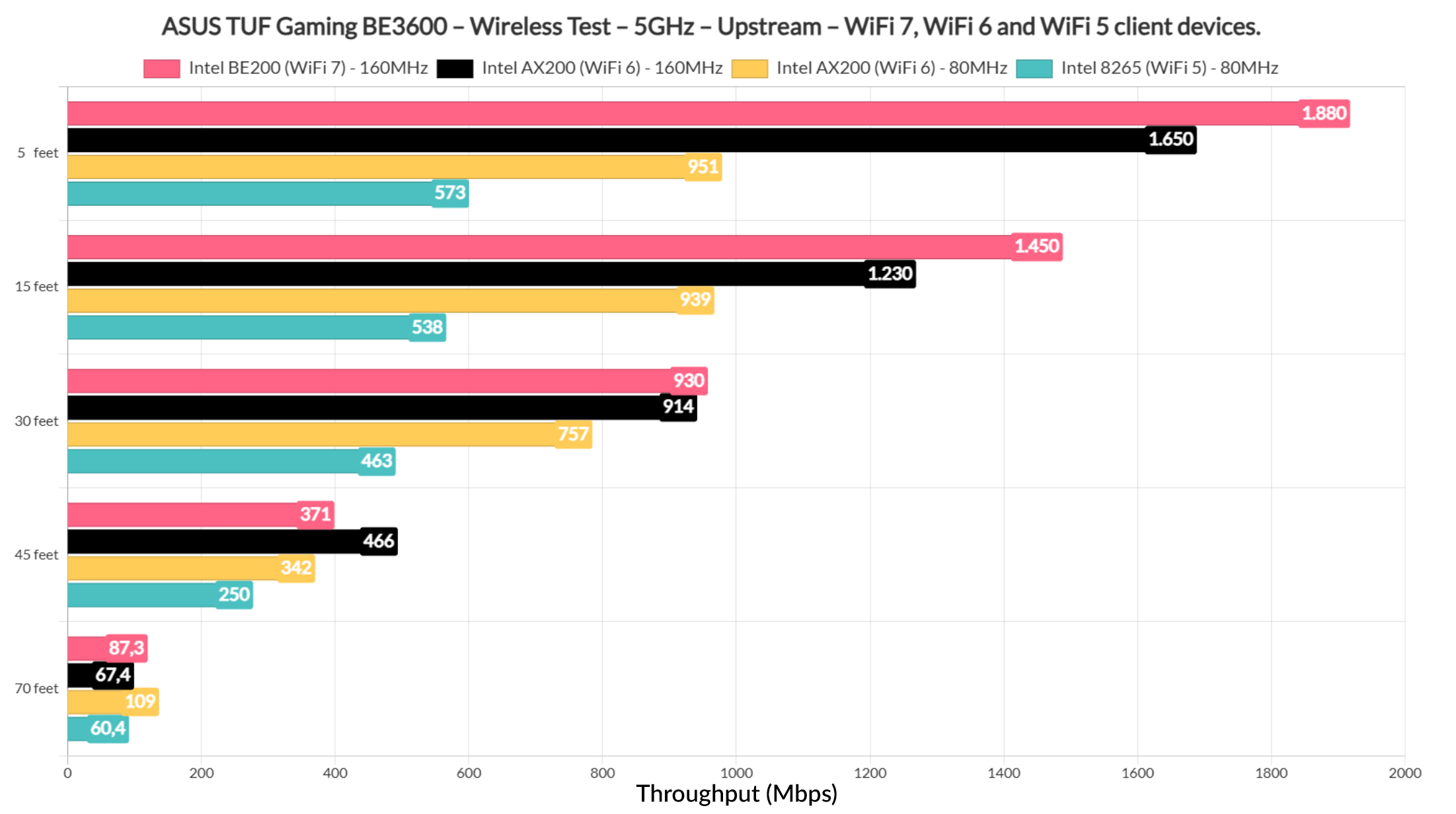
Now, as for the throughput, we can see that the TUF Gaming BE3600 did really well with both the WiFi 6 and especially the WiFi 7 clients, reaching very close to 2Gbps with the latter. And that’s upstream, but even downstream, it’s a very good overall performance.
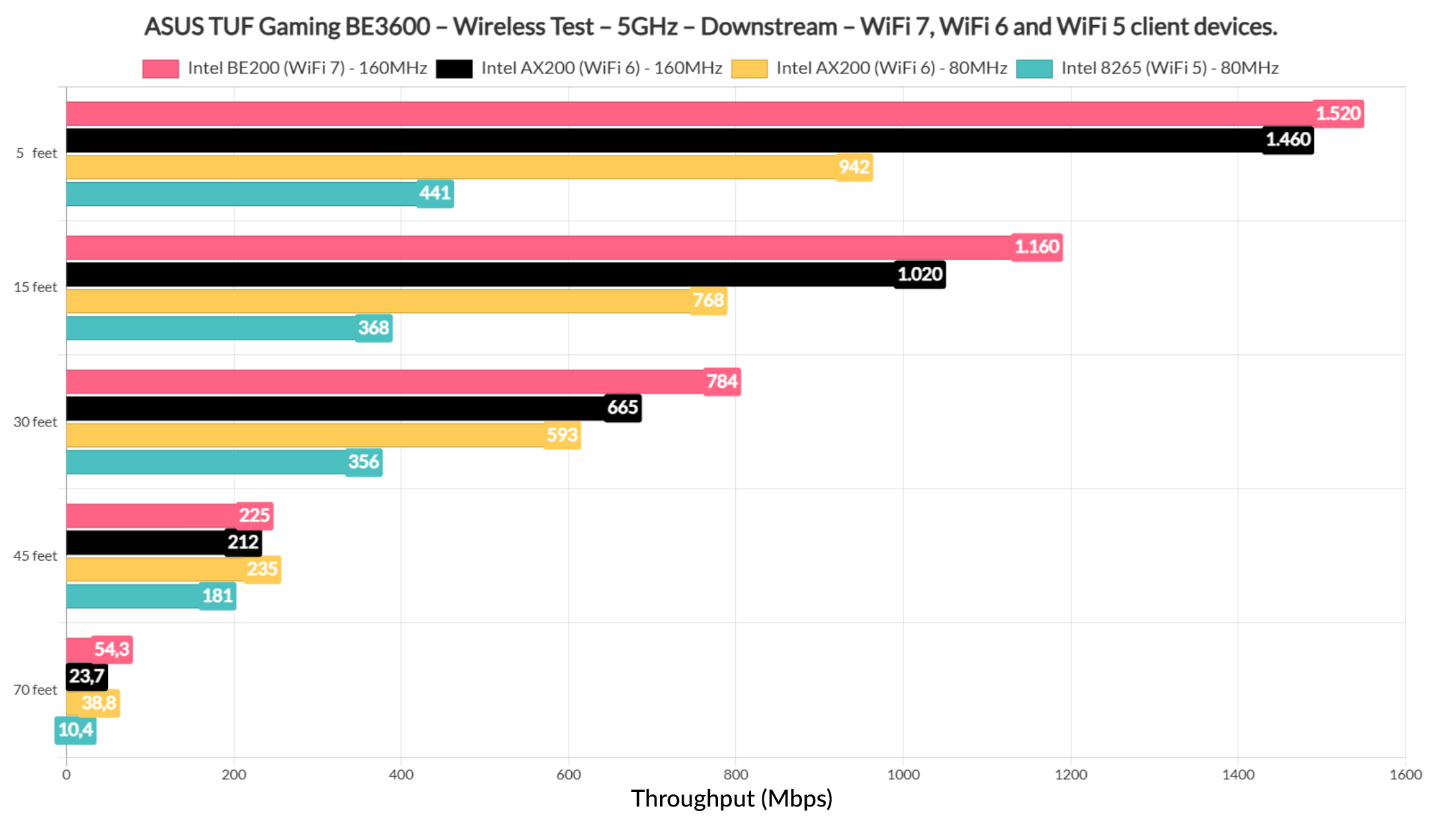
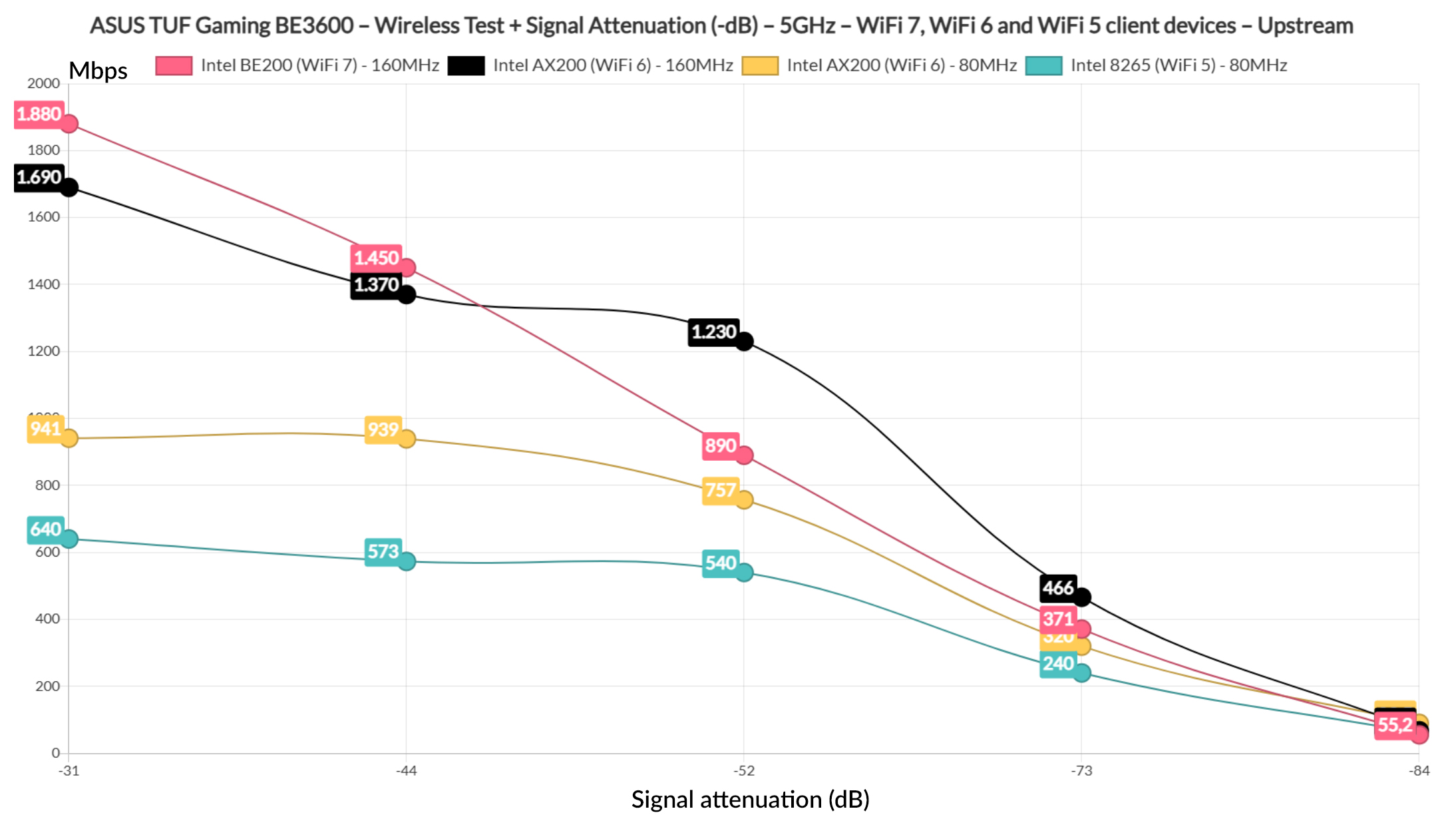
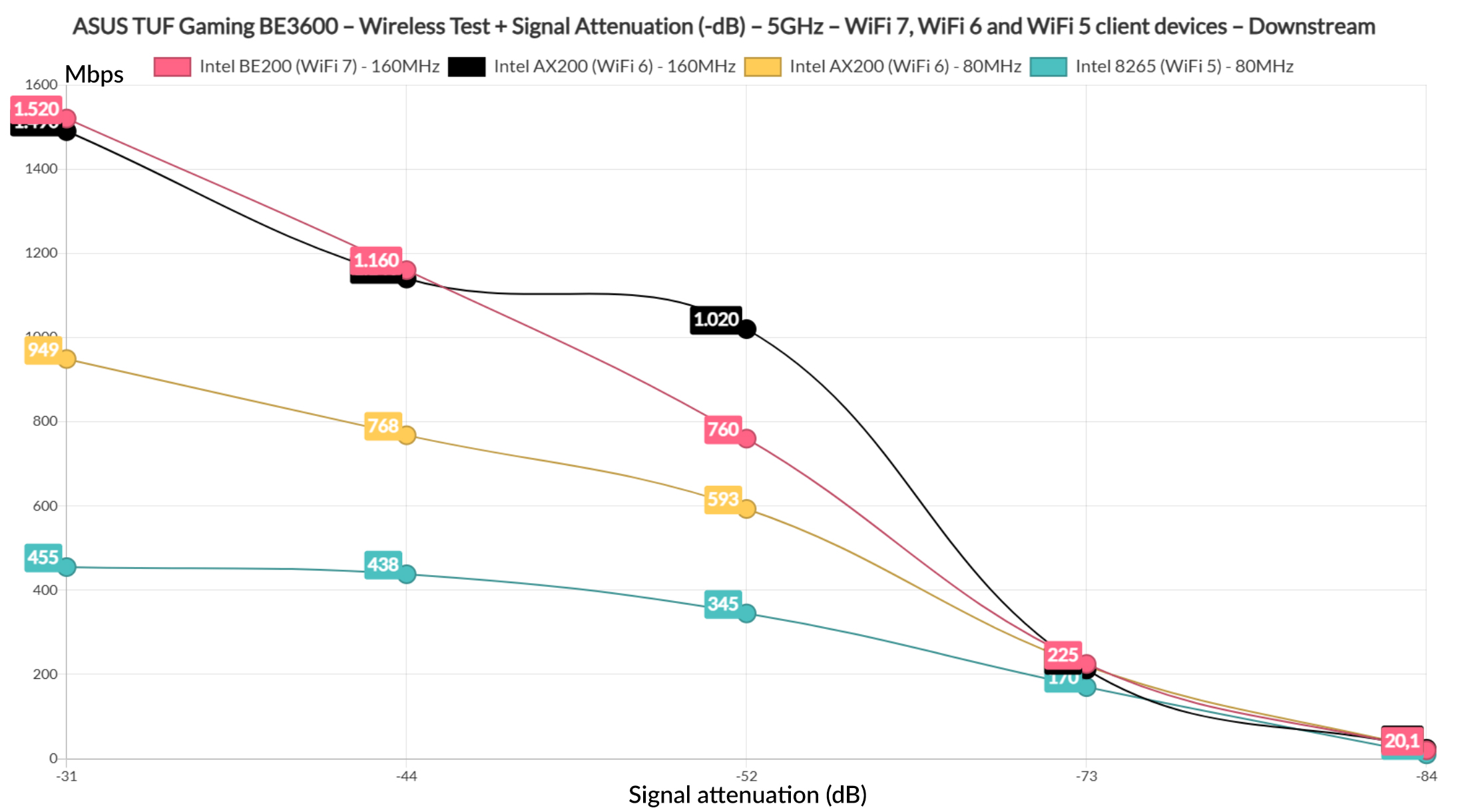
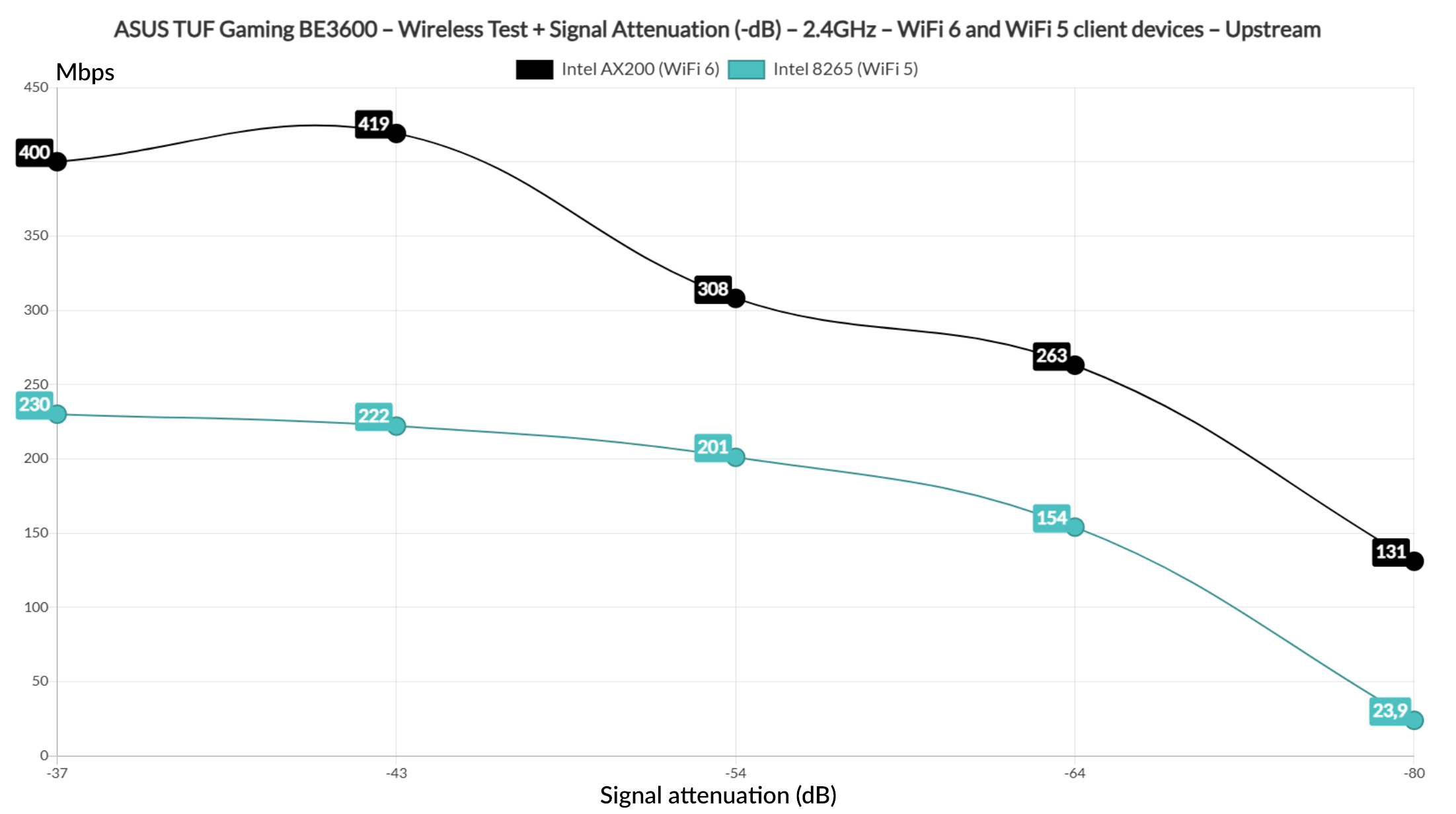
We get usable throughput even at 45 feet and closer to 70 feet. Obviously, feet, meters, miles matter little if the signal attenuation doesn’t match the one in my house, so I added the following graphic to highlight what you can expect based on the signal attenuation measured at each client level.
That was upstream, so now let’s see downstream. This way, it’s easy for you to get an idea about what you can expect in your own home based on the attenuation there.
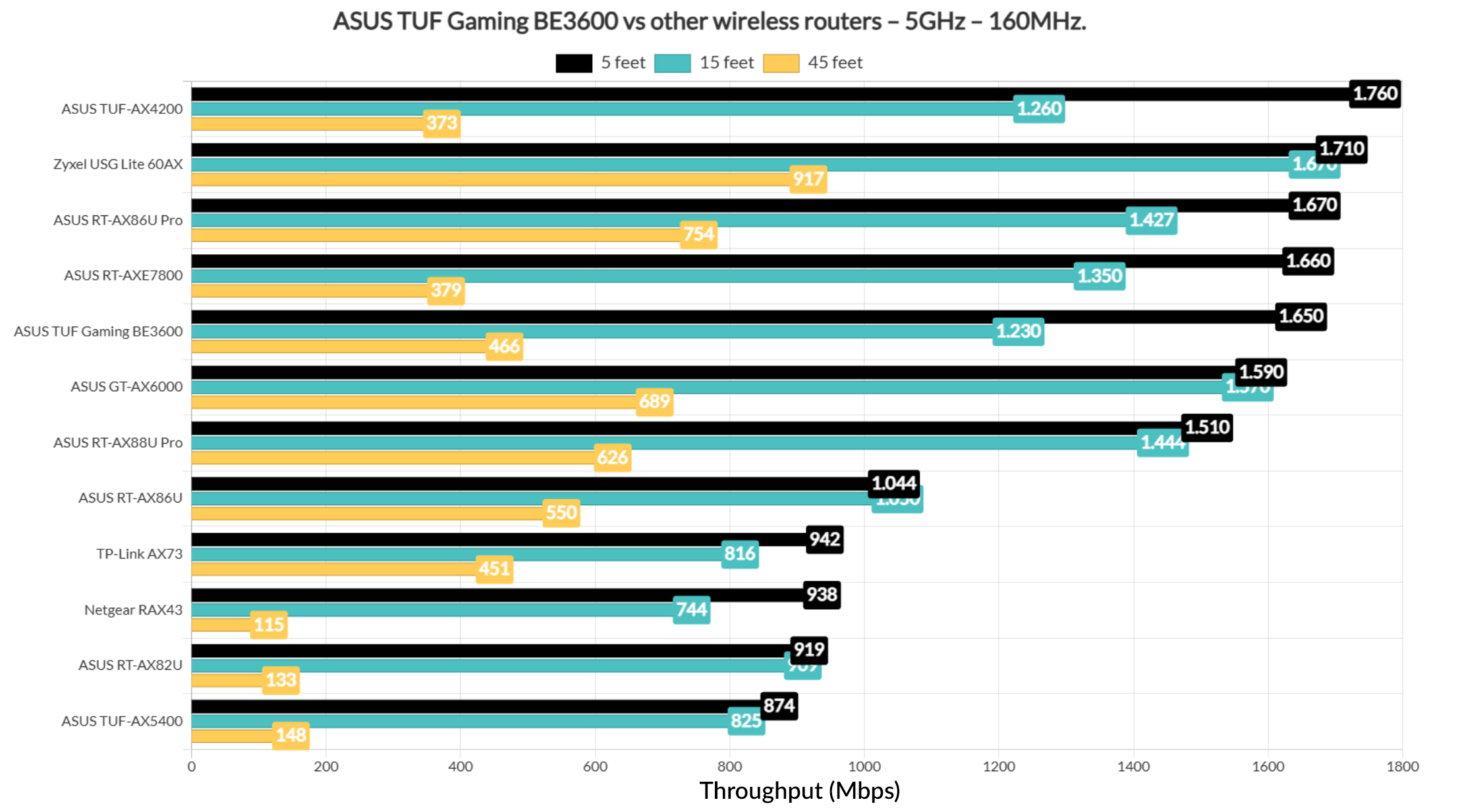
If I were to compare the ASUS TUF Gaming BE3600 with other wireless routers, it seems to sit immediately below the RT-AXE7800 when the channel bandwidth is set to 160MHz.
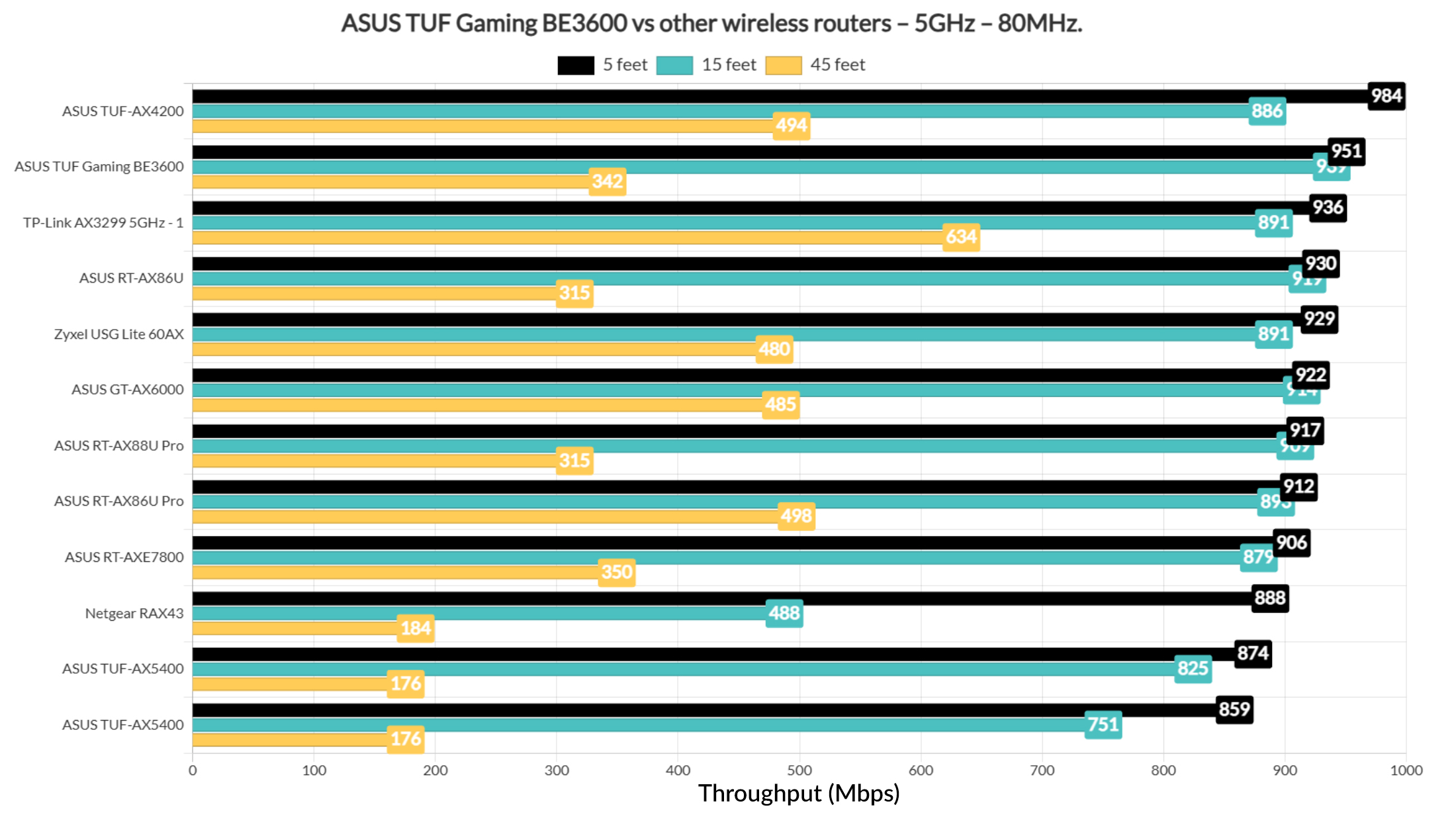
Using the 80MHz width, it’s actually the second device in my list, only below the TUF-AX4200. Not bad.
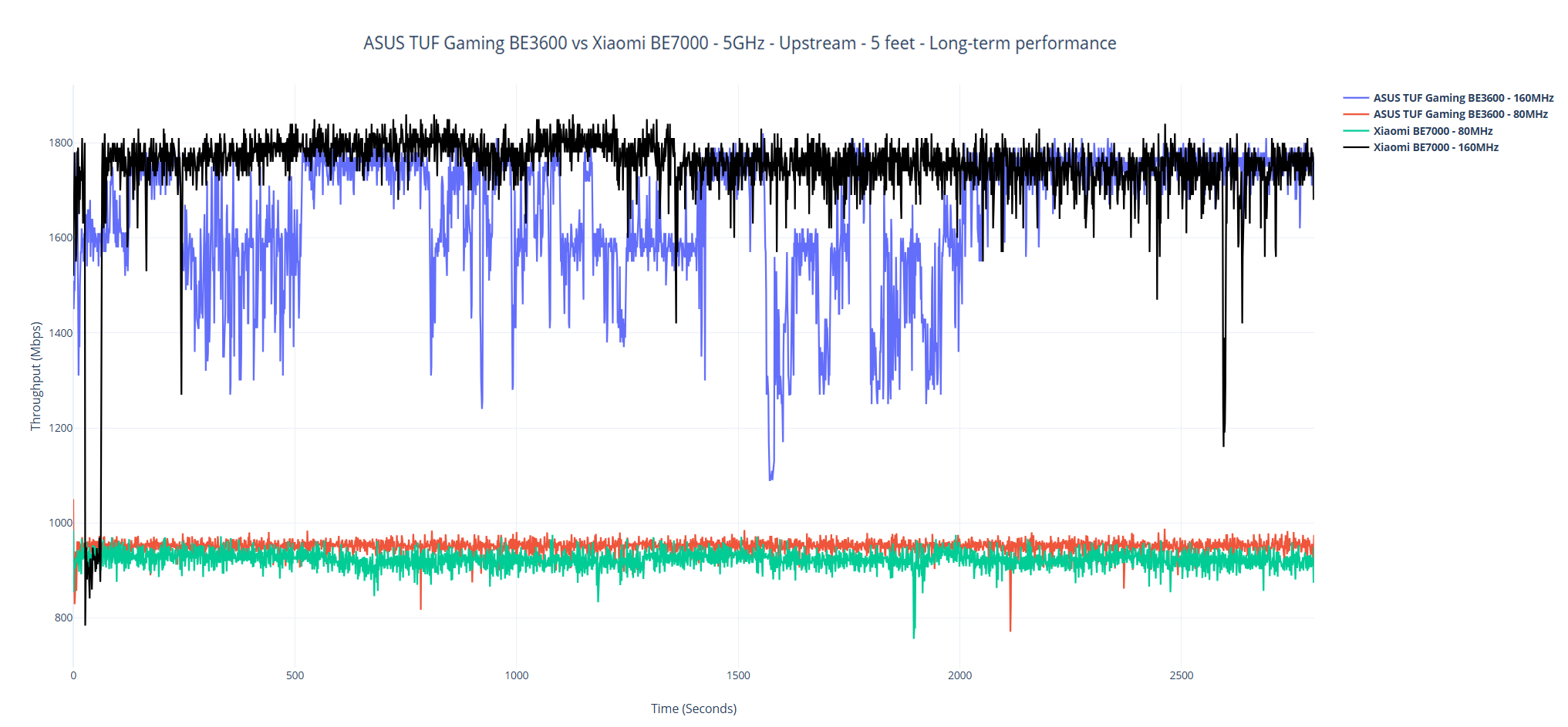
As always, I have included a longer-term graph to see how the throughput fluctuates over time.
The Wireless Test (2.4GHz)
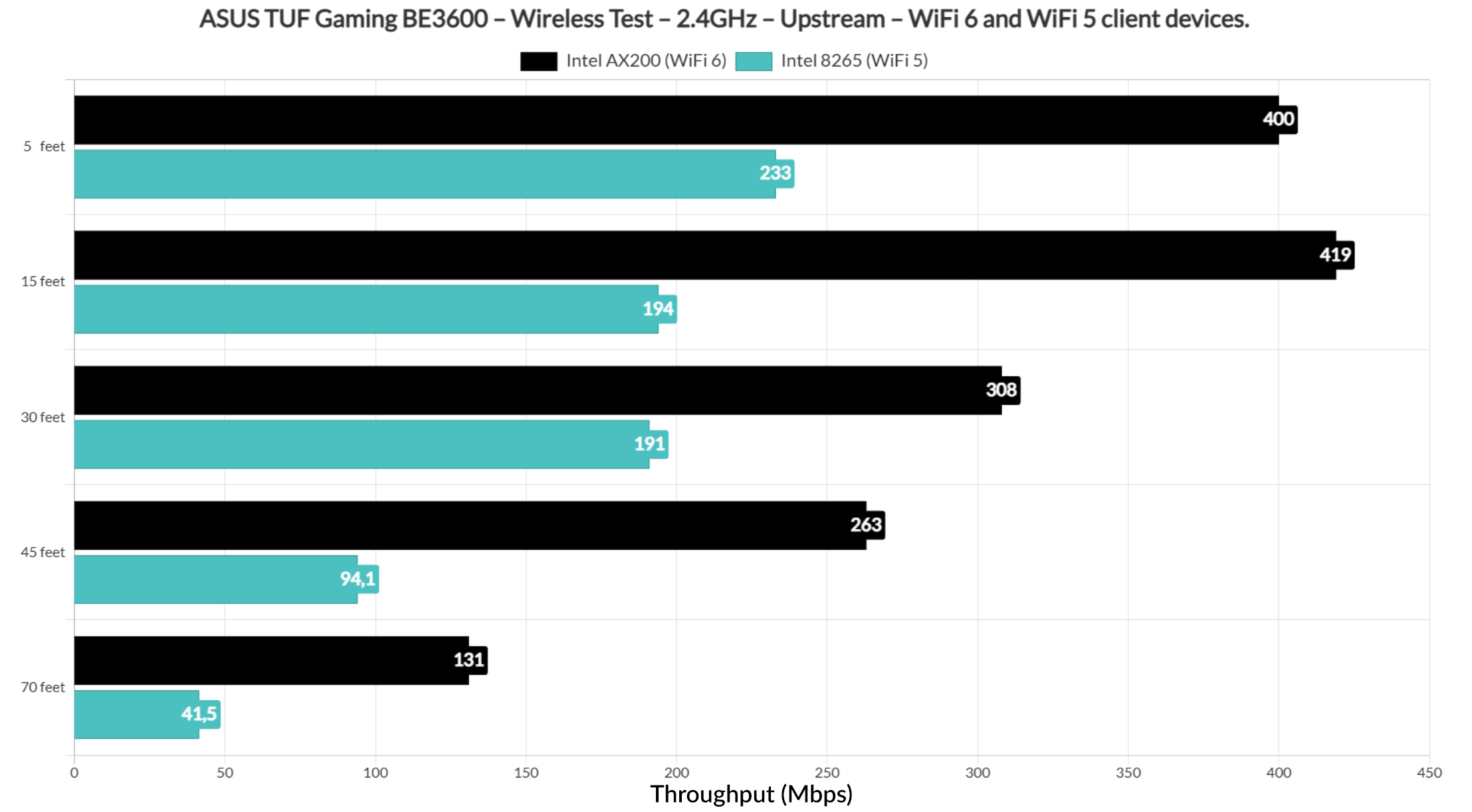
Let’s talk a bit about the throughput on the 2.4GHz radio band. Since I removed the Pixel 2 XL, we get info only from the AX200 WiFi 6 client and the Intel 8265 WiFi 5 device. I set the network to use the 40MHz channel bandwidth and the throughput is very good on both client devices.
As expected, the WiFi 6 did better when the signal attenuation was about -80dB.
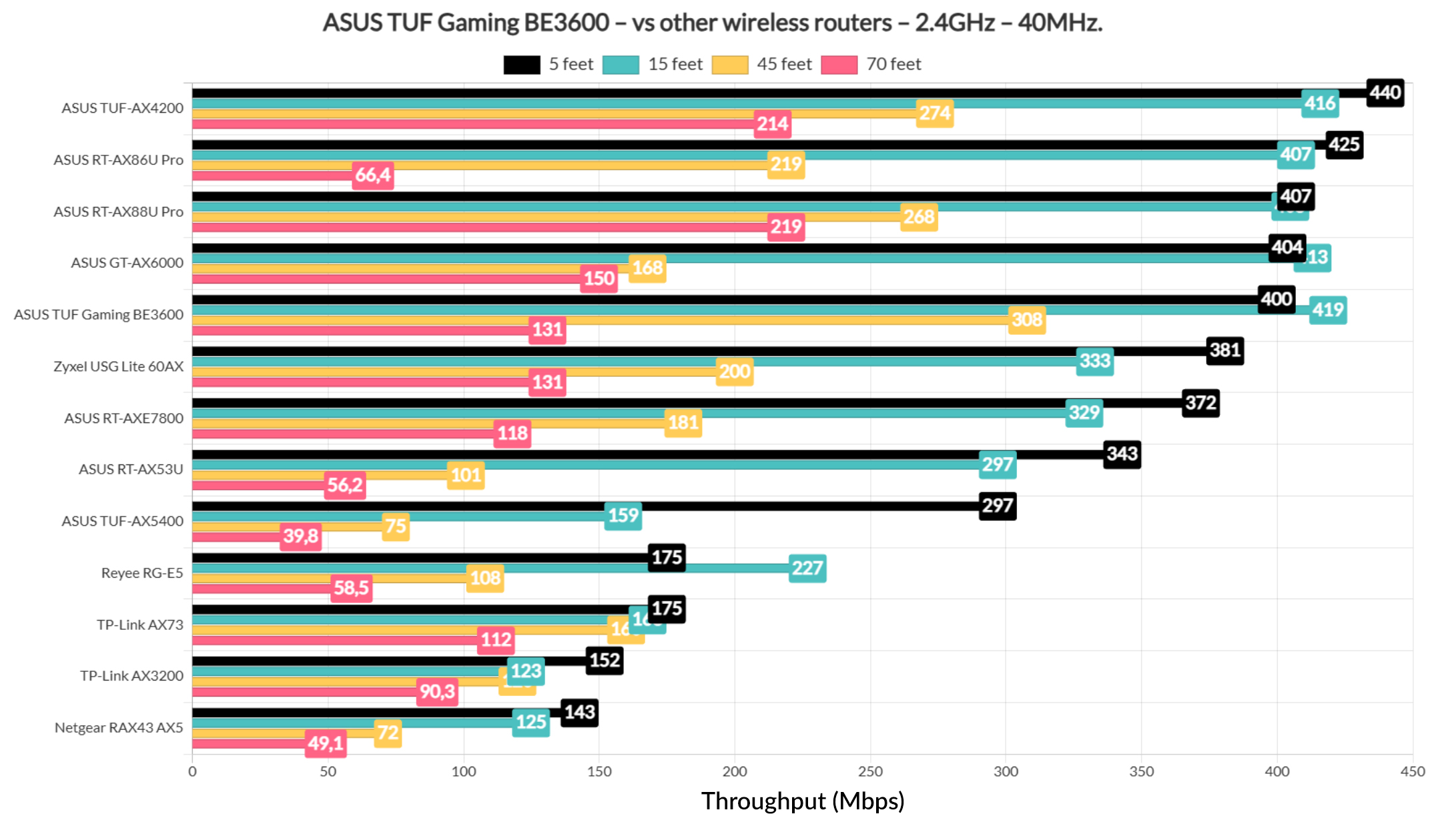
And, when compared to the other wireless routers that I tested so far, the TUF Gaming BE3600 falls somewhere in between the GT-AX6000 and the Zyxel USG Lite 60AX.
The Multi-Client Tests (5GHz)
For the multi-client tests, I used the same devices as before and you can see their specs here as well as the signal attenuation which shows that one device is always farther than the four other ones.
| 2x Lenovo Y520 | Custom PC | MacBook Pro | ZimaBoard 832 SBC | |
| Signal Attenuation | -33dB & -33dB | -37dB | -39dB | -69dB |
The tools remain the suite from net-hydra developed by Mr Jim Salter. I will most likely include a better testing methodology in the future, but for now it suffices since there is a long time until I can afford a proper lab with the tools I want. Anyway, the first test checked how the router handles five clients running 1080p simulated traffic.
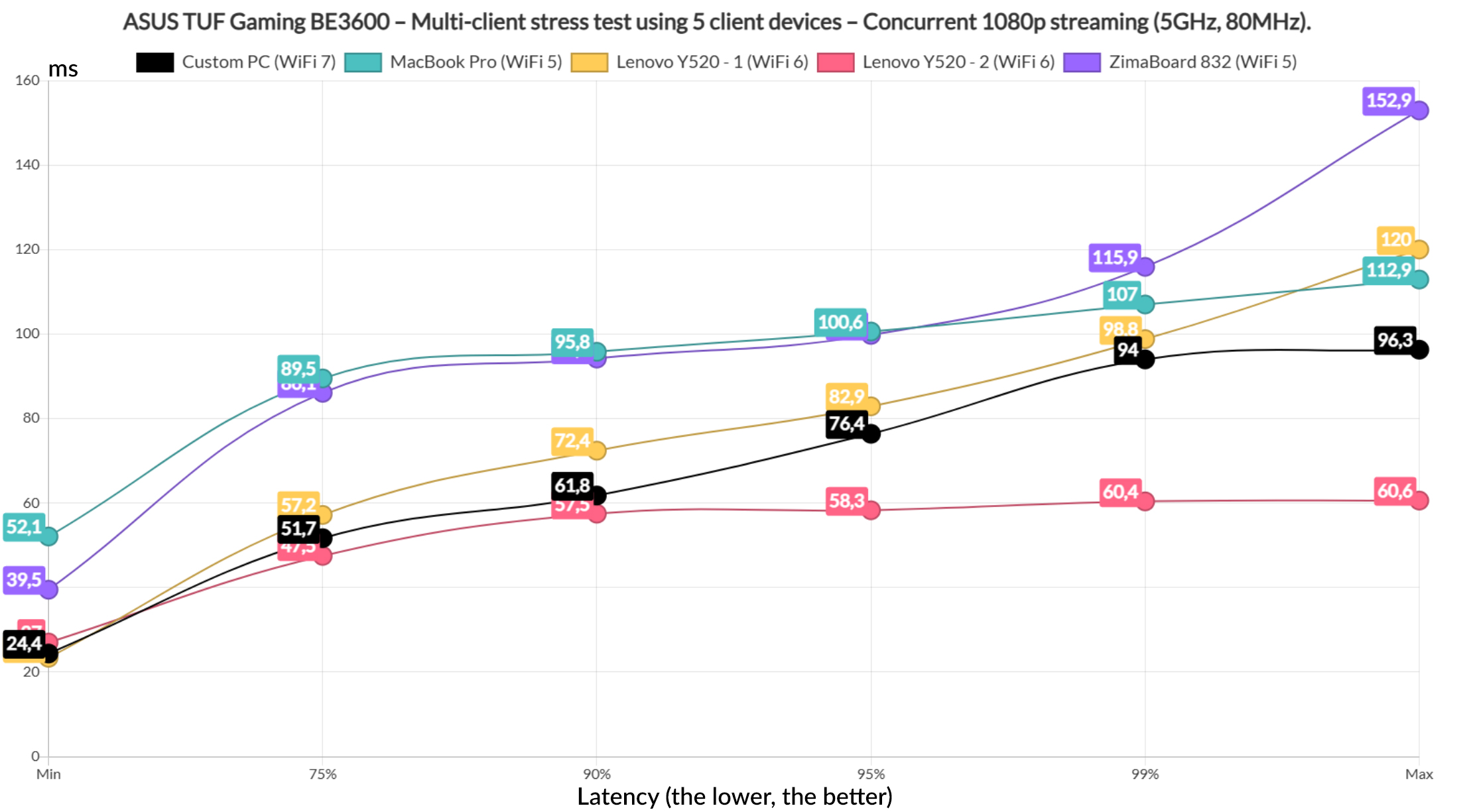
And we see some good things with one WiFi 6 client device which stayed near and below 60ms all the time. This is how it should be. The WiFi 7 client device did well for about 95% of the time and I suppose the second WiFi 6 managed to be decent, even if for less than 90% of the time. The two WiFi 5 clients remained beneath 100ms, but very close to this value for about 90% if the time. It could have been better. But let’s see how the router handled 4K streaming on the same five client devices.
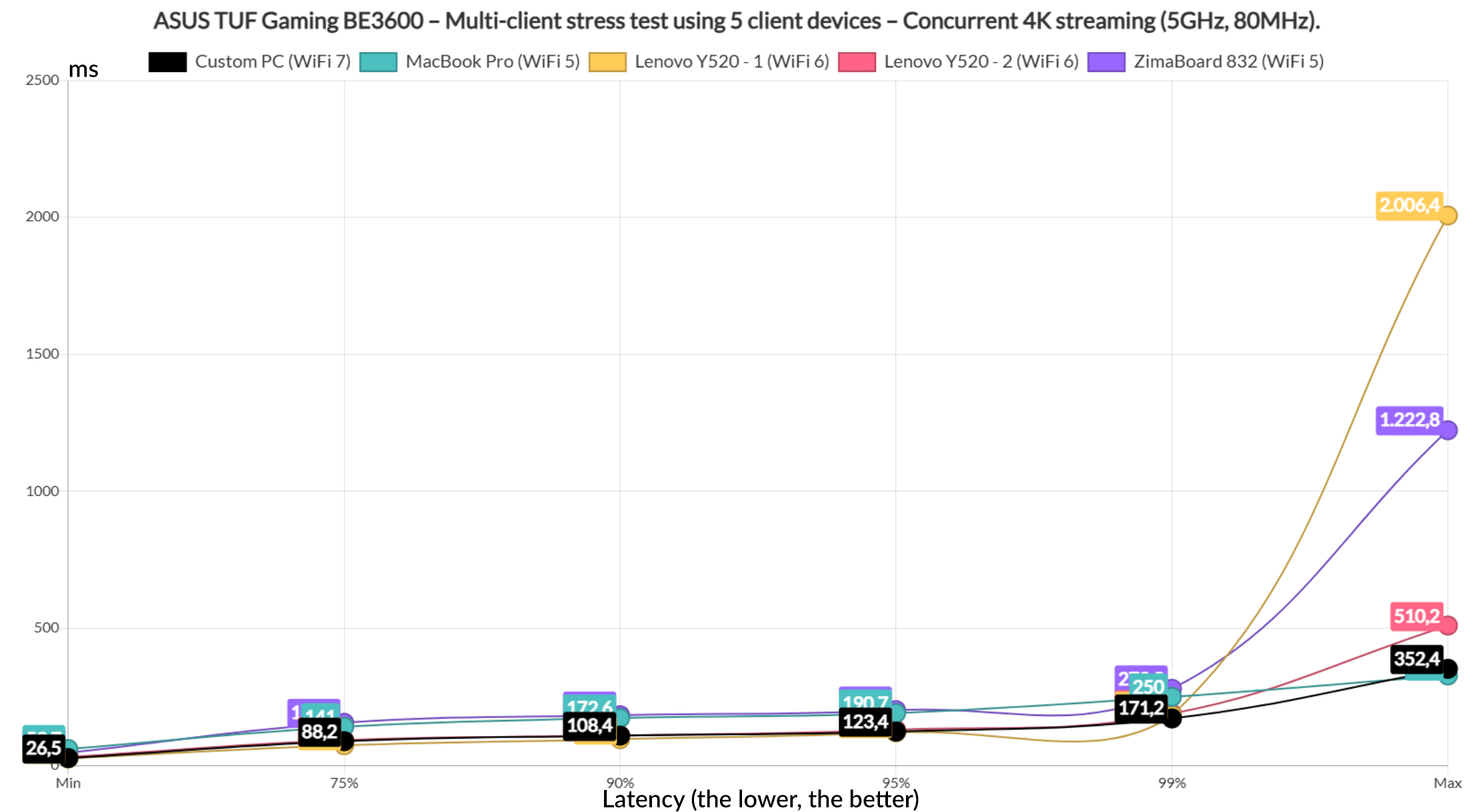
Well now, the two WiFi 6 clients stayed below 100ms for about 90% of the time and the WiFi 7 only wen above this value for 10% of the time. The two WiFi 5 clients didn’t care and showed values above 100ms immediately, so overall, it’s not really an impressive performance. Of course, I had to make it worse, so I included intense browsing on all five clients running alongside the 1080p streaming.
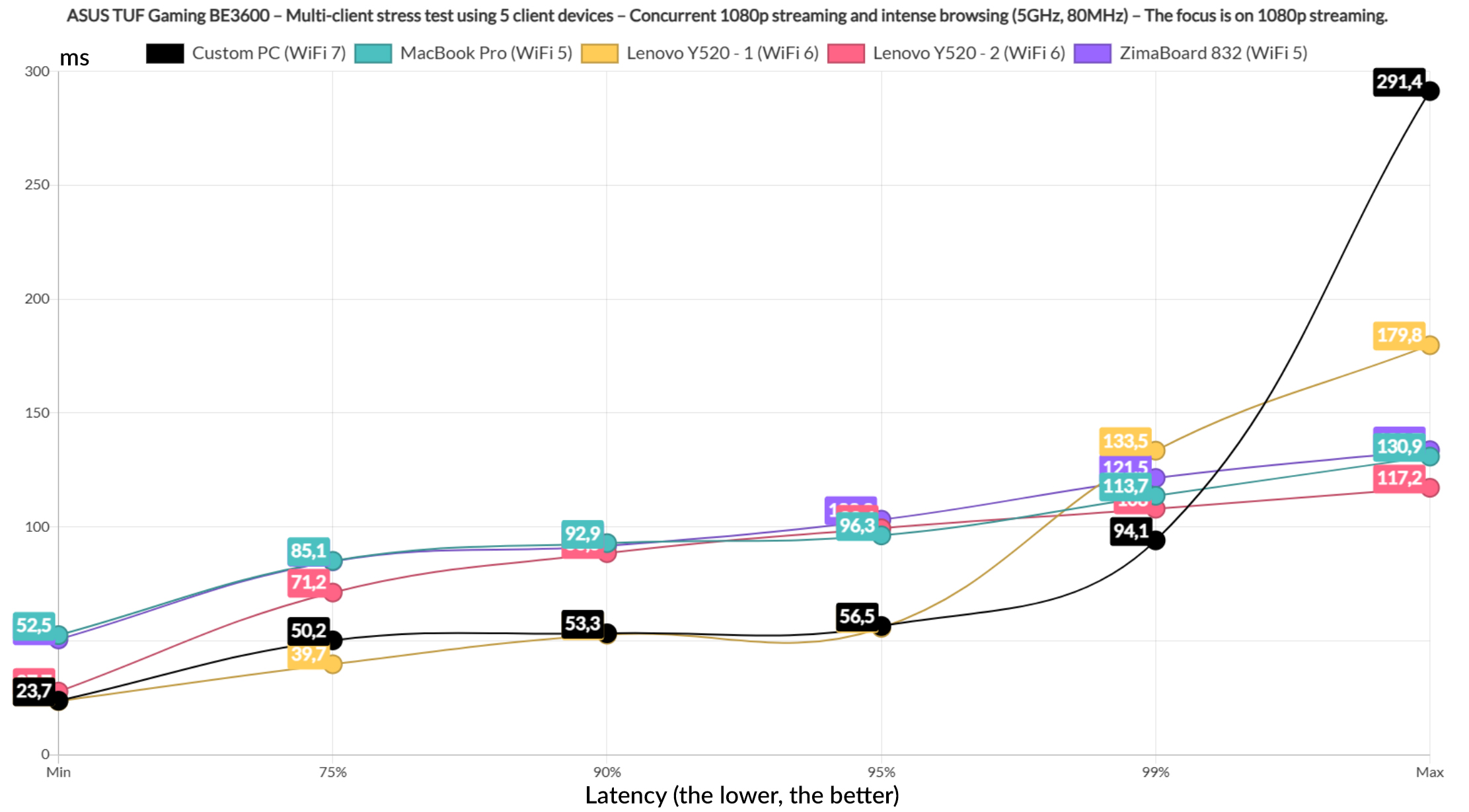
And the WiFi 7, as well as one WiFi 6 client actually held up nicely as you can see, both of them staying below 60ms pretty much all the time. The other gambled their way closer to 100ms which is not really ideal.
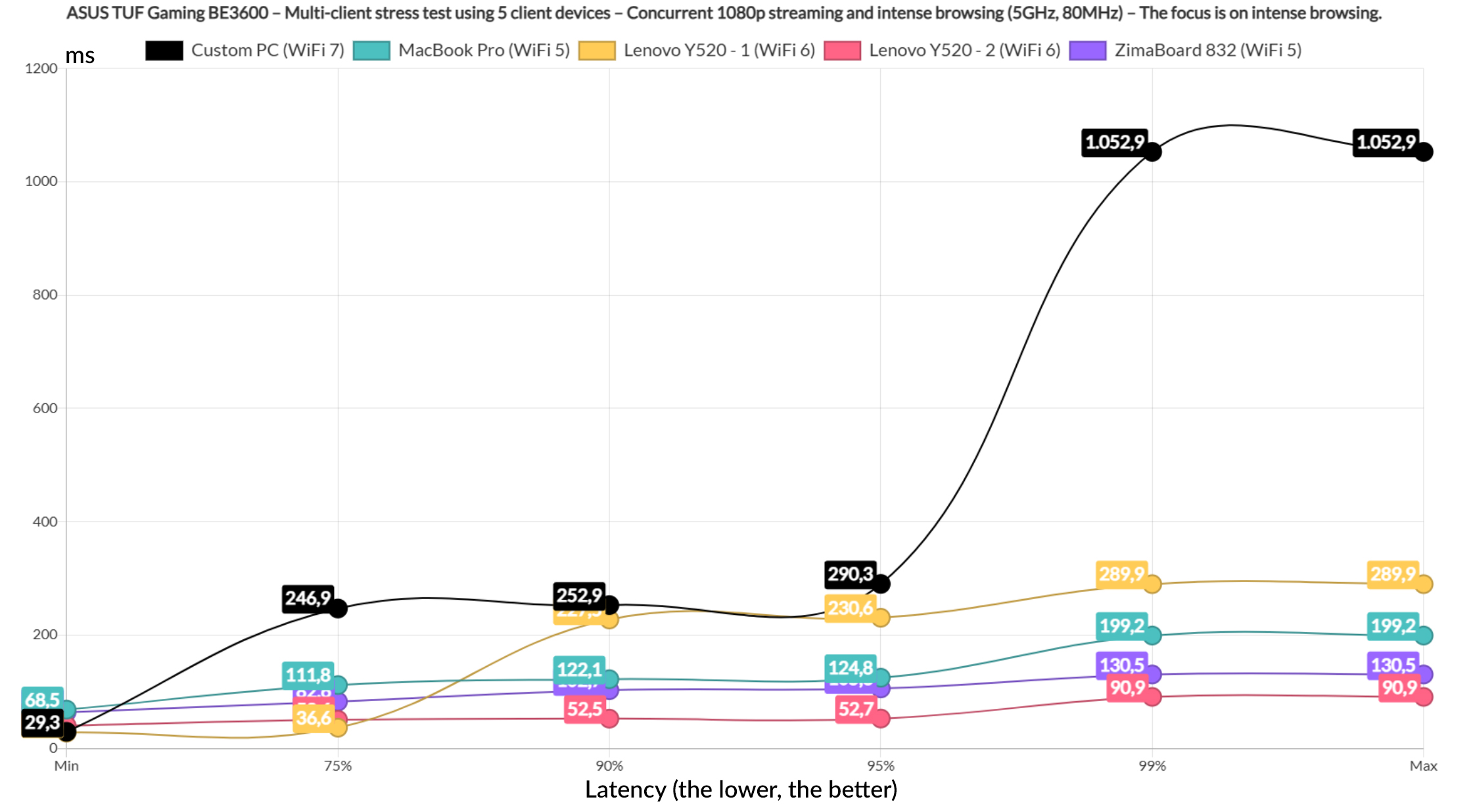
And the intense browsing graphic shows that all five clients remained below 300ms for the entire duration of the test, expect for one that went above 1s but only for 1% of the time, so it’s negligible.
Now let’s see if the intense browsing had a major impact on the 4K streaming latency.
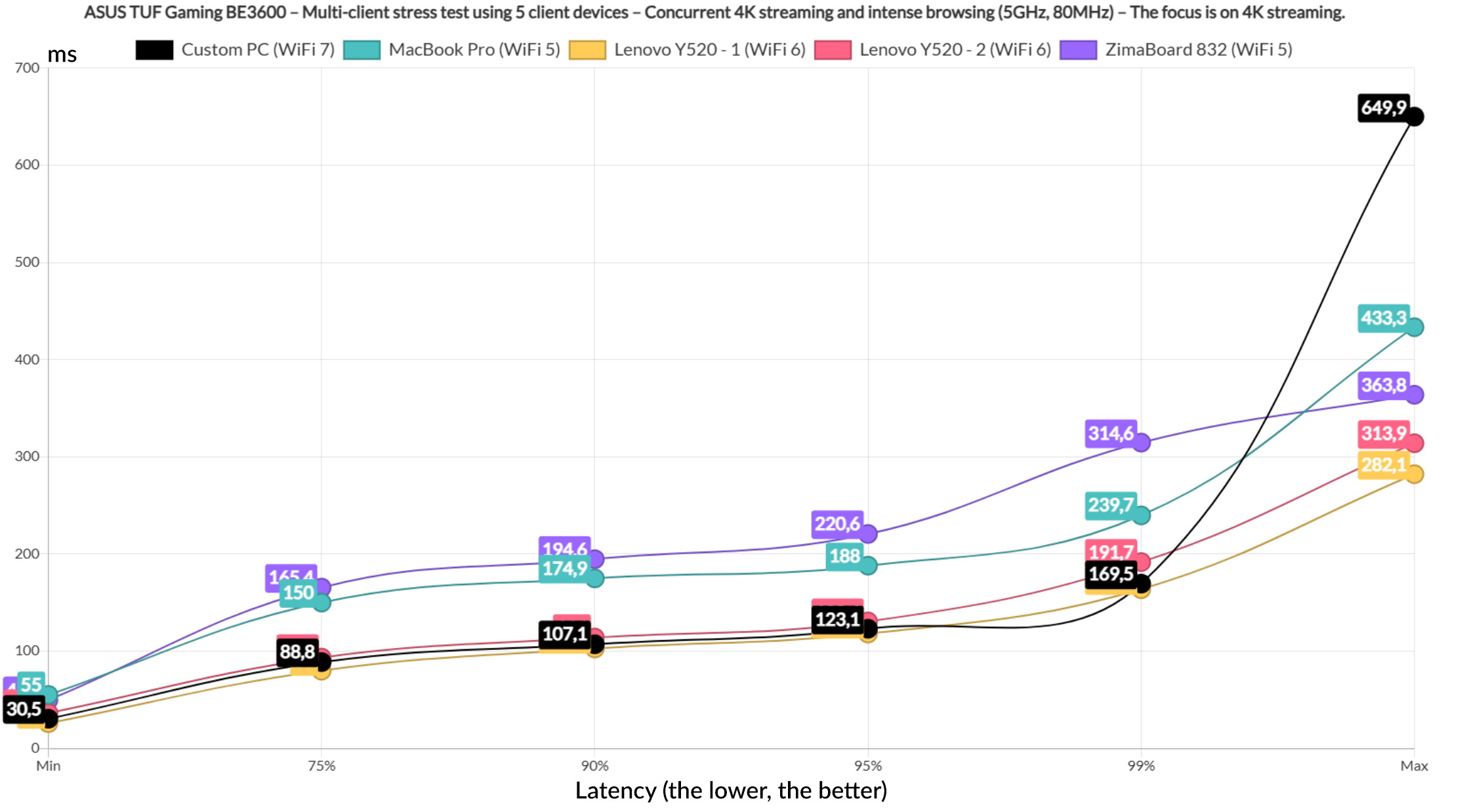
Of course it did since now we get above 100ms almost immediately, with only two clients stayed below this value for 75% of the time. Not good once again. It’s better to add Ethernet cable into the mix. As for the intense browsing, one client did reach 1s for 5% of the time, while the rest stayed within reasonable value limits.
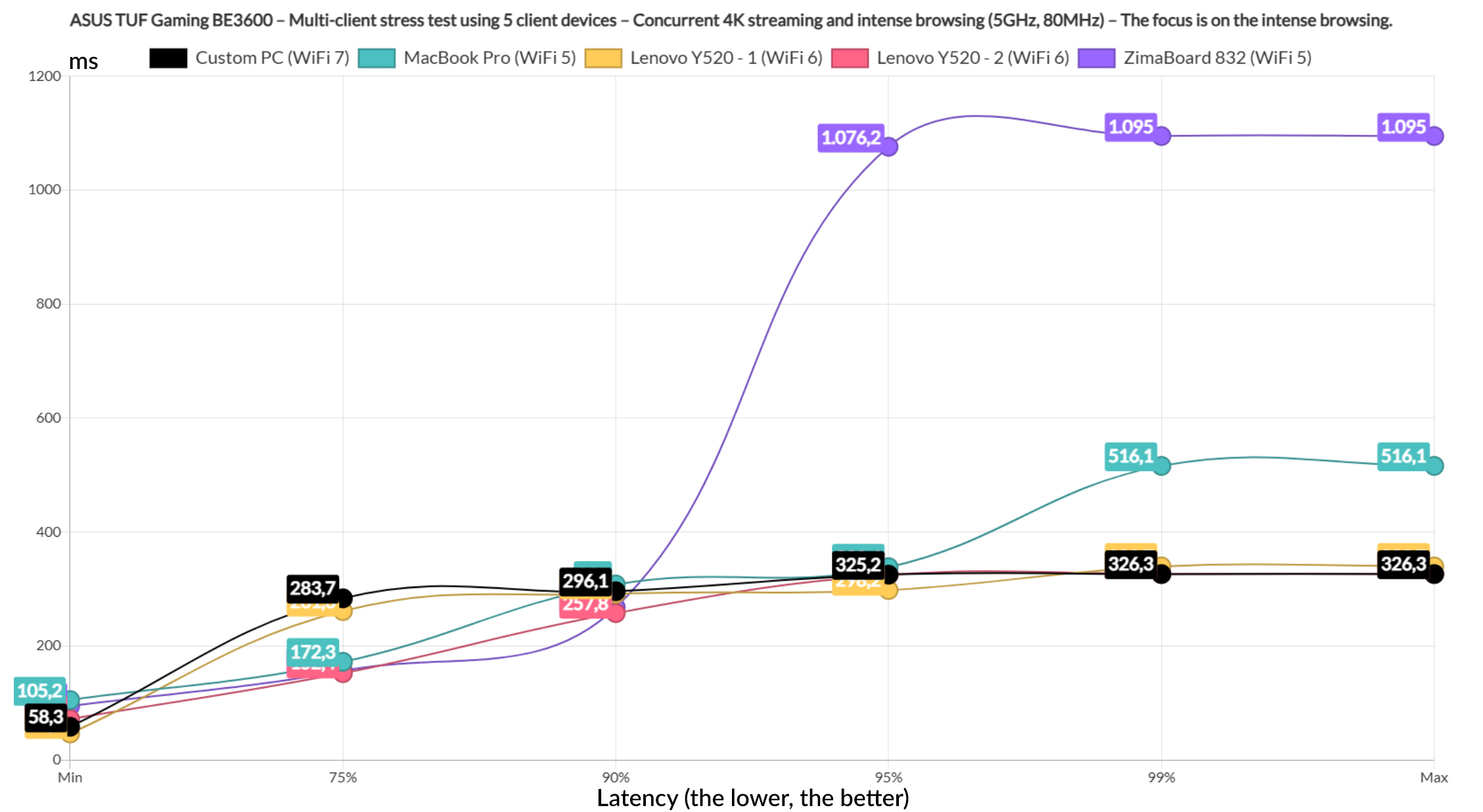
Then again, most people will refresh the page only after 1.5 or even 2 seconds of delay. Now let’s change things up a bit by dedicated two clients for the simulated downloading traffic of a 10MB file continuously, two for the intense browsing and one for the 4K streaming.
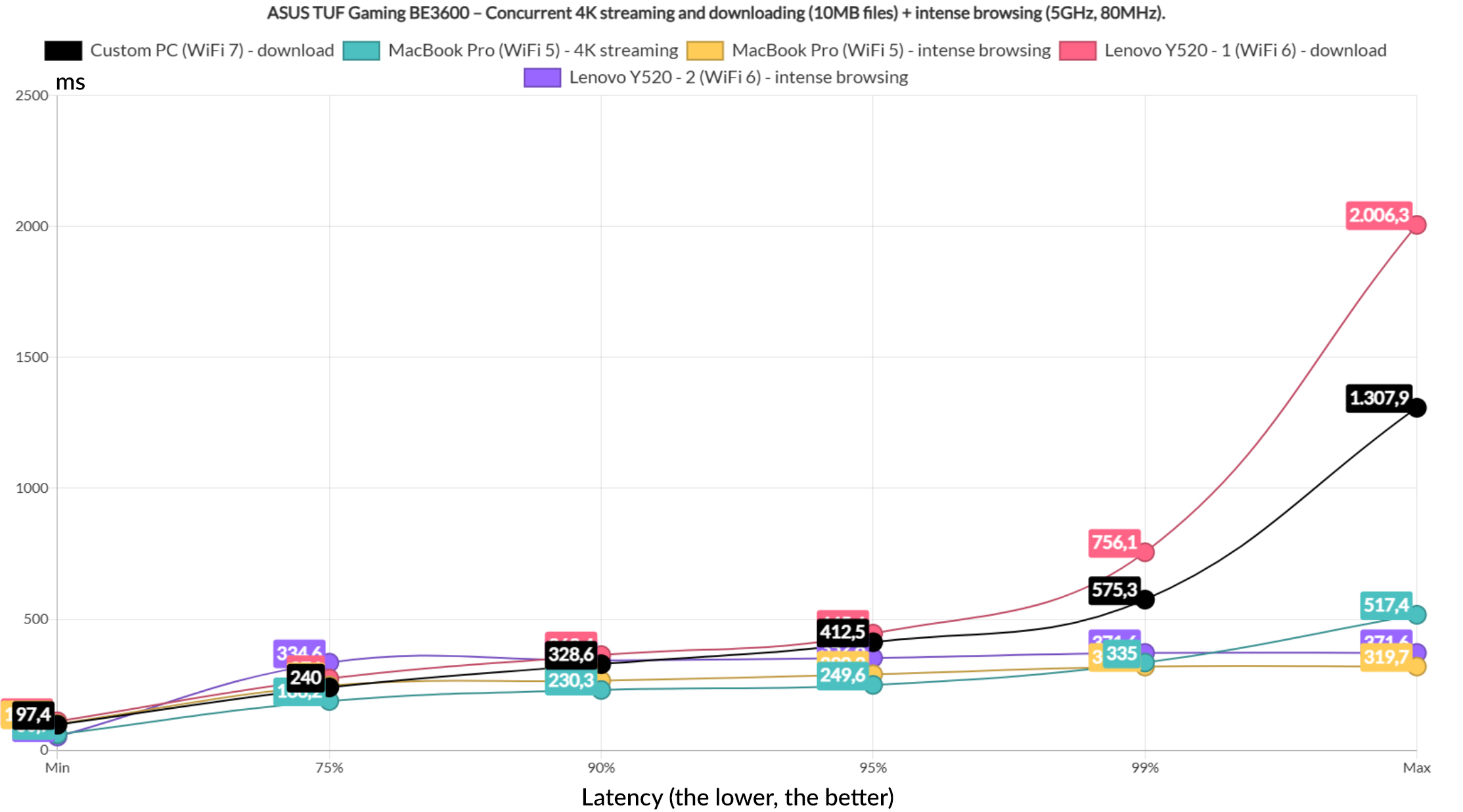
The downloading clients did better than expected, but not good enough for the latency do be deemed reasonable. 200ms is not reasonable. The intense browsing is within the acceptable limits, while the 4K streaming rises above 200ms which is not really good.
The total throughput for the downloading clients was 529.5Mbps. Next, I decided to limit the downloading clients to limit the downloading traffic to one client, while two will handle the 4K streaming and two the intense browsing.
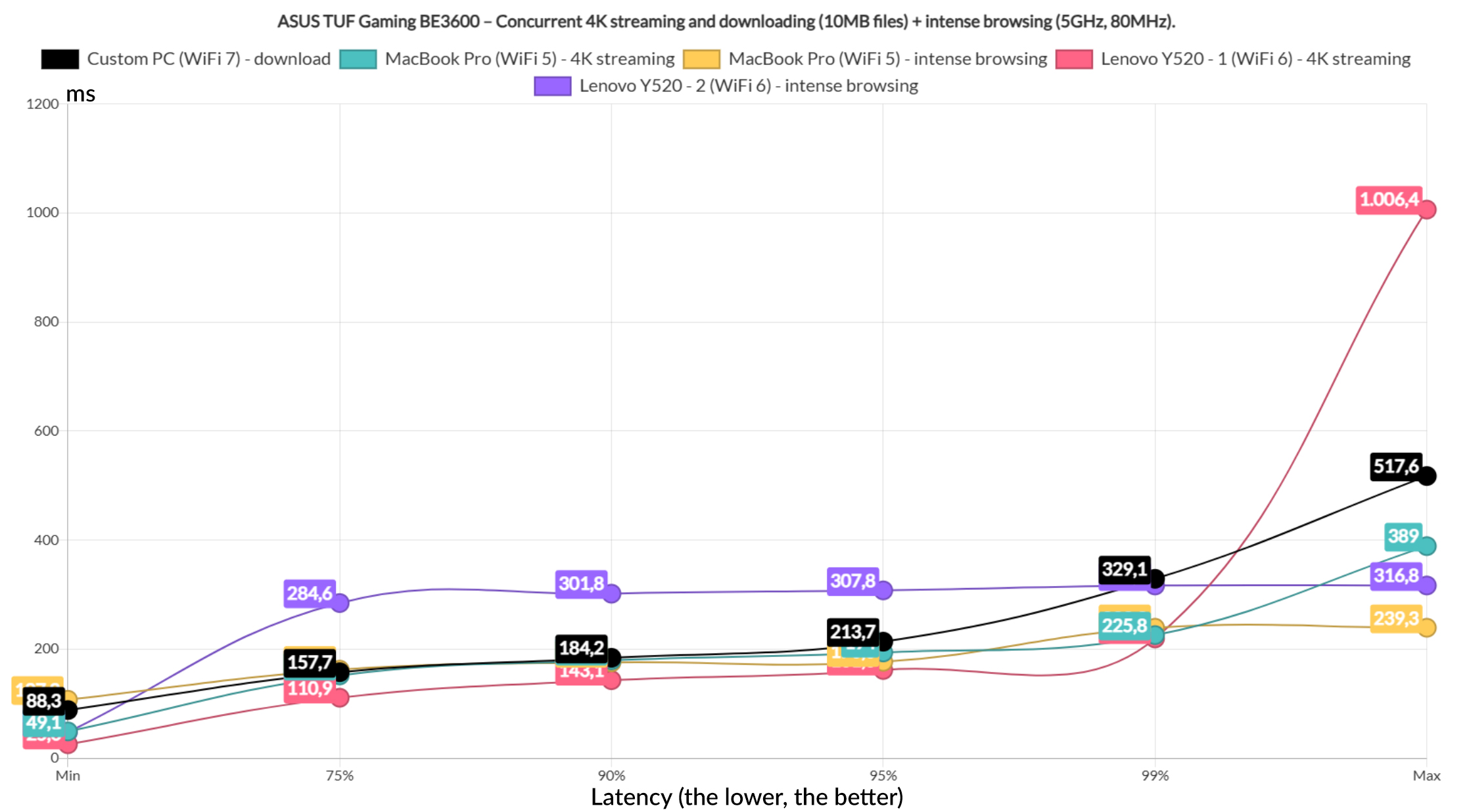
That downloading latency really caught my eye, it’s way better than expected and if you’re not particularly picky, it may even be passable. The 4K streaming latency on the WiFi 6 client was close to 100ms at the 75% mark, but it got higher immediately, while the other 4K streaming client couldn’t really care less to offer a decent performance. The intense browsing clients did good as expected.
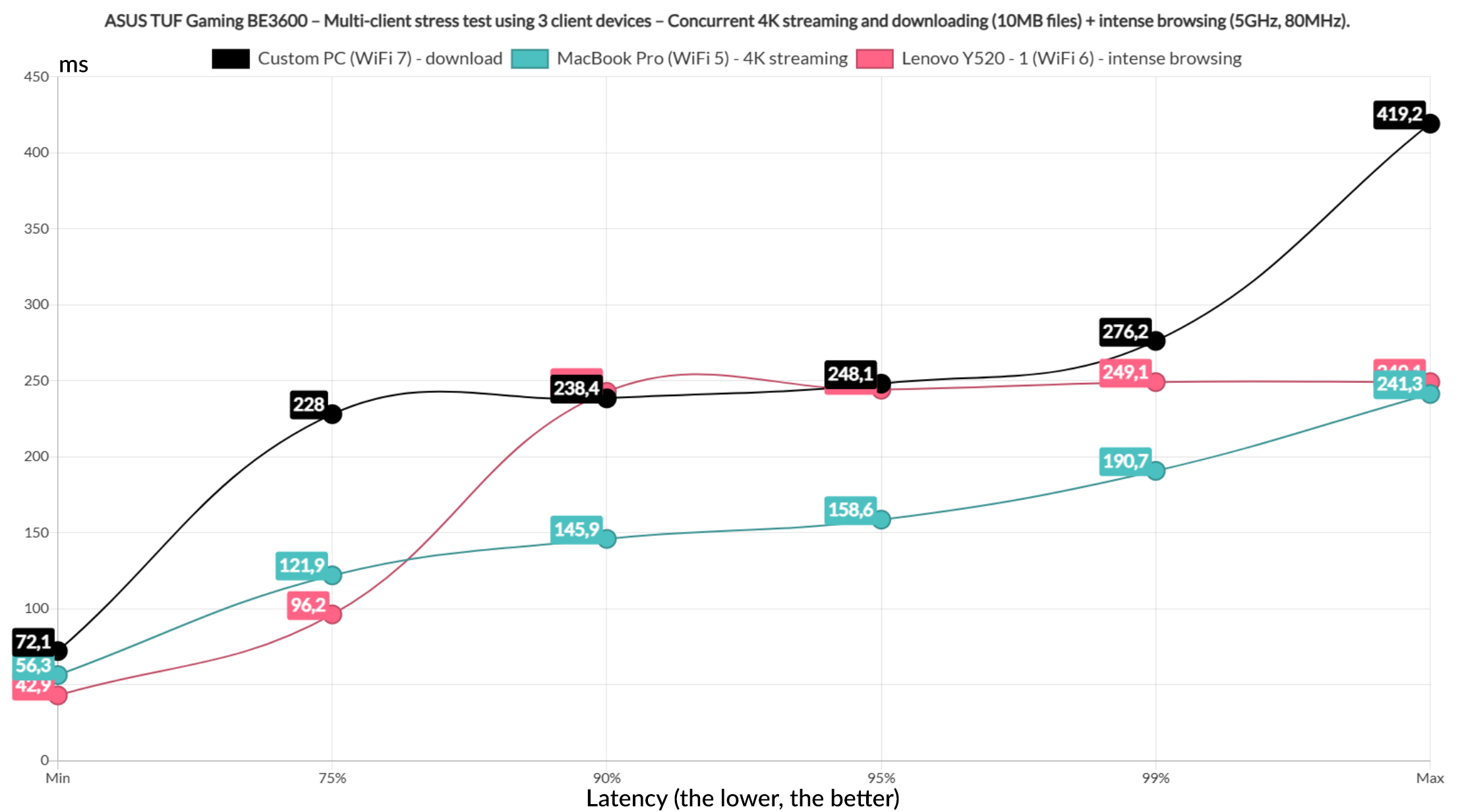
Let’s now limit the number of clients to three, one for the download traffic, one for the 4K streaming and one for the intense browsing. Curiously, the downloading client did worse than before, the 4K streaming client was a disappointment, but the intense traffic latency was decent.
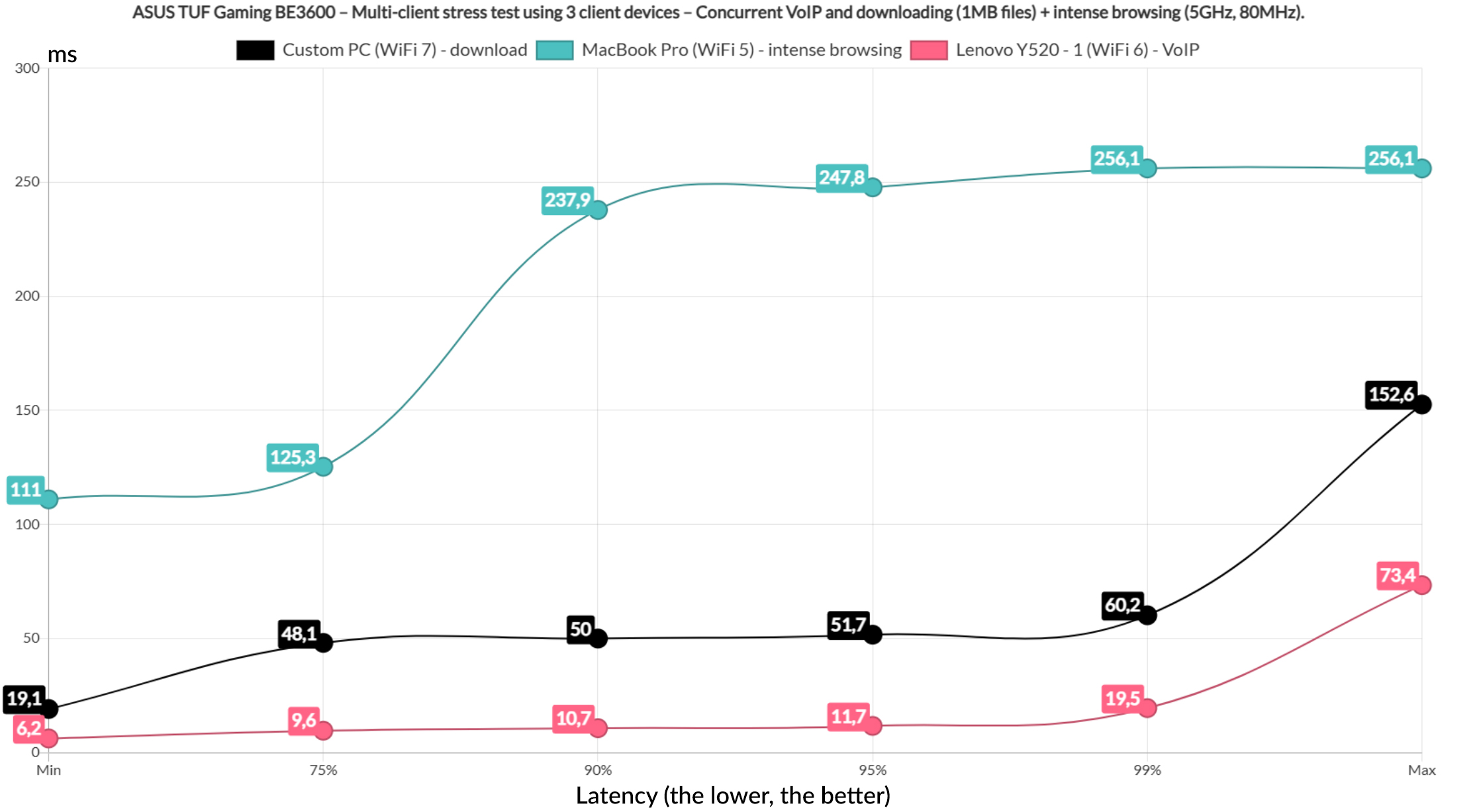
Next, I switched
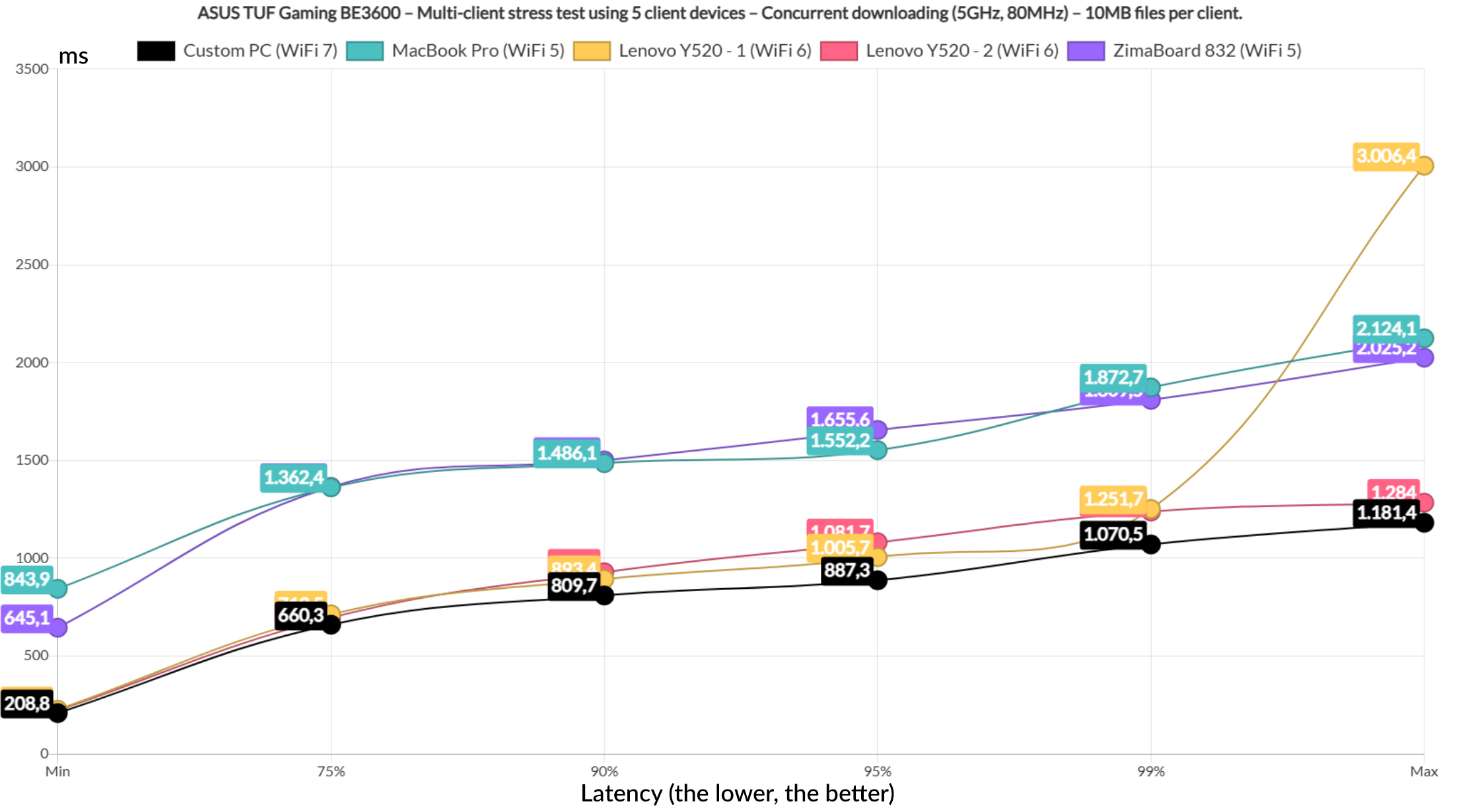
Let’s go lighter by downloading a 1MB file continuously, leaving one client for the intense browsing and one for the VoIP traffic. And all did decently well as you can see from the graphic. The last test involves all five clients and yes, I did run the 10MB downloading simulation on them. The results speak for themselves.
The Multi-Link Operation Tests
The whole reason why the TUF Gaming BE3600 can be called a WiFi 7 router is because it supports MLO and as I mentioned before, there is no 6GHz radio here, so the aggregation happens between the 2.4GHz and the 5GHz radio bands. But there is some good news, as well as some bad ones as well. The good news is that ASUS has made it relatively easy to enable the MLO. The first requirement is to enable the Smart Connect feature which will create a single WiFi network for both bands and then from the Advanced Settings, got to Wireless and choose MLO.
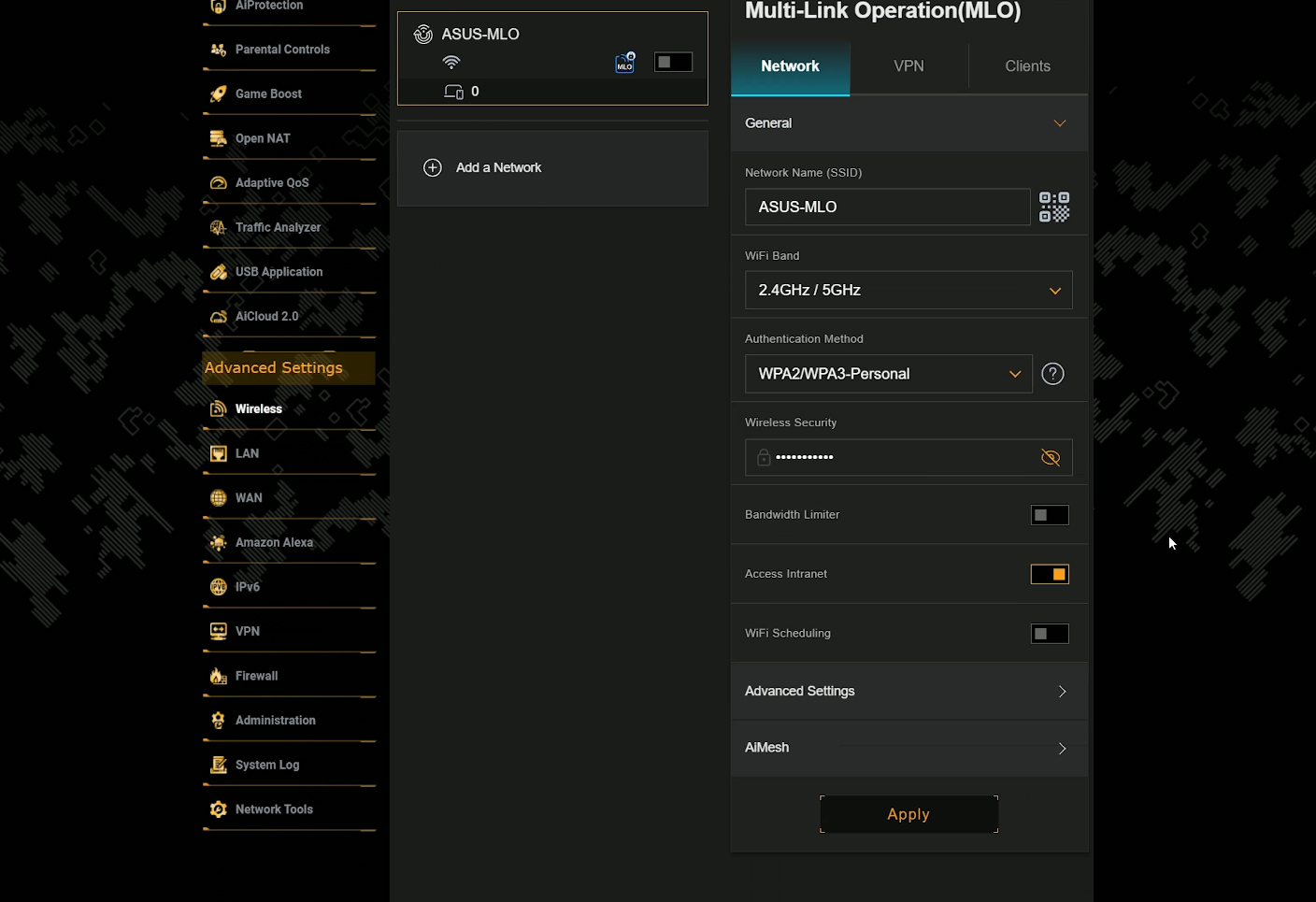
If you don’t see this tab, make sure that the router is updated to the latest firmware. If you do see it, then enable MLO and wait for the router to reboot. As you can see, there are some striking similarities between the VLAN and the Guest Network Pro implementation and the MLO interface layout. There’s nothing wrong with recycling, although it seems that the VLAN is not supported.
In any case, we do need to create a new MLO network and since I had to run some tests here, I made sure that it’s on the same subnet as the main network. You can set it to separate, block its access from the intranet and more. It’s pretty much the same as the Guest Network Pro networks. After that was done, I connected a WiFi 7 client device, used Windows 11 with the still experimental version of the 24h2 update and I could see that the aggregated link was detected.
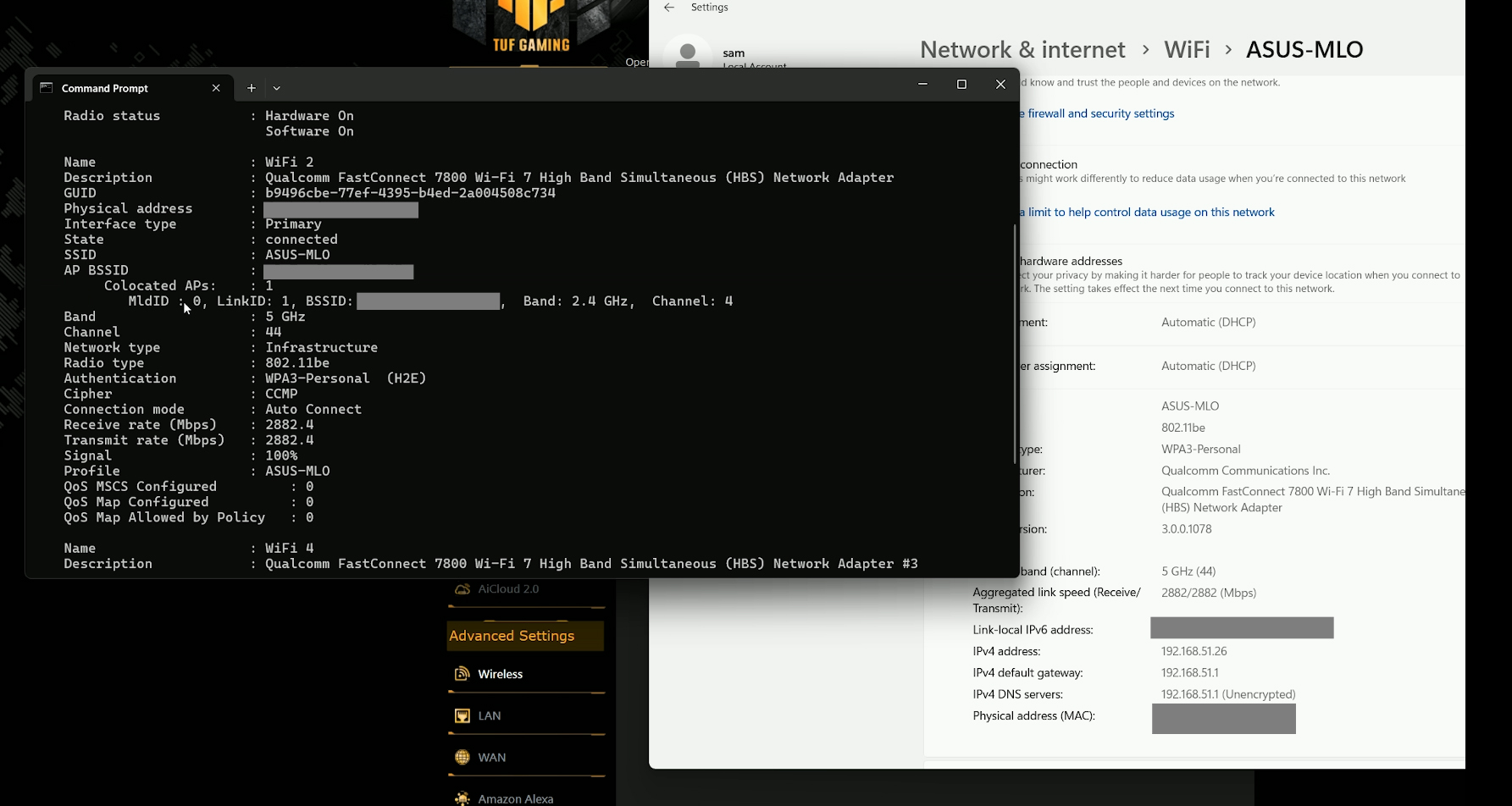
The netsh command confirmed it as well, so I ran some iperf tests. Something was wrong. The throughput was the same as when I used only the 5GHz network. It could be a signal issue, so I used the Vistumbler tool to better understand what’s going on. I could see that there were two MLO networks, one for each radio band, but what settled things for me was when I increased the distance between the client and the server. Immediately after the signal attenuation was higher on the 5GHz radio, Windows saw that I was connected to the 2.4GHz radio only.
And the throughput confirmed as well. This is just Smart Connect it action, no MLO. I also used a Linux computer running the kernel version 6.11-rc6 and using the Intel BE200, I got the same performance, I still cannot test the MLO.
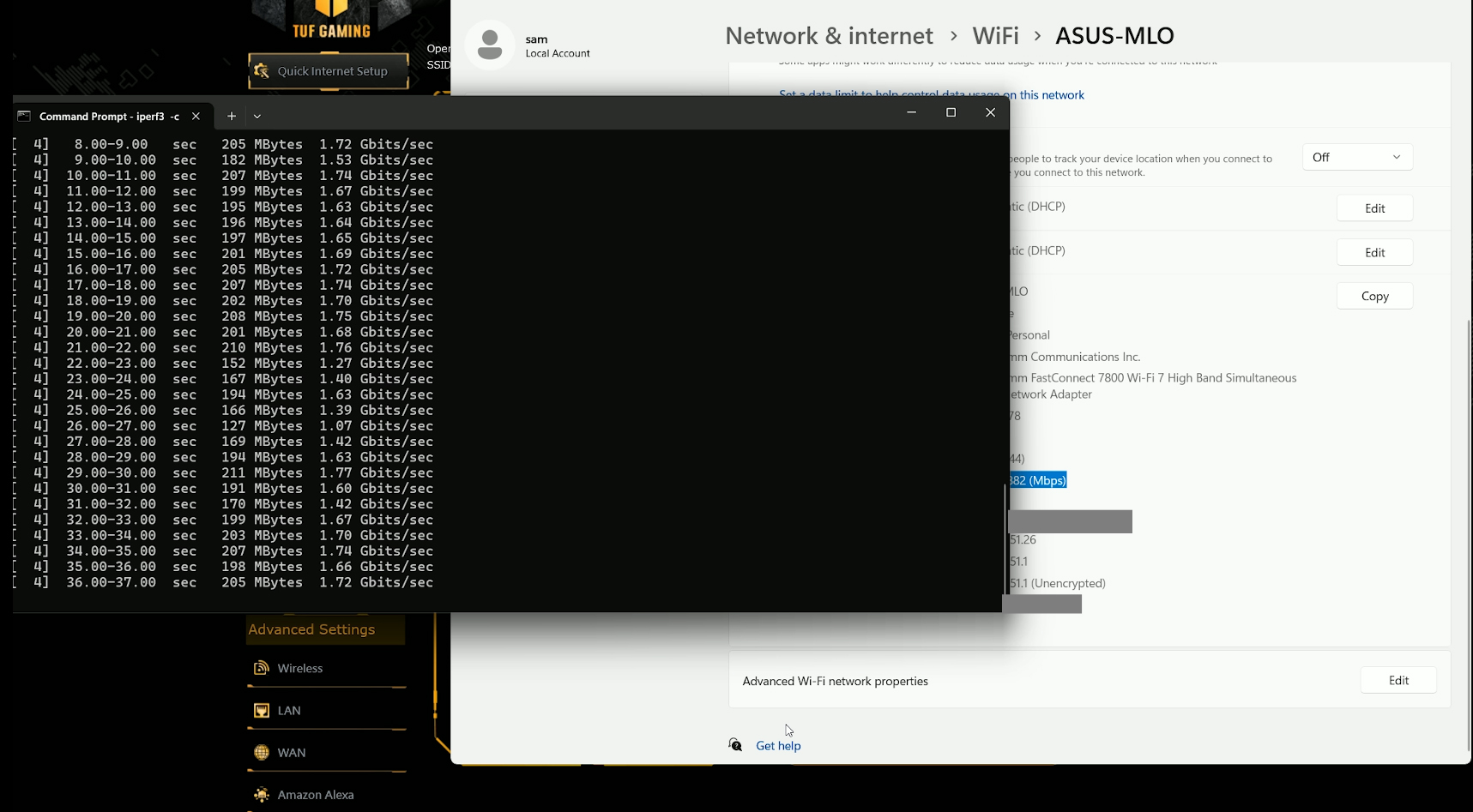
I am fully aware that some other testers can by relying on better equipment, but this is what I got right now and most likely what most of you are stuck with as well. Unless you have thousands of dollars to throw at the latest shinning thing. I will retest the ASUS Gaming TUF BE3600 as soon as the stable update version for both Windows and Linux are released.
Dual WAN Performance
At this point, I usually test the LACP aggregation using a TrueNAS that I built, but the BE3600 does not support it, so I moved straight to the dual WAN. To set it, go to the WAN section and choose Dual WAN. Then enable this function and choose which port will be the Primary WAN and which will be the secondary one. Know that it is possible to use USB dongles as well.
I used the Fail Over mode with failback enabled as well and pinged two hosts at the same time. Then, I disconnected the main WAN connection.
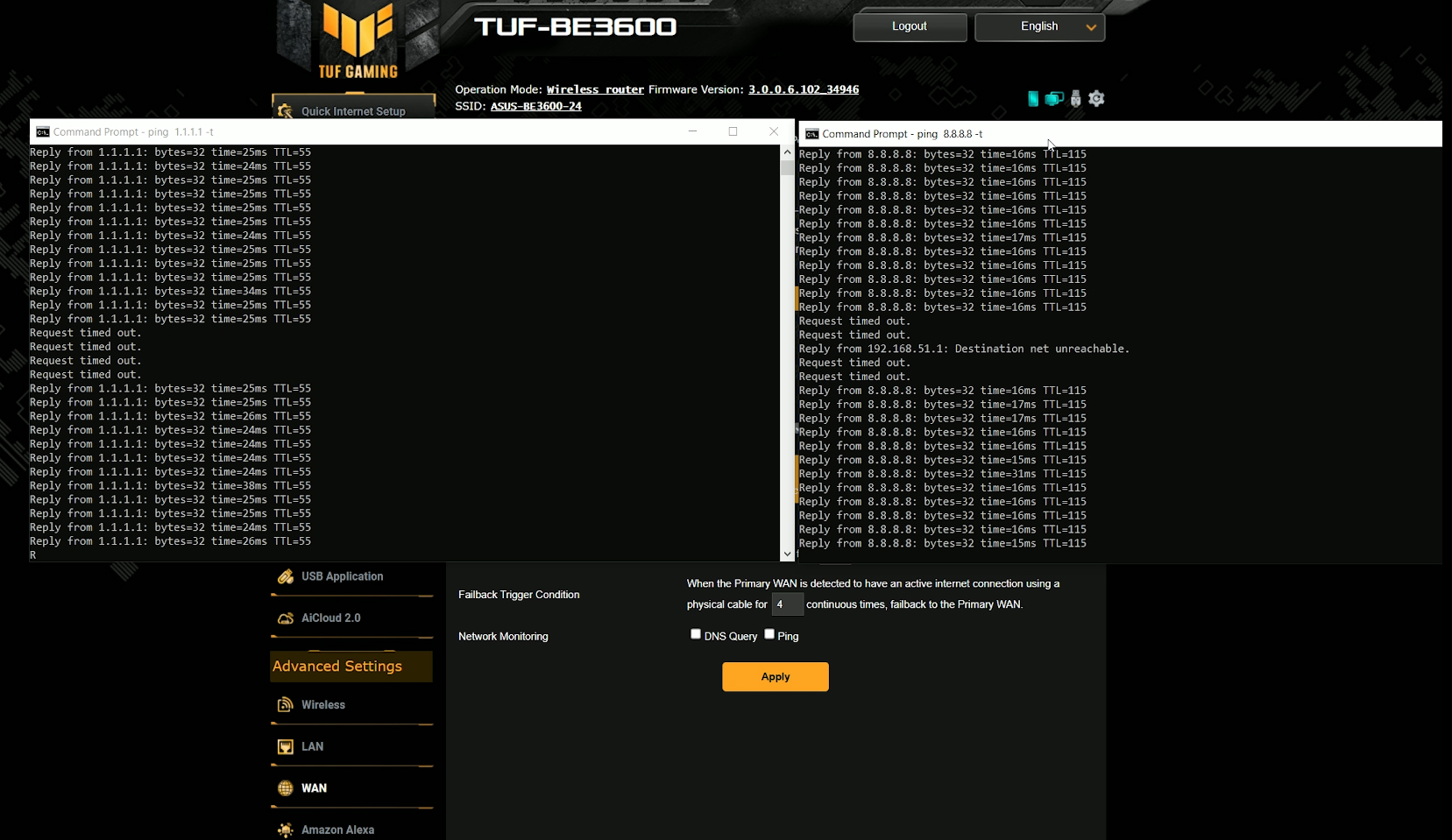
It took quite a bit until the link switched to the secondary WAN, about as long as when I tested the AXE7800. Then, I reconnected the main link and disconnected the secondary WAN cable. It took a lot less to move to the primary WAN, so there is a sort of preference system in place.
The Power Consumption
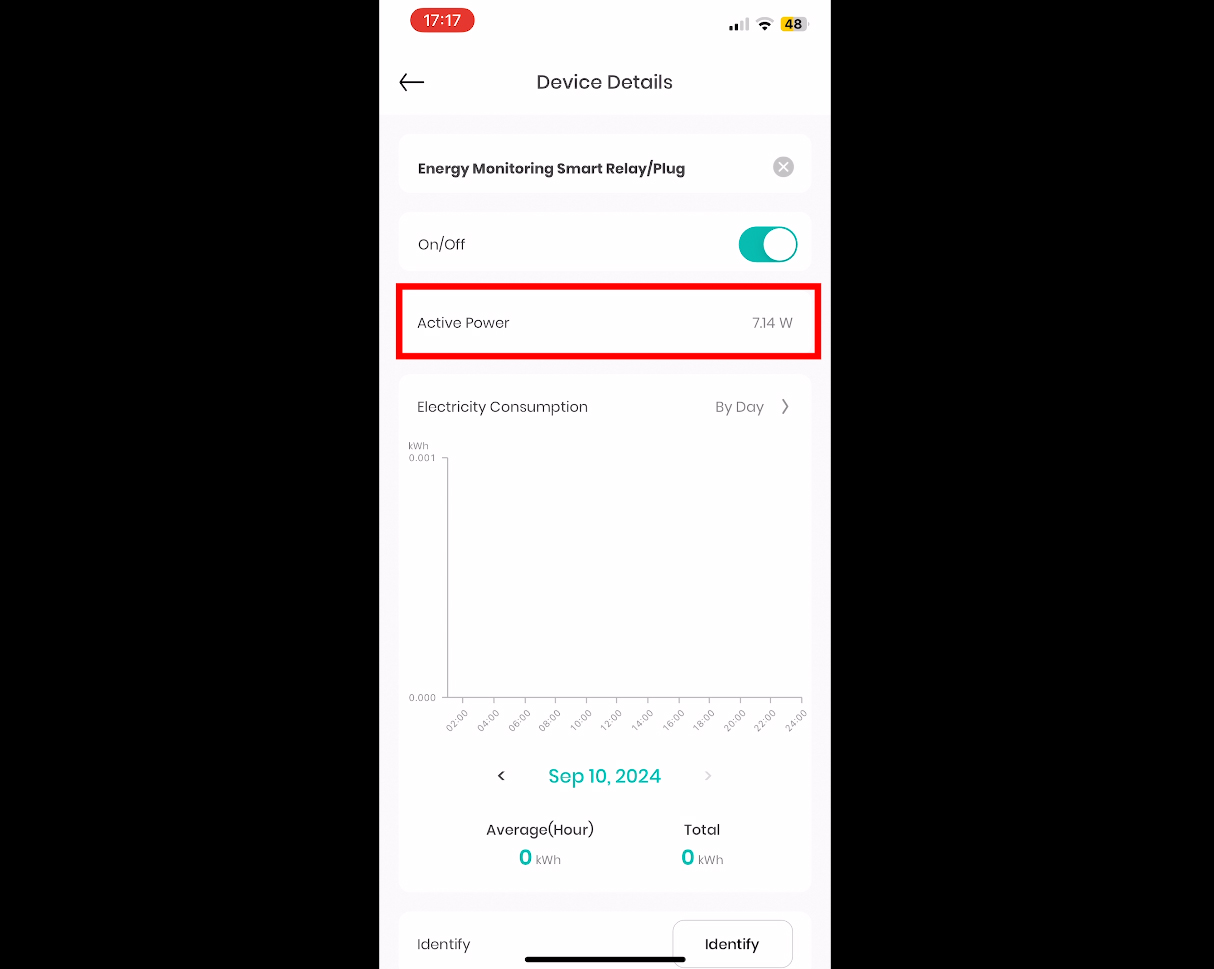
I also wanted to check the power consumption of the router and to do so, I relied on a smart relay from EVVR and you can see from their dedicated app, about what to expect from the BE3600. Know that this value was recorded while the router was functioning normally, not in a higher load than usual.
The Web-based Interface
OK, now let’s talk about the web-based interface. The layout is the same as with other TUF routers, there’s that black and yellow color palette and the settings are again divided into General and Advanced. I noticed that the Guest Network is the same as what ASUS called the Guest Network Pro on other routers.
So we get the option to create networks dedicated to a specific type of application, such as VPN, MLO, IoT and even a Kid-suitable network. I guess the Pro is missing because there is no VLAN to accompany it. The AiProtection remain more or less the same, covering a wide spectrum of prevention and detection systems. All remains powered by Trend Micro and that does include the Parental Controls which require Web and Apps Filters to control what’s being served from the web in your network.
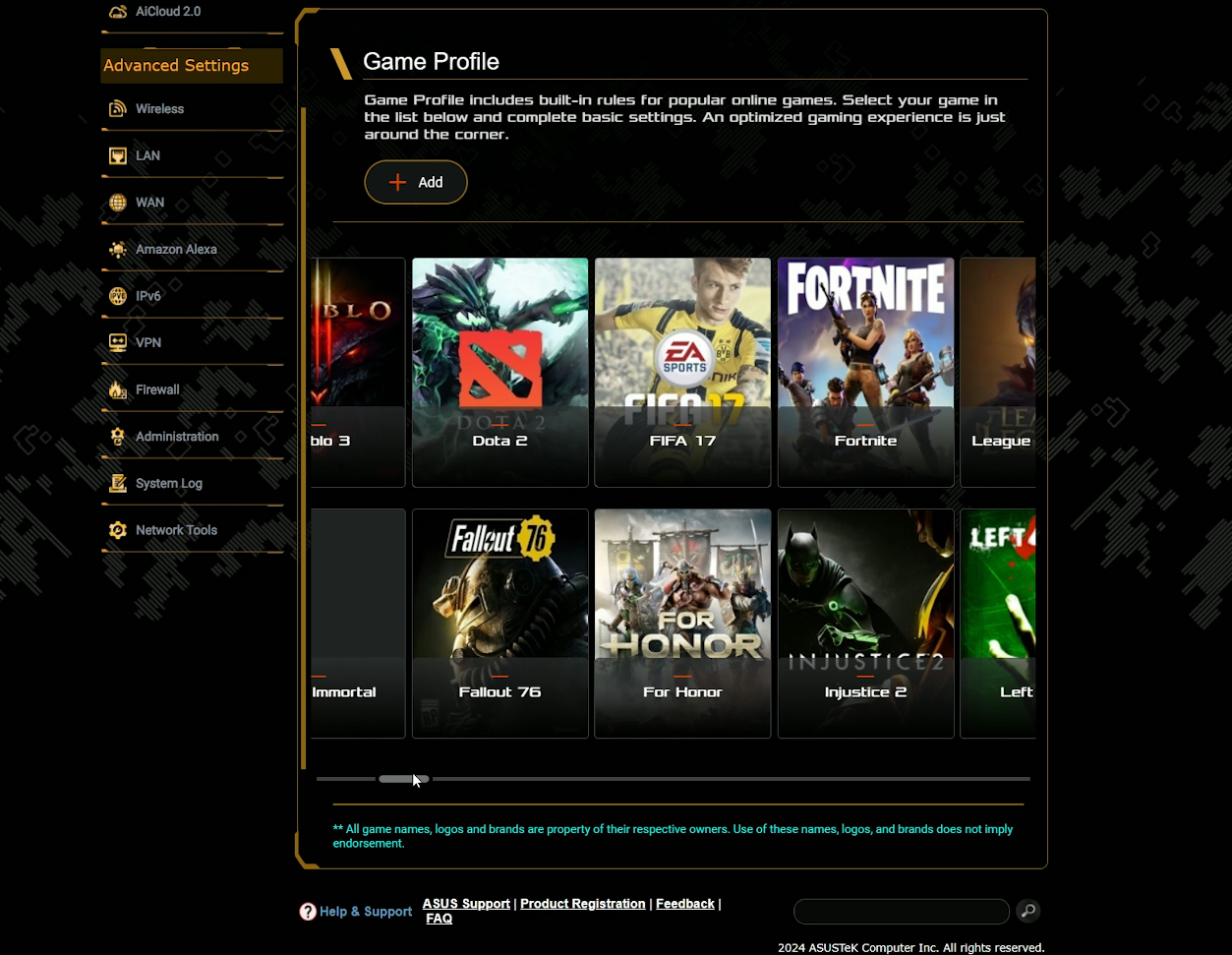
Some gaming features are present here as expected. There’s the Game Boost suite which includes device prioritization, the Mobile Game Mode which is again a form of device prioritization and lastly, we get the Open NAT. We do get a dedicated section for it that includes Game Profiles for specific games, where the router adjusts the prioritization system to favor a better gaming performance.
We get a decent QoS system as well, where we can choose the type of application that will be pushed at the top of the priority list, as well as a fairly comprehensive Traffic Analyzer. The Advanced settings remain just as comprehensive as on other ASUS routers, but we do get the MLO function under Wireless and that’s besides the incredibly in-depth Professional section.
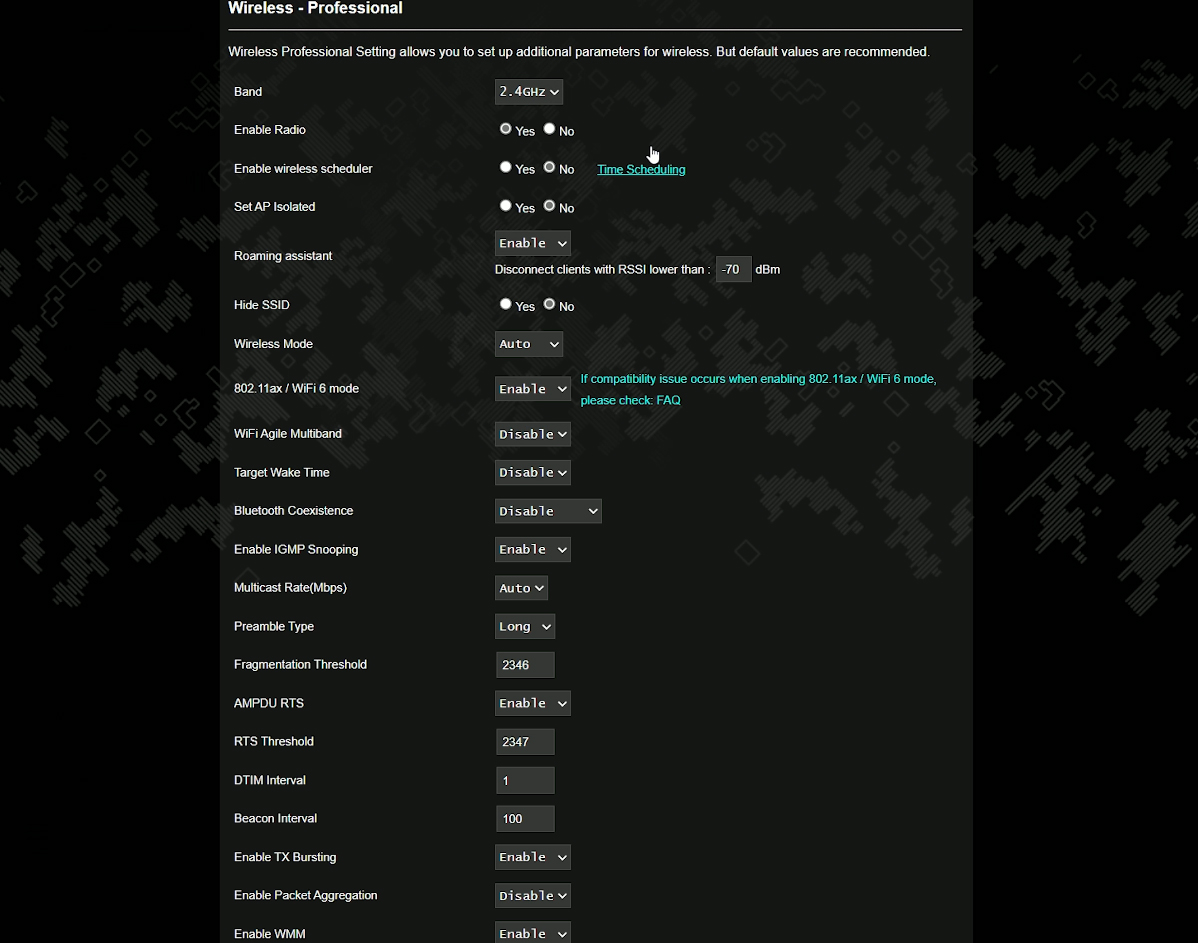
I did mention that the LACP support is gone, but we do get dual WAN which should not be confused with WAN aggregation. And I also saw support for Amazon Alexa which I hope nobody uses.
The Mobile App
There is, of course a mobile app as well. And it’s the same layout as we’re accustomed with, it didn’t receive the ExpertWiFi treatment yet. On the Home page, we get to see some status info which does include data about the AiMesh and you also get a quick link to the Mobile Game Mode. Under Devices, we can make some quick changes to the router and we can also configure the QoS on separate clients.
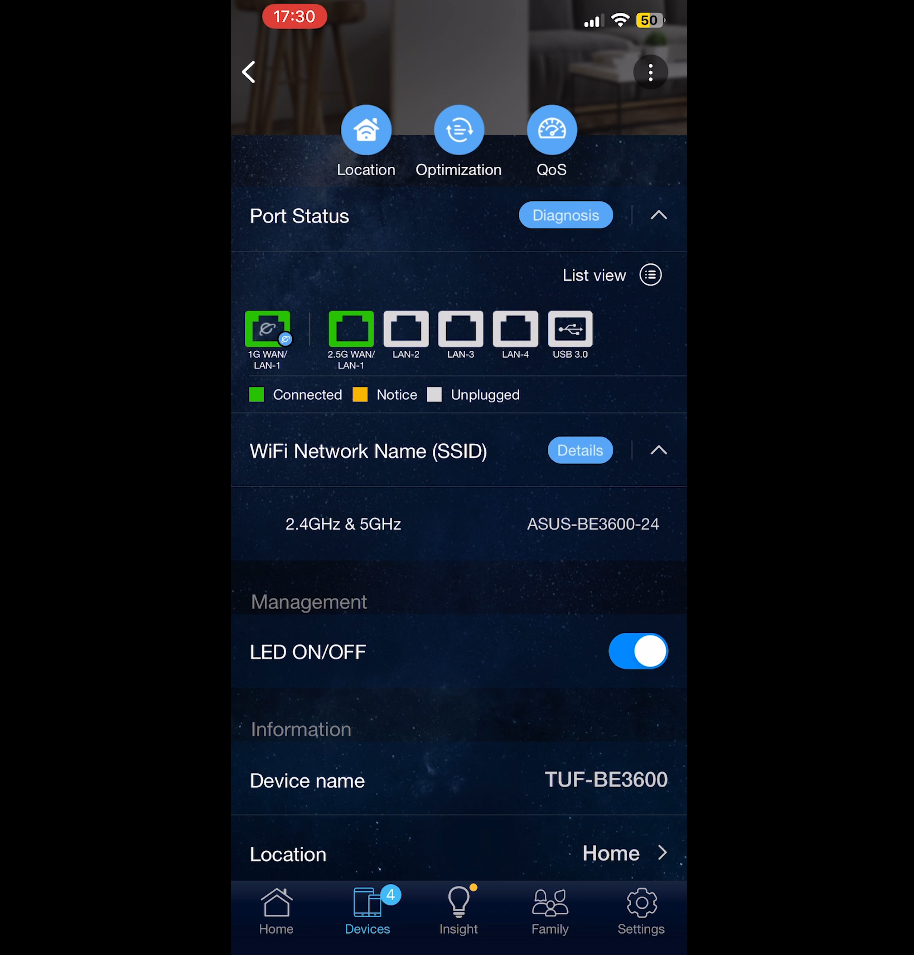
The Family section remains comprehensive enough and under Settings, we get access to the rest of the features. I did not mention the VPN support yet, so know that you can use PPTP, OpenVPN, IPSec and WireGuard, as well as the VPN Fusion and the IPSec-core Instant Guard.
The Conclusion
So, would you get the ASUS TUF Gaming BE3600? If it costs anywhere near or above 300 dollars, then absolutely not. It functions well as a WiFi 6 router, the throughput is good, the latency fairly decent up to a certain point and we do get lots of features. But as a WiFi 7 router, it’s still a bit early for MLO. And I say that it’s the case for the large majority of people. If you have the latest hardware, then you’re set. The problem remains the cost of the router because I have tested the Xiaomi BE7000 a few months back and has a similar approach to what ASUS did with the BE3600. And that router costs less than half, so I’d say wait a bit because I have a feeling that the price will drop very soon to where it should have been from the beginning.

Mark is a graduate in Computer Science, having gathered valuable experience over the years working in IT as a programmer. Mark is also the main tech writer for MBReviews.com, covering not only his passion, the networking devices, but also other cool electronic gadgets that you may find useful for your every day life.