
Originally published: June 12, 2024
Updated: September 4, 2026
I bought the Xiaomi BE7000 recently since it is the cheapest WiFi 7 router on the market right now considering its features and the total available bandwidth, but there is one major catch. Since the version I got was directly from China, there is no support for the 6GHz radio band. Will that change in the future?
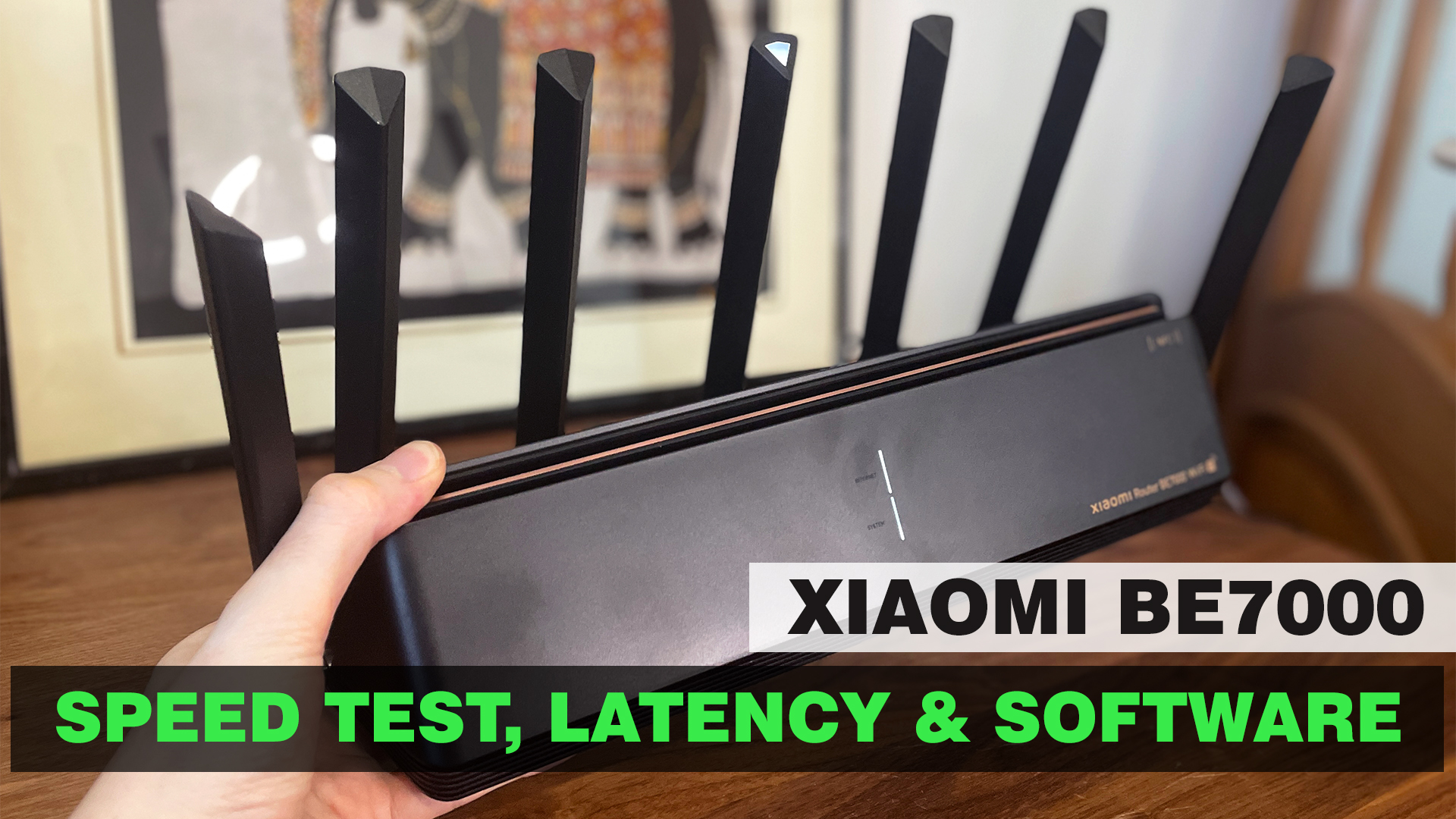
Probably, especially considering that the chipset that Xiaomi used does have the support for it, but unfortunately the manufacturer doesn’t really have a great track record of software update and feature upgrades over the last few years. So, how come it’s called a WiFi 7 router? It’s because it does have some of the other features under the WiFi 7 standard, the 6GHz only being one of them. The Xiaomi BE7000 does support Multi Link Operation and there is support for the 160MHz channel bandwidth, but not for the 320MHz one.
Instead, due to the MLO, we can get a combination of 160+80MHz as demoed by the Qualcomm and Xiaomi presentation last year. Furthermore, there is support for OFDMA, MU-MIMO and lastly, one very important addition is multiple 2.5GbE ports. Indeed, we got four multi-Gigabit ports that can work as either WAN or LAN. So let’s have a closer look at the design of this device since it’s one of the strangest looking routers I have seen so far.
The Design and Build Quality
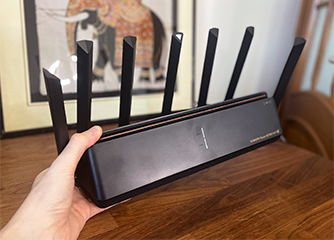
There are seven external antennas surrounding the case and no, they are no removable, but can be adjusted. And there are two extra antennas inside the case, one for the 2.4GHz radio and the other for the NFC. As seen on the case, there is a spot where you can touch your phone and pair the router to the app without having to enter a passkey.
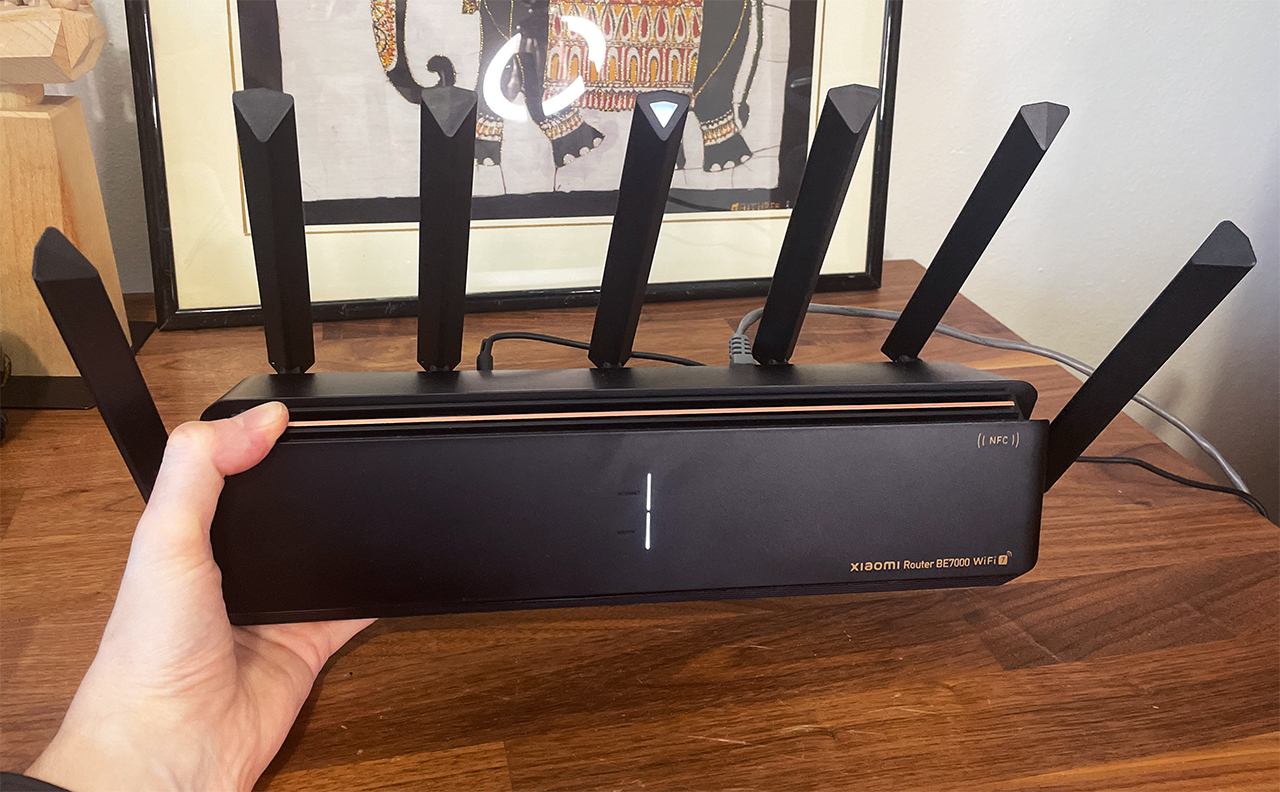
The case is entirely made of plastic and it’s very narrow, but quite lengthy. It’s also taller than most routers I tested, forming a sort of triangular shape. And as we will see in the teardown section, there is little unused space inside, so Xiaomi had to rely on lots of ventilation holes to keep the temperature low. One unfortunate design decision was to not add the option to mount the router on the wall. It sits nicely on the desk, but it’s not a small device, so a couple of mounting holes would have helped a lot.
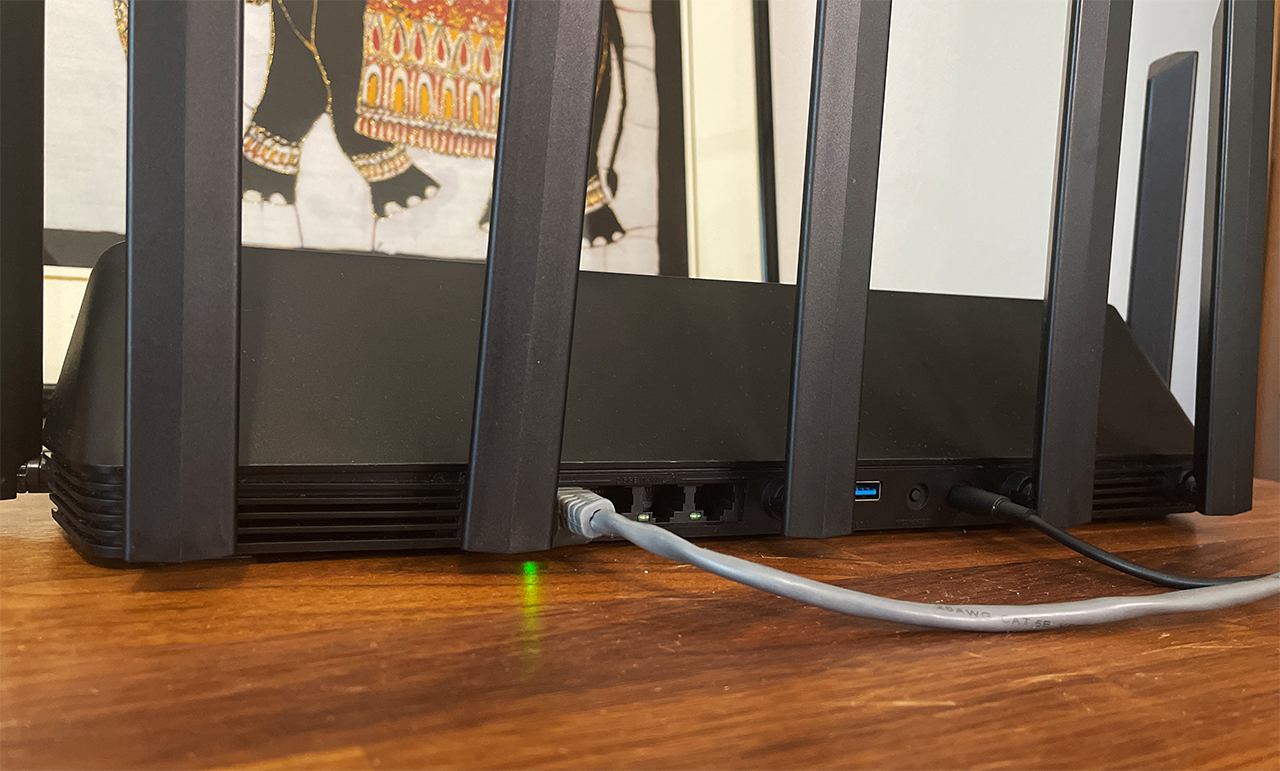
Now let’s talk about the ports. While we usually get four LAN ports and at least one WAN port, the BE7000 offers four ports in total, but I’m not really complaining because all four are 2.5GbE and you can choose whichever you want to function as the WAN port. Furthermore, we get a USB port, a Reset button and a power connector which is proprietary. Alright, cool looking device, but how does it perform? Let’s dive into it.
Wireless Performance and Test Lab
Xiaomi BE7000
Test details
Test year: 2024. Firmware: 1.1.6.
Charts use measurements stored in the MBReviews benchmark database. Stability charts are downsampled for display; the full one-second series remains in the database.
Read the full MBReviews Wi-Fi testing methodology.
Explorer version: 0.21.0.
Since the 6GHz radio is not supported, we’re going to have to test just the 5GHz performance. And I have ran a few single-client tests using both WiFi 5 and WiFi 6 devices. I used the main 5GHz radio, the better one and yes, there is a secondary 5GHz radio which Xiaomi seems to have dedicated for gaming purposes. In any case, the throughput is excellent, reaching close to 2Gbps and this is using WiFi. It goes head-to-head with the TUF-AX4200 and even the better routers from ASUS. Also, there is one place where the BE7000 excels and it’s the range. Additionally, I noticed that the Xiaomi BE7000 reacts much better to interference and pierces farther than other router, so at 70 feet, I saw -77dB, when it’s usually way more than -80dB.
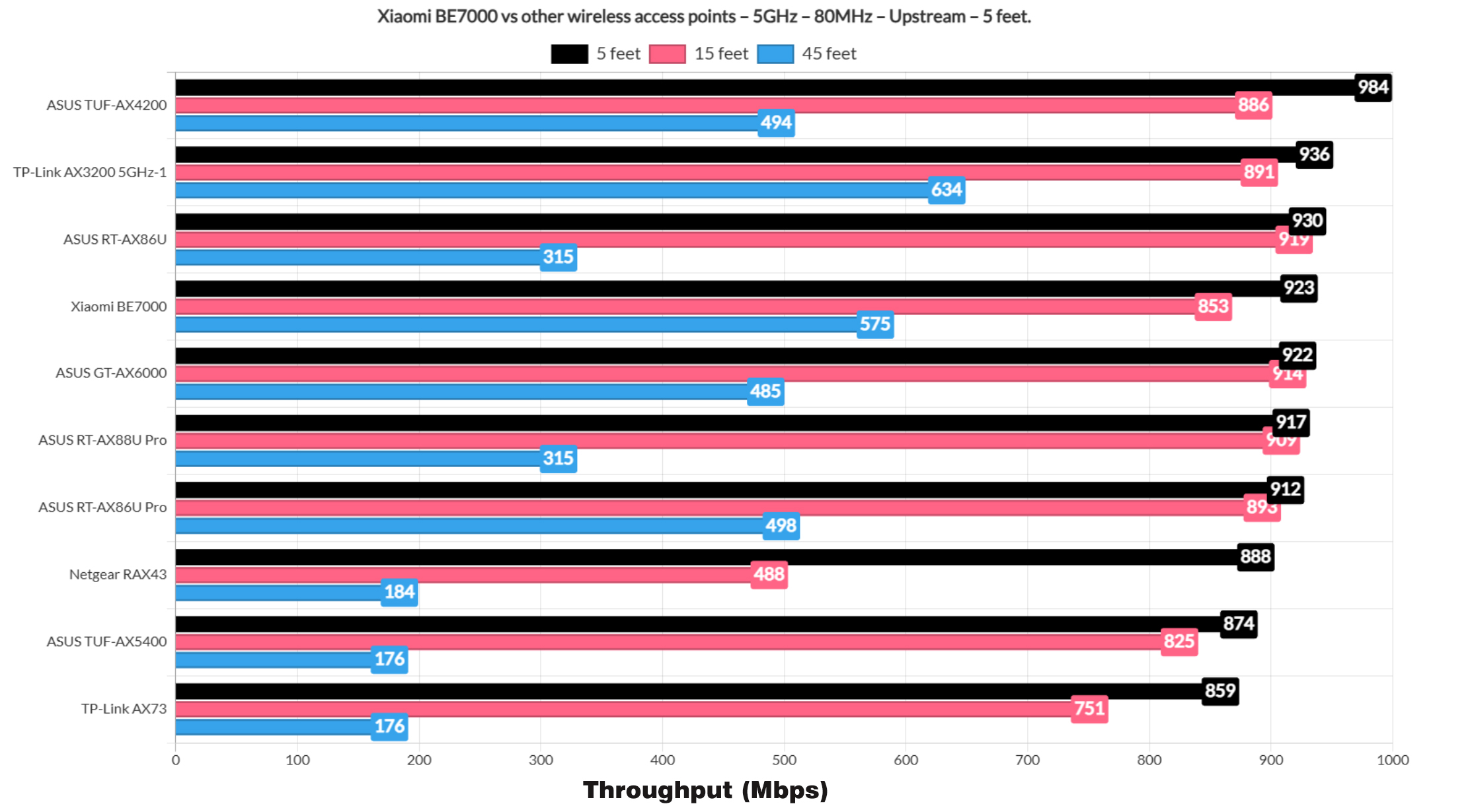
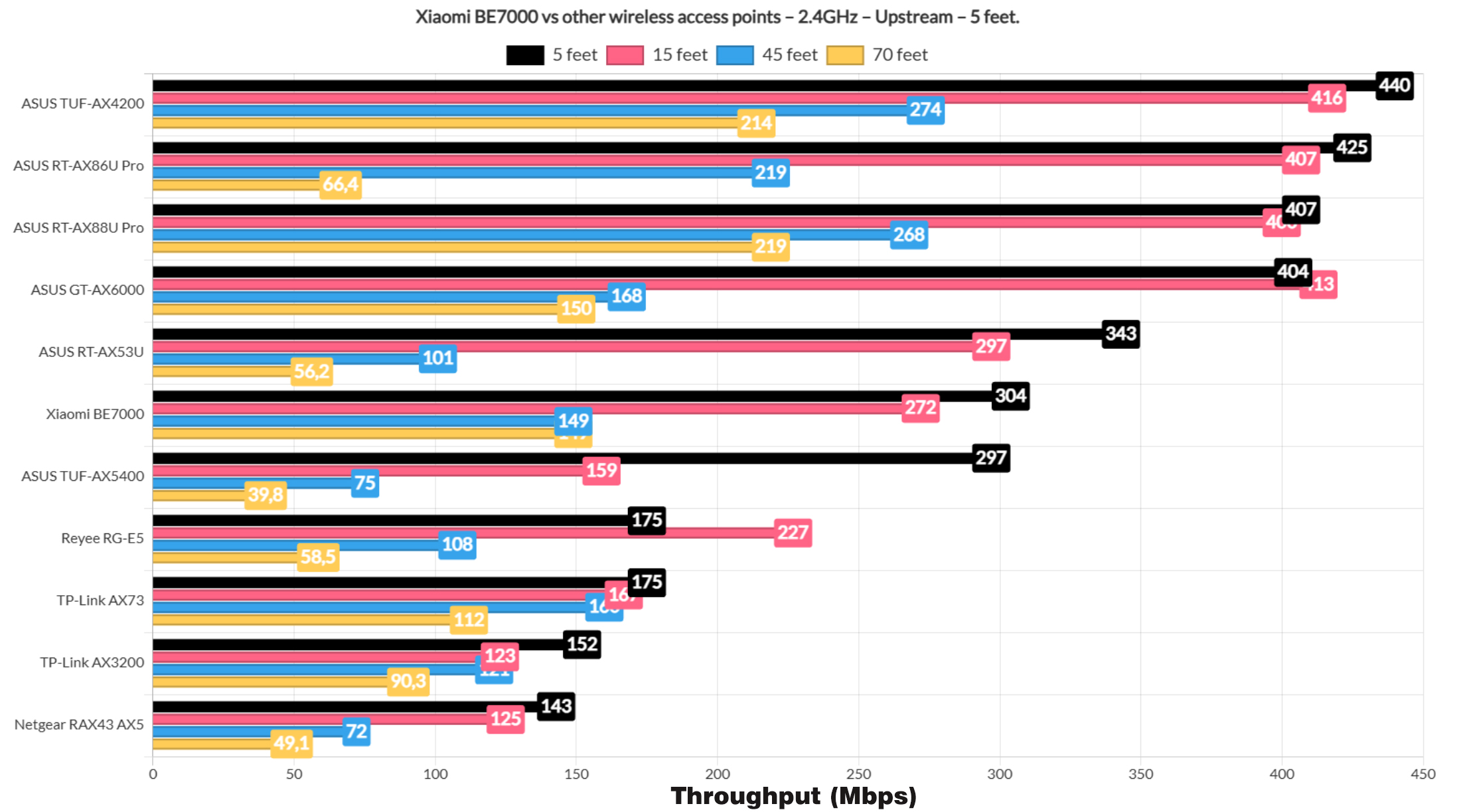
As for the 2.4GHz single-client performance, since Xiaomi allowed me to choose the channel bandwidth, I selected the 40MHz one. And the throughput is good, better than expected really.
For the multi-client tests, I again used the same net-hydra tools developed by Mr Jim Salter with five wireless clients and a wired server, combining streaming, browsing, downloading and VoIP workloads.
With 1080p streams on 5 client devices, we can see the WiFi 6 and 6E clients performing better than the WiFi 5 ones, something that got more obvious when I switched to 4K streaming. The WiFi 5 clients jump immediately above 100ms.
Adding intense browsing alongside the streams pushed the streaming clients even farther away from reasonable latency, although the browsing clients did well. The download traffic was where things got curious. With two uncapped downloads running alongside 4K streams and browsing, the BE7000 produced one of the better heavy-load results I’ve measured from a router so far
Reducing the workload to one downloading client and just three active clients improved the responsivness even more. The lighter combo of repeated 1MB downloads, browsing and VoIP was handled particularly well. Anyway, the full client-by-client latency distributions and throughout results are available in the Test Lab above.
The MLO Performance
I admit that I had some trouble testing MLO with other Wifi 7 devices and it’s little I can do except wait until Linux and Windows 11 do add support to it and the adapter firmware follows suit. But this time, I had enough waiting and decided to go with the experimental update for Windows 11, the one which supposedly has included support MLO. And it actually does support it because I could check it using a shell command.

First, I only used the main 5GHz radio and the throughput is impressive not doubt about it. Then, I enabled MLO on the router which involves enabling the third radio as well and then aggregating the three bands together. I checked using console and yes, the two 5GHz radio bands were indeed aggregated. But then after running the same iperf test, I got a worse performance than before. I will shift the blame on Microsoft since the update is still not actually done and I am sure that using those expensive WiFi 7 phones, I could see a far better performance. But this is the only equipment I have available right now.
Dual-WAN Performance
Just like most ASUS routers, the Xiaomi BE7000 does have support for dual-WAN and it’s fairly simple to set up. Connect the cable to the port you want and then from the Advanced settings, choose the port for the secondary link. As usual, I pinged two sites and disconnected the main Internet cable.
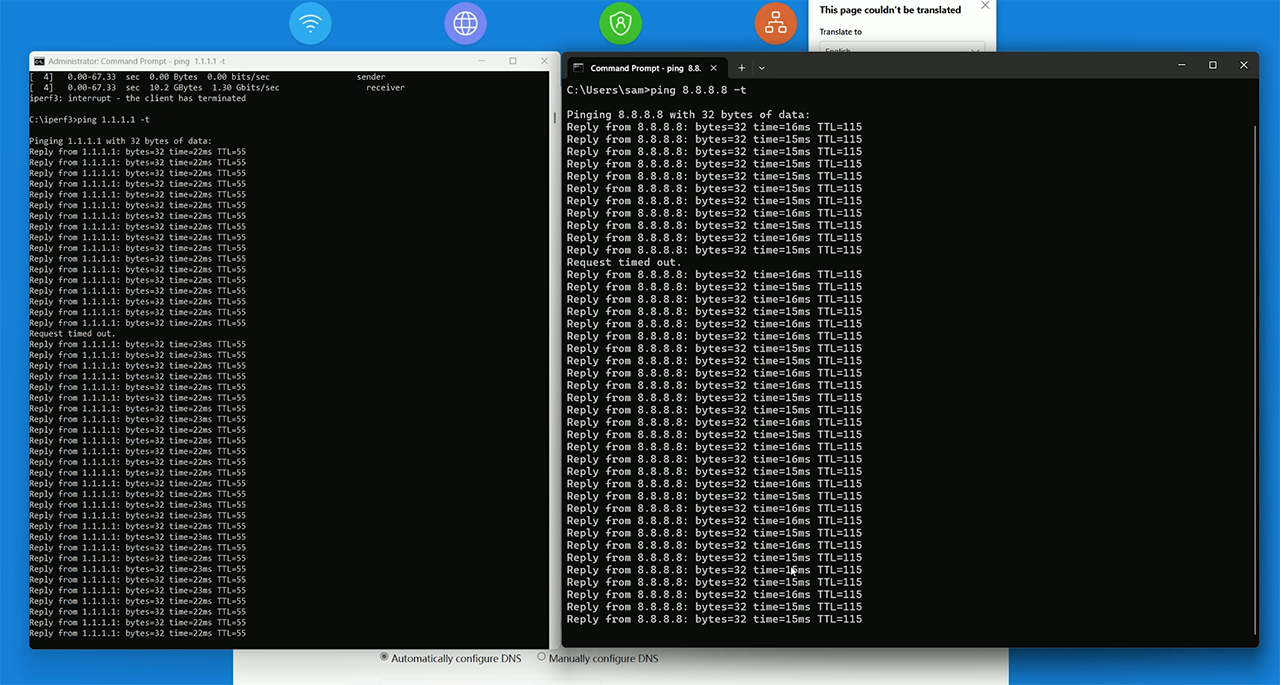
This caused a single packet to be dropped, so I reconnected it and disconnected the secondary cable. This time, we got two packets wre dropped, so it’s a very fast switch for a home-suitable router. There is also link aggregation available in the form of LACP, but I don’t have a NAS to test this feature.
The Thermal Management
All those ventilation holes that Xiaomi put at the top and on the bottom of the case seem to be enough to push the heat out and, as we can see in the photos that I captured with a thermal camera, there are no hot spots.
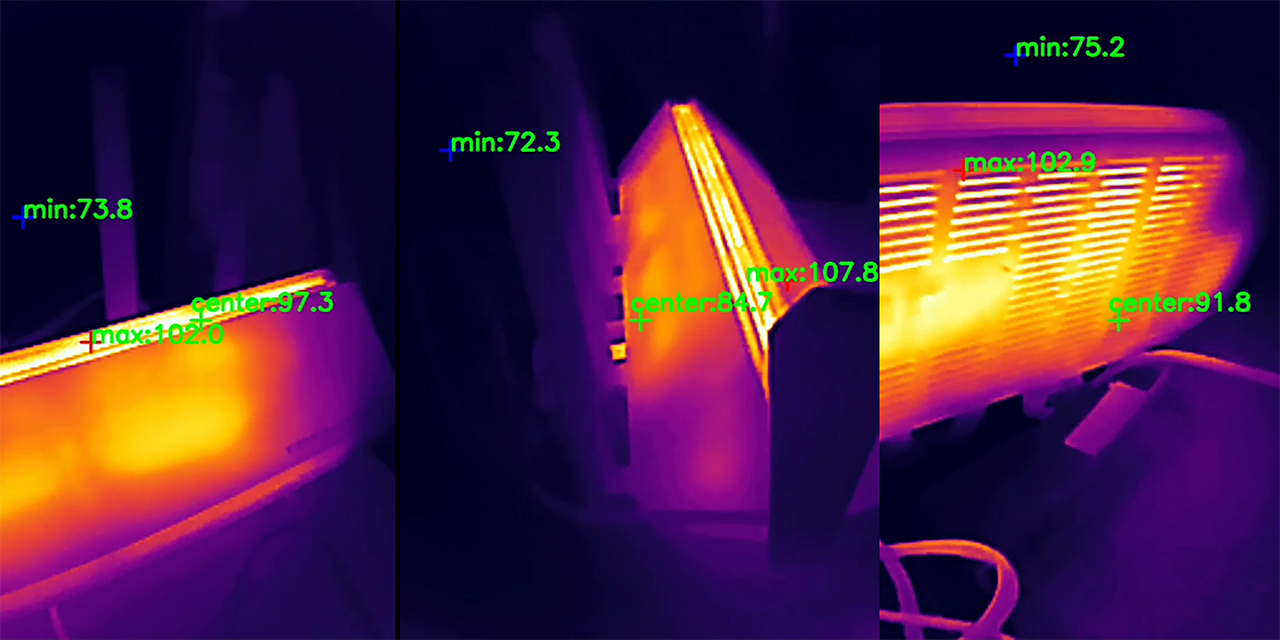
And this temperature was registered while the wireless router was running my usual tests, so it’s not in idle mode.
The Xiaomi BE7000 Teardown
If you want to get a step-by-step guide on how to open up the Xiaomi BE7000, I did a separate video that you can check. There are five screws on the bottom, no warranty stickers and it’s fairly easy to reach the PCB. There is a fairly large heatsink at the top and a heat spreader at the bottom, and you can also see the curious inner antenna design. I have added the main components here as well, so pause at any time to get a better view. Then again, I always add a comparison table at the end as well.
| Asus TUF-AX4200 | Xiaomi BE7000 | TP-Link AX3200 | Asus RT-AX86U Pro | |
| CPU | quad-core 2.0GHz Mediatek MT7986AV | quad-core 1.5GHz Qualcomm IPQ9554 | quad-core 1.5GHz Broadcom BCM6755KFEBG | quad-core 2.0GHz Broadcom BCM4912 |
| RAM | 512MB Nanya NT5CB256M16ER-FL | 1GB Nanya (2x NT5CC256M16ER-EK) | 256MB ESMT M15T4G16256A | 1GB (2X Samsung SEC 234 K4A4G165WF) |
| Storage | 256MB Winbond 25N02KVZEIR | 128MB GigaDevice 5F1GQ5REY1G | 128MB ESMT (F50L1G41A) | 256MB MXIC (MX30LF2G28AD-TI) |
| Switch | MXL TC1PZ4122 | Qualcomm QCA8084 | Broadcom BCM53134SKFBG + Broadcom BCM54991EL | Broadcom B50212EB1KMLG PHY |
| 5GHz Radio – 1 | Mediatek MT7976DAN an/ac/ax 3×3:3 | Qualcomm QCN6224 a/n/ac/ax/be 4×4:4 | Broadcom BCM6755KFEBG a/n/ac/ax 2×2:2 | Broadcom BCM6715KFBG a/n/ac/ax 4×4:4 | 5GHz Radio – 2 | – | Qualcomm QCN6224 a/n/ac/ax/be 4×4:4 | Broadcom BCM43684KRFBG a/n/ac/ax 4×4:3 | – |
| 2.4GHz Radio | Mediatek MT7986AV b/g/n/ax 2×2:2 | Qualcomm QCN5024 b/g/n/ax 4×4:4 | Broadcom BCM6755KFEBG b/g/n/ax 2×2:2 | Broadcom BCM6710KFFBG a/b/g/n/ax 3×3:3 |
The Software
The Xiaomi BE7000 router that I got is not really adjusted for the international market which means that the software is in one language, Chinese. And yes, that does mean that the installation wizard is a bit weird, but nothing the good old translation can’t handle. I did wanted to first use the web-based interface, but it’s mandatory to install and pair the router to the app in order for the setup process to finish.

The layout and options are similar between the app and the web interface, so I used the latter for the convenience sake. On the main page, we get to see the two or three radios, depending on what you have enabled, each with its number of clients. You can access each of them and block the Internet connection if you want to. This is the Route status page, so let’s see the Storage features. It support Samba and the Docker-based Virtual Memory.
The cgi-bin/luci in the address seems to show that the software is built on OpenWRT, even though the router itself is not currently compatible with OpenWRT, which is a shame. The Docker does significantly expand the app possibility of the BE7000, so it’s a major plus. Then, under Common settings, we can access the Wi-Fi settings for enabling the third radio band, MLO, MU-MIMO and adjust the options for each network.
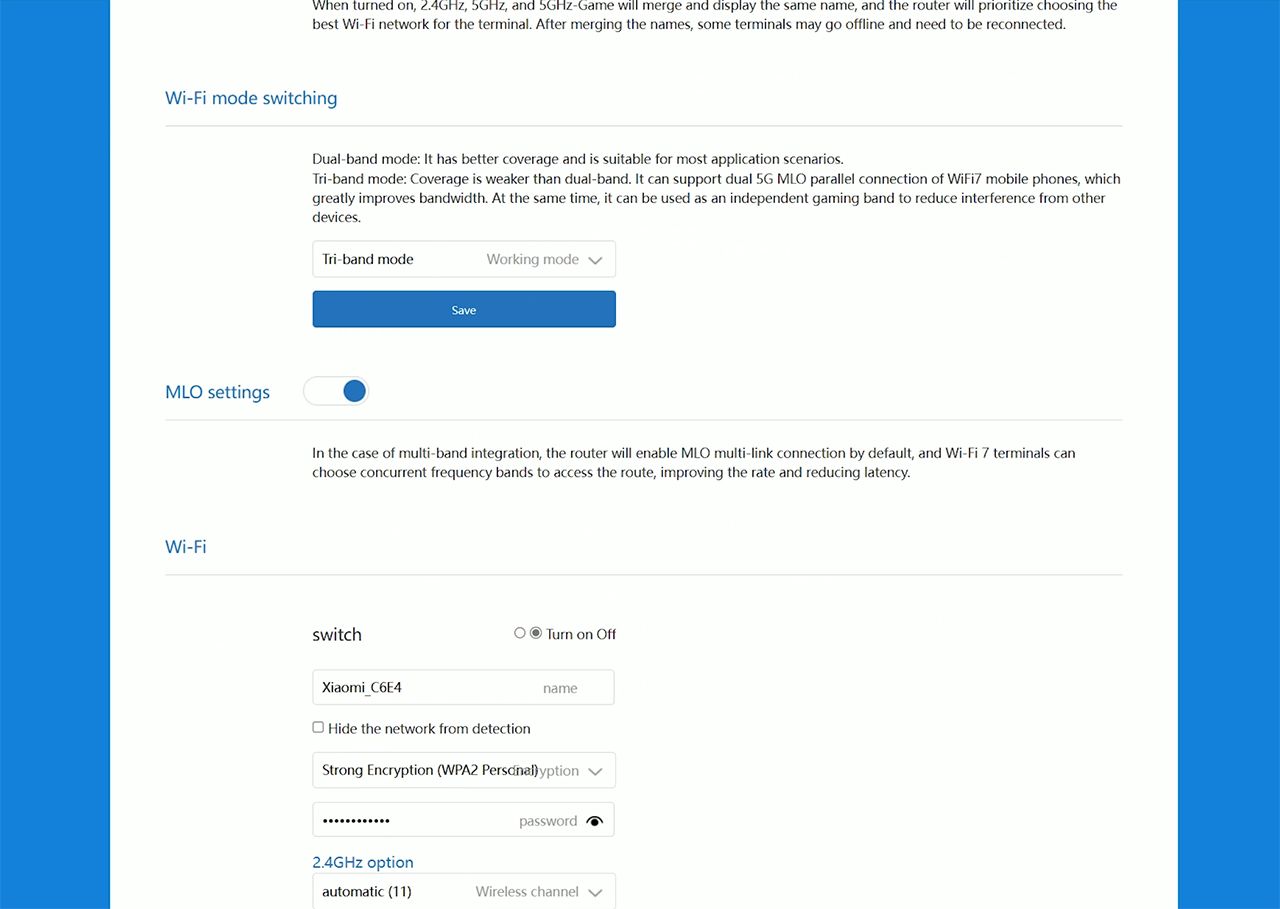
I expected a bit more from the Security Center since it only lets you create a device Blacklist and there isn’t much else here, so let’s head over to the Advanced Settings. Here, we can enable the intelligent QoS and I would have preferred a manual option since I don’t trust these machine learning algorithms. There’s DDNS and Port Forwarding, as well as VPN, but only PPTP and L2TP are supported. Lastly, there’s the network port customization, where you can enable the Dual-WAN, IPTV, LAN aggregation and there is also the option to prioritize a specific port for gaming purposes.
I also need to mention that it’s possible to add a mesh subroute which works very similarly to the Asus AiMesh and the TP-Link OpenMesh. That’s about all for the web-based interface, no Parental Controls, but there are some features which can’t be found on other routers, so let’s get a quick look at the mobile app. This is the first device that has more features on the app, so we do get what is called the Anti-Hacking Protection which expands a bit on what is offered by the web interface.
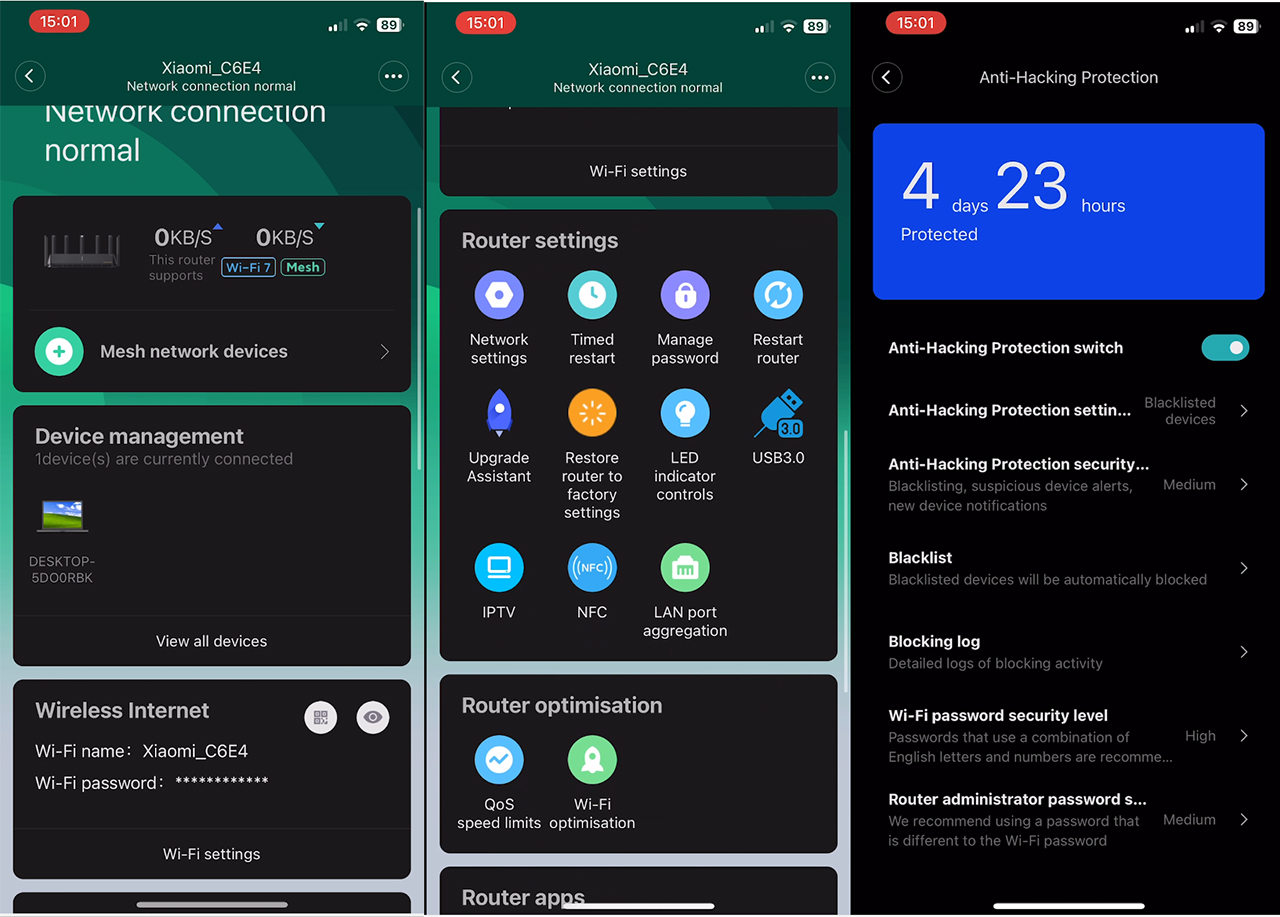
There’s a Family protection section which allows the creation of profiles and it’s possible to select devices, set a schedule and choose the type of content that will be blocked. There are some other apps, of which a couple of them I have no idea what they are, although I guess one is related to gaming. So, I do look forward to an English version of the software.
The Conclusion
Considering the price tag of the Xiaomi BE7000, this is an excellent WiFi 6 router, but can it be put next to the other WiFi 7 routers as well? No, but it is in a category of its own. That’s because it’s made for the Chinese market, where the 6GHz radio band is not yet allowed. Xiaomi still wanted to be attractive to its domestic and even international public by implementing MLO but without the use of 6GHz. It does work and with the right hardware, I assume the performance will be better.
In my tests, the device did well in both single-client and the multi-client stress tests, but I do admit that the software is a bit strange, although it does feel like there is a lot of potential there. Perhaps the BE7000 will receive an update and maybe the 6GHz will be enabled since the chipset supports it, but I also know that Xiaomi doesn’t have a very good track record of updating its devices, so I would not hold my breath.
Xiaomi BE7000
Pros
- Strong wireless performance
- Good behavior under load
- Tri-band?
- MLO
Cons
- No 6ghz
- WiFi 7 claim can be seen as misleading
- Strange GUI
- No good track record of firmware updates